 AllMacWorld MAC Apps One Click Away
Download Muffle 1.5 for Mac free latest full version standalone setup. Muffle 2026 for MacOS is a focus-boosting app that blurs all windows on the screen except the active one, helping you focus.
Muffle 2026 for Mac Review
Muffle for Mac is an app that helps you focus on the window you are currently using. It does this by blurring and darkening other open windows on your screen. This makes your active window easier to see and helps reduce distractions. You can also download Tacque for MacOS
If you work with several apps at the same time, you may find it difficult to stay focused. For example, you might be writing an article while keeping your browser, email, and messaging apps open. Even when you are not using them, these windows can take your attention away from your work.
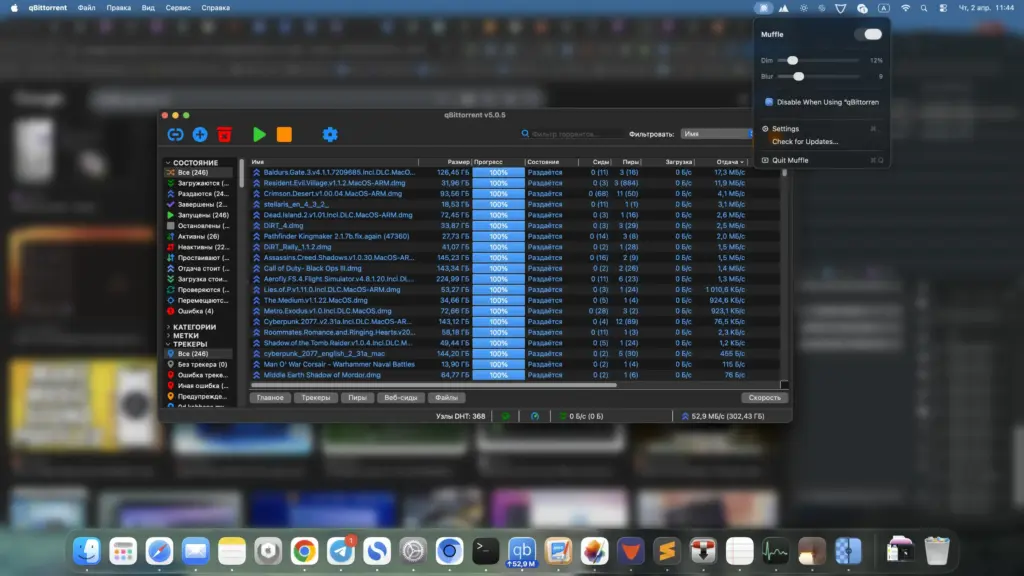
Muffle solves this problem by keeping your other windows open but making them less noticeable. You do not need to close apps or hide every window yourself. The app automatically puts more attention on the window you are using.
You can adjust the blur and darkness levels according to your choice. If you want a light effect, you can keep the settings low. If you want fewer distractions, you can increase them. This gives you control over how your desktop looks. Another useful feature is the cursor shake option. You can shake your mouse cursor to turn the effect on or off. This saves time when you want to see all your open windows again.
Muffle is built with Swift, according to its developer. The official website describes it as a lightweight app that uses very few system resources. However, there are no independent test results available to confirm its performance on different Mac models.
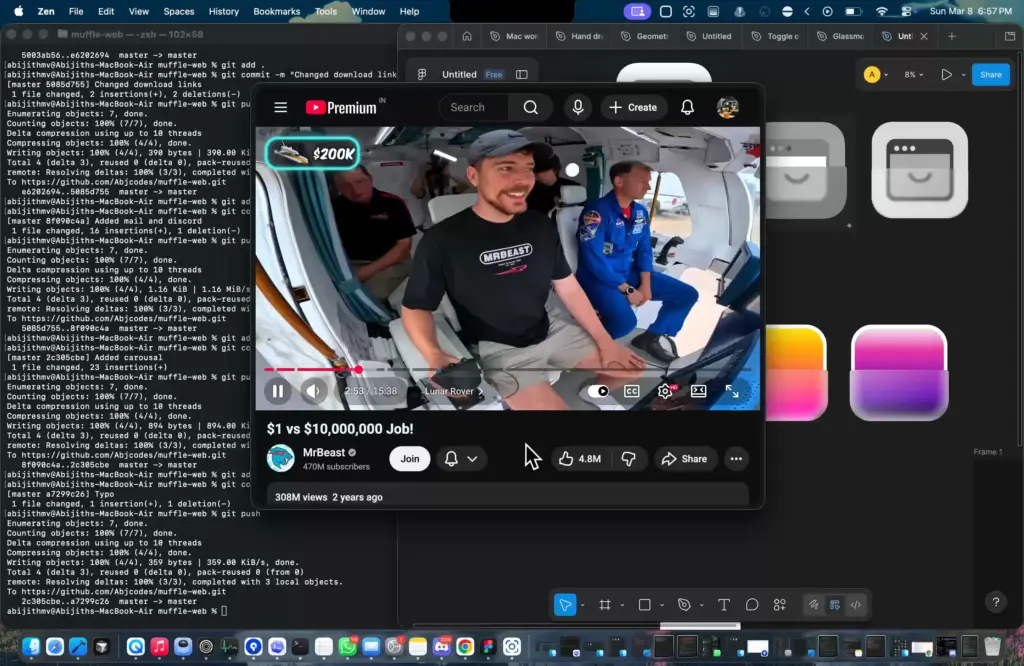
The app can be useful for writers, students, designers, developers, and people who work with many open windows. It can also make your desktop look cleaner during presentations. However, blurring a window does not guarantee that its contents will be hidden during screen sharing or screen recording.
One thing to remember is that Muffle does not arrange your windows. It cannot move, resize, or organize them into different layouts. Its main purpose is to make unused windows less noticeable. Overall, Muffle is a simple option for Mac users who want fewer distractions while working. It is easy to understand and focuses on one main task.
Features of Muffle for Mac
- Blur Inactive Windows: Automatically blurs background windows while keeping the active window clear.
- Dim Background Windows: Reduces the brightness of inactive windows to make the current application stand out.
- Adjustable Blur Intensity: Lets you control how strongly background windows are blurred.
- Adjustable Dim Intensity: Allows you to change the darkness of inactive windows.
- Cursor Shake Shortcut: Quickly enables or disables the effect by shaking the mouse cursor.
- Native macOS Application: Built with Swift, according to the developer.
- Lightweight Design: The developer describes the app as having negligible system overhead.
- Improved Visual Focus: Helps reduce distractions when working with several open applications.
- Presentation-Friendly Appearance: Makes the desktop look less cluttered when preparing or giving presentations.
- Simple Workflow: Lets you keep background applications open instead of closing them to create a cleaner workspace.
Technical Details:
- Software Name: Muffle MacOS
- Software File Name: Muffle 1.5.dmg
- Version: 1.5
- File Size: 5 MB
- File Extension: DMG
- License Type: Premium
- Developer: Muffle
System Requirements
- Operating System: macOS 10.10 or later
- Processor: Apple Silicon (M1, M2, M3, M4, M5) or Intel Core 64-bit
- RAM: 4 GB minimum, 8 GB recommended
- Storage: 200 MB free disk space
Best Alternatives to Muffle for Mac
If Muffle does not offer all the features you need, there are other Mac apps worth considering.
HazeOver helps you focus by making background windows darker. It is a good choice if you want to reduce distractions without using a blur effect. Unlike Muffle, HazeOver mainly focuses on darkening inactive windows. It is worth considering if you prefer a simple and clean desktop.
Monocle is another option for Mac users who want more control over their workspace. It offers different ways to change how background windows appear. It may suit users who want more settings to adjust their desktop. Check its official website for the latest features and supported macOS versions.
FocusBlur is an open-source project that aims to make background windows less distracting. It is worth exploring if you prefer open-source software. Keep in mind that FocusBlur is a separate project. It is not made by the Muffle developer. You can visit its GitHub page to check its current features and development status.
Muffle 1.5 for Mac Free Download
Click the button below to download Muffle 2026 for Mac latest full version setup free. It is a complete standalone installer for macOS with a single-click download link.