AllMacWorld MAC Apps One Click Away
Download Bear v3.0.2 for Mac free latest full version standalone setup. Bear 2026 for MacOS is a beautiful, incredibly easy-to-use app with markup capabilities for capturing and organizing your life’s events through notes.
Bear 2026 for Mac Review
Bear for Mac is a note-taking app designed for people who want to write, organize, and find their notes without dealing with a complicated interface. It works well for daily notes, personal documents, research, study notes, and writing projects. The app focuses on a clean writing space. You can start writing right away and organize your notes with tags instead of managing a long list of folders. You can also download Antinote for MacOS
Bear also supports Markdown, which lets you format text using simple characters. Bear stands out because it keeps note-taking simple. When you open the app, you can focus on your writing without dealing with too many menus or settings. This makes it useful for quick thoughts, meeting notes, article ideas, personal journals, and longer documents.

The writing tools are suitable for both short and long notes. You can add headings, lists, links, tables, images, and other elements to make your notes easier to read. Bear also supports Markdown, so you can format text without constantly reaching for the mouse.
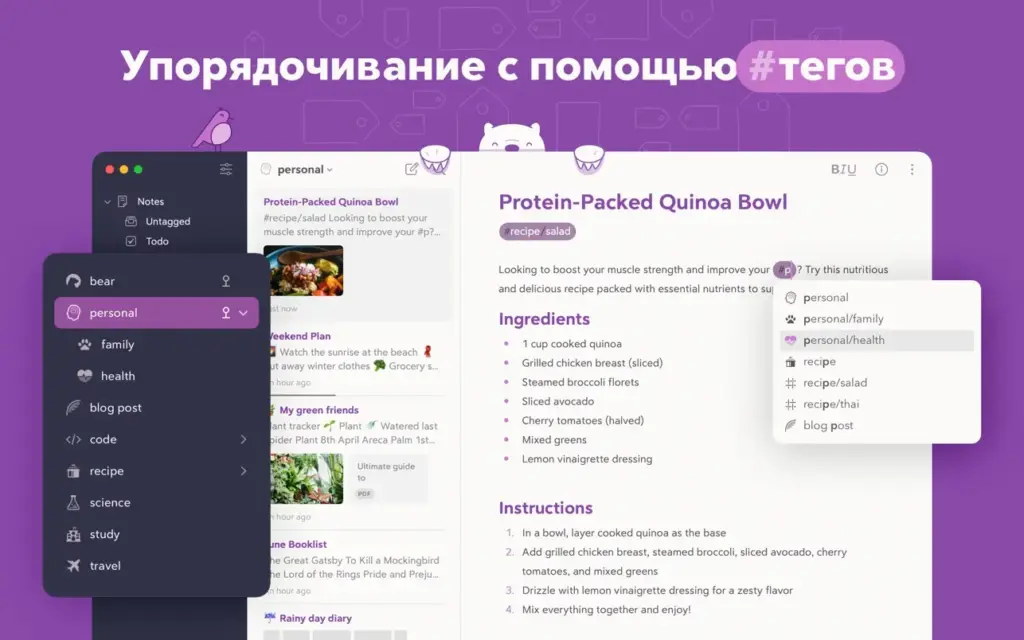
One of Bear’s most useful features is its tag system. Instead of placing every note inside a folder, you can add tags such as #work, #ideas, or #research. You can also create nested tags to keep related topics together. A single note can have several tags, which makes it easier to find the same note from different categories.
Bear also includes tools for connecting related notes. You can link one note to another and use backlinks to see which notes refer to it. These tools are useful when working on research, planning content, or collecting information about a subject over time.
Search is another important part of the experience. You can search your notes by words and tags. Bear Pro also supports text recognition in PDFs and images, which can help you find information inside scanned documents and pictures.
Bear’s free version is a good starting point if you mainly write and organize notes on one device. However, syncing between devices requires Bear Pro. The paid plan also adds individual note encryption, app locking, extra themes, and more export formats.
For performance, Bear is best judged by how it fits your daily work. Its simple layout makes it easy to open a note and start writing. However, the experience can vary depending on your device, note library, and workflow. It is not necessary to assume that it will be faster than every other notes app.
There are also some limitations to consider. Bear’s main apps are designed for Apple devices, so it may not suit people who regularly switch between Mac, Windows, and Android. Bear Web has been introduced as a way to access notes through a browser, but you should check its current features before relying on it as a full replacement for the Mac app. Bear is also focused on personal writing and note organization. If you need advanced team collaboration, shared workspaces, or detailed project management, another app may be a better fit.

Features of Bear for Mac
- Clean writing space: Write without unnecessary distractions.
- Markdown support: Format text with simple commands.
- Tag-based organization: Group notes without relying only on folders.
- Nested tags: Organize related topics under larger categories.
- Note linking: Connect related notes and view backlinks.
- Powerful search: Find notes by words and tags.
- Image and PDF support: Add useful files to your notes.
- Text recognition: Search text inside images and PDFs with Bear Pro.
- Tables and lists: Present information in a clear format.
- Export options: Save notes in formats such as TXT, Markdown, RTF, HTML, DOCX, and PDF, depending on your plan.
- iCloud syncing: Keep notes updated across supported Apple devices with Bear Pro.
- Privacy features: Protect individual notes and lock the app with Bear Pro.
- Custom appearance: Choose themes and app icons with Bear Pro.
- Apple device support: Use Bear on Mac, iPhone, and iPad.
Technical Details:
- Software Name: Bear MacOS
- Software File Name: Bear v3.0.2.dmg
- Version: 3.0.2
- File Size: 55 MB
- File Extension: DMG
- License Type: Premium
- Developer: Shiny Frog Ltd
System Requirements
- Operating System: macOS 10.10 or later
- Processor: Apple Silicon (M1, M2, M3, M4, M5) or Intel Core 64-bit
- RAM: 4 GB minimum, 8 GB recommended
- Storage: 200 MB free disk space
Best Alternatives to Bear for Mac
If Bear does not match your needs, several other apps are worth considering.
Apple Notes is a practical choice for people who want a simple notes app that comes with Apple devices. It supports folders, checklists, attachments, and syncing through iCloud. It is a good option if you do not need Bear’s Markdown-focused writing experience.
Obsidian is suitable for people who want to connect a large collection of notes. It stores notes as local Markdown files and offers tools for linking ideas. It can be useful for research, study, and long-term projects, although it may take more time to set up.
Craft is a good option if you want polished documents with images, links, and structured layouts. It works well for notes that need to look presentable when shared. Some features depend on the plan you choose.
Microsoft OneNote is worth considering for work, study, and handwritten notes. It supports notebooks, sections, pages, drawings, and different types of content. It is also more suitable for people who use Microsoft products across several platforms.
Joplin is an option for users who prefer an open-source notes app. It supports Markdown, notebooks, and several ways to sync notes. Its appearance and workflow are different from Bear’s, but it offers more flexibility for people who want greater control over their notes.
Bear v3.0.2 for Mac Free Download
Click the button below to download Bear 2026 for Mac latest full version setup free. It is a complete standalone installer for macOS with a single-click download link.