AllMacWorld MAC Apps One Click Away
Download Vibe Island 1.0.51 for Mac free latest full version standalone setup. Vibe Island 2026 for MacOS is an app that turns your Mac’s “notch” into a unified control center for AI agents working in the terminal.
Vibe Island 2026 for Mac Review
ibe Island for Mac is a macOS app designed for people who use AI coding tools such as Claude Code, Codex, Gemini CLI, Cursor, and other coding assistants. It uses the area around the MacBook notch as a small control panel, making it easier to see what your coding tools are doing without constantly switching between windows. You can also download System Toolkit for Mac.
The idea is simple. Instead of keeping a terminal or coding window open all the time, Vibe Island gives you quick access to active tasks, questions, approvals, and other updates from the top of your screen. The main reason to use Vibe Island is convenience. If you regularly run several coding tasks at the same time, checking every terminal window can become annoying. Vibe Island puts important updates in one place.
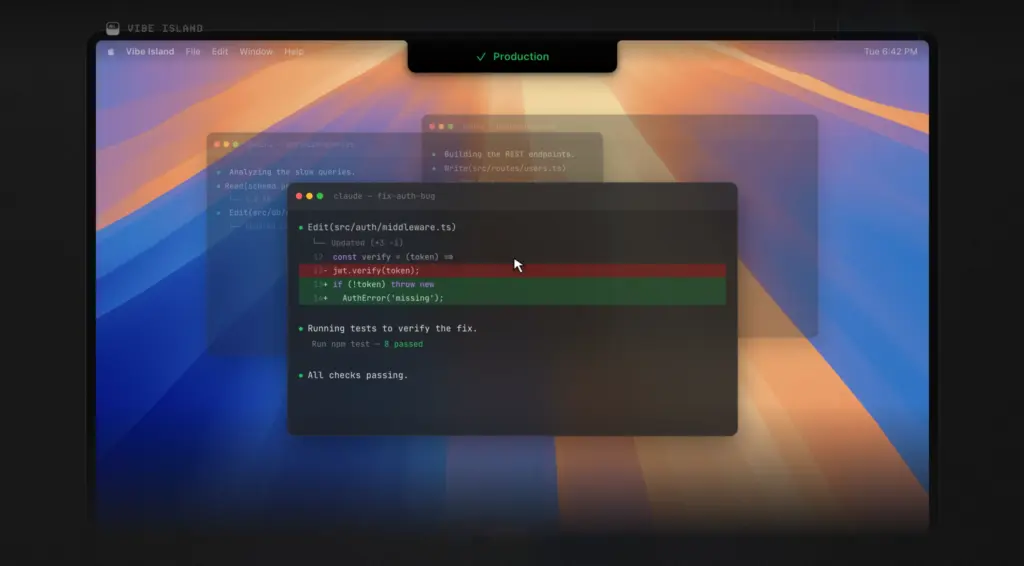
When a coding assistant is working, you can see its current status from the top of your screen. If it needs your permission, asks you a question, or finishes a task, Vibe Island can show the update without requiring you to search through different windows.
One particularly useful feature is permission approval. Some coding assistants need permission before performing certain actions. Vibe Island lets you review these requests and respond directly from its interface.
You can also answer questions from your coding assistant. This is useful when an AI coding tool pauses and waits for you to choose an option or provide additional information. Vibe Island also supports reviewing plans before a coding task continues. This gives you an opportunity to check what the coding assistant intends to do before allowing it to proceed.
Another useful feature is quick jumping. Vibe Island can take you directly to the terminal tab, split, or supported development application where the task is running. This can save time when several coding sessions are open.
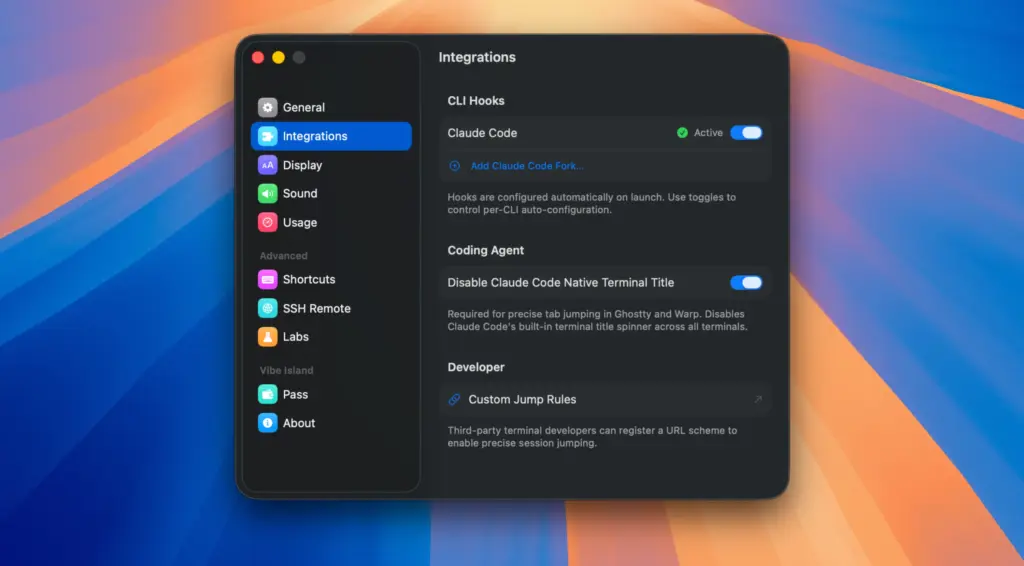
The app supports a large selection of coding assistants and development tools. The official Vibe Island website currently lists 30 supported AI coding agents, including Claude Code, Codex, Gemini CLI, Cursor, OpenCode, Qwen, Kimi Code, Copilot, Kiro, and several others. It also works with popular terminal applications such as Terminal, iTerm2, Ghostty, Warp, WezTerm, and Kitty. Support is also available for development applications including VS Code, Cursor, and Zed.
Vibe Island is not limited to coding sessions running directly on your Mac. Its SSH Remote feature allows you to monitor supported coding agents running on remote servers. You can add a remote server, install the required connection setup, and then monitor the session from your Mac. This can be useful for developers who keep their coding projects on another computer or server. The app also provides usage information for supported services. Depending on the service, you can see information such as remaining usage or limits without opening the provider’s website separately.
Another positive point is that Vibe Island is built specifically for macOS using Swift rather than being based on a large cross-platform framework. The developer describes it as a lightweight native Mac application.
Privacy is also worth mentioning. According to the developer, communication between Vibe Island and local coding tools happens locally. The app does not require an account or cloud service for normal local agent communication. However, this does not mean that the AI services themselves do not collect or process data. If you use Claude, OpenAI Codex, Gemini, or another service, their own privacy policies still apply.
Installing Vibe Island is straightforward. You can download it from the official website or install it through Homebrew using:
brew install –cask vibe-island
After installation, the app can detect supported local coding tools and configure the required connections.
All in all, Vibe Island for Mac is a useful utility for developers who spend a lot of time working with AI coding assistants. Its biggest advantage is convenience. Instead of repeatedly moving between terminal windows, coding applications, and different sessions, you can see important updates from the top of your Mac screen. Features such as permission approvals, questions, plan reviews, quick session access, usage information, and SSH monitoring make it more useful than a simple notification tool.
Features of Vibe Island for Mac
- Designed specifically for macOS
- Works with MacBook models that have a notch
- Also works on Macs without a notch
- Supports Intel and Apple Silicon Macs
- Monitors multiple coding assistants
- Supports Claude Code
- Supports Codex
- Supports Gemini CLI
- Supports Cursor
- Supports OpenCode
- Supports Kimi Code
- Supports Copilot
- Supports many other coding assistants
- Shows active coding sessions
- Displays task progress
- Shows permission requests
- Lets you respond to coding assistant questions
- Allows plan reviews
- Provides quick access to terminal sessions
- Supports terminal tabs and split sessions where supported
- Works with several popular terminal applications
- Supports VS Code, Cursor, Zed, and other development tools
- Supports remote coding sessions through SSH
- Provides usage and limit information for supported services
- Offers sound alerts
- Includes quiet options for notifications
- Does not require a separate account for normal local use
- Available through the official website
- Available through Homebrew
Technical Details:
- Software Name: Vibe Island MacOS
- Software File Name: Vibe Island 1.0.51.dmg
- Version: 1.0.51
- File Size: 18 MB
- File Extension: DMG
- License Type: Premium
- Developer: Edward Luo
System Requirements
- Operating System: macOS 10.10 or later
- Processor: Apple Silicon (M1, M2, M3, M4, M5) or Intel Core 64-bit
- RAM: 4 GB minimum, 8 GB recommended
- Storage: 200 MB free disk space
Best Alternatives to Vibe Island for Mac
Vibe Island is mainly useful if you want a Mac notch or top-bar interface for monitoring coding assistants. If you are looking for something different, there are several alternatives worth considering.
DynamicLake focuses on bringing a Dynamic Island-style experience to macOS. It can be useful for people who want more general controls and notifications rather than a tool focused mainly on coding assistants.
NotchNook turns the MacBook notch area into a small utility space. It provides access to shortcuts, media controls, and other Mac functions.
Boring Notch is another option for users who want to make better use of the notch area. Its features are more focused on general Mac use rather than monitoring coding assistants.
Native macOS notifications are also enough for many users. If you only need occasional alerts from your coding tools, you may not need an additional application.
The main difference is the purpose. Vibe Island is designed around active coding sessions and coding assistants, while many notch utilities focus on general Mac controls and notifications.
Vibe Island 1.0.51 for Mac Free Download
Click the button below to download Vibe Island 2026 for Mac latest full version setup free. It is a complete standalone installer for macOS with a single-click download link.