AllMacWorld MAC Apps One Click Away
Download QOwnNotes v26.10.9 for Mac free latest full version standalone setup. QOwnNotes 2026 for MacOS is a plain-text file notepad and list manager with markdown support and Nextcloud / ownCloud integration.
QOwnNotes 2026 for Mac Review
QOwnNotes for Mac is a free, open-source note-taking app for people who want to write, organize, and manage their notes. It supports Markdown, which lets you format text using simple symbols. You can also save your notes as regular text files on your Mac.
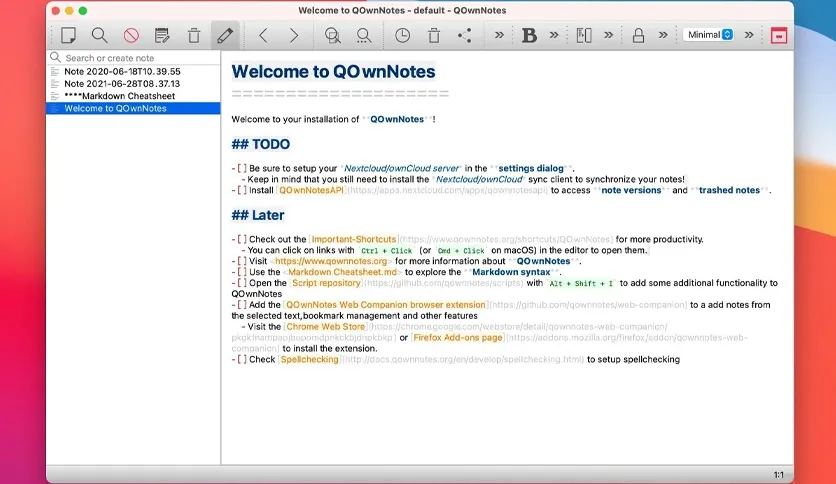
Unlike many note-taking apps, QOwnNotes stores notes in files that you can access outside the app. This gives you more control over your content. You can open and edit these files with other text editors whenever you need to.
QOwnNotes is a useful choice for students, writers, developers, researchers, and anyone who keeps a large collection of notes. You can create separate folders, add tags, link related notes, and search your content. These tools make it easier to find information when you need it.
The app also supports dark mode, Markdown previews, spelling checks, and several layout options. You can adjust the workspace to suit your writing habits. If you prefer a simple setup, you can keep the interface clean and focus on your notes.
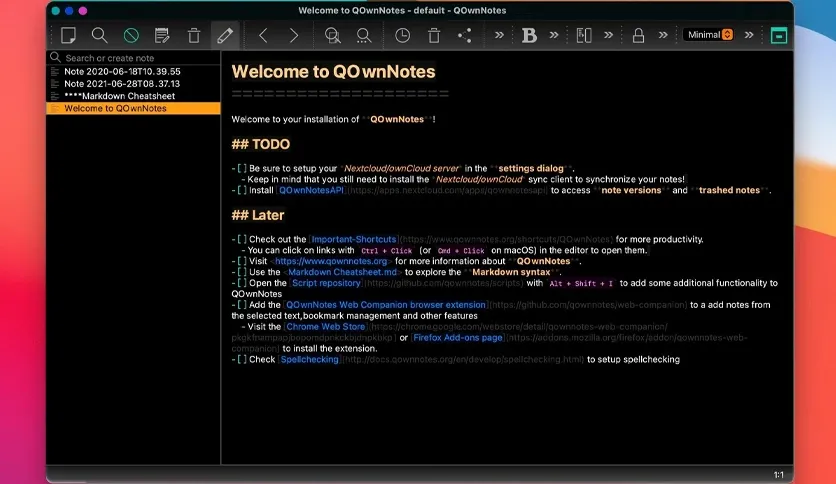
One of its main strengths is its focus on local files. Your notes are stored on your Mac in plain-text Markdown format. You can choose an external service to sync them across devices. For example, you can use Nextcloud, ownCloud, Dropbox, or Syncthing. However, QOwnNotes does not sync your files by itself. You need to set up a separate sync service.
The app also offers extra features for users who connect it to Nextcloud or ownCloud. Depending on your setup, you may be able to use features such as note sharing and access to previous versions of your files.
QOwnNotes provides several ways to protect your notes. It supports optional note encryption, but you should review its setup before using it for sensitive information. Your privacy also depends on the services you use to store or sync your files.
The main drawback is its learning curve. The interface has many settings and options. Beginners who want a simple app for quick notes may find it less convenient than Apple Notes. Some advanced features also require extra setup.
Overall, QOwnNotes is a good option for Mac users who want control over their files and prefer Markdown. It is especially useful for people who manage many notes and want to keep them organized in folders.
Features of QOwnNotes for Mac
- Free and open-source: Use the app without paying for a subscription.
- Markdown support: Write and format notes with simple text symbols.
- Local file storage: Keep your notes as regular text files on your Mac.
- Folder management: Organize notes into separate folders and subfolders.
- Tags: Add tags to make related notes easier to find.
- Note links: Connect related notes using links such as [[Note Name]].
- Search: Find words and phrases across your notes.
- Dark mode: Choose a darker interface for comfortable writing.
- Markdown preview: View how your formatted notes will look.
- Multiple note folders: Work with more than one collection of notes.
- Cloud syncing support: Use compatible external services to sync files between devices.
- Nextcloud and ownCloud support: Connect with supported features from these services.
- Import options: Import notes from supported apps and formats.
- Spelling checks: Check spelling while writing.
- Custom layouts: Adjust panels and other parts of the workspace.
- Encryption options: Encrypt notes using supported methods when configured.
- Browser extension: Save selected text, screenshots, and other content using the supported browser extension.
- Extra customization: Use scripts and additional tools to adjust the app to your needs.
Technical Details:
- Software Name: QOwnNotes MacOS
- Software File Name: QOwnNotes v26.10.9.dmg
- Version: 26.10.9
- File Size: 50 MB
- File Extension: DMG
- License Type: Premium
- Developer: Patrizio Bekerle
System Requirements
- Operating System: macOS 10.10 or later
- Processor: Apple Silicon (M1, M2, M3, M4, M5) or Intel Core 64-bit
- RAM: 8 GB minimum, 16 GB recommended
- Storage: 200 MB free disk space
Best Alternatives to QOwnNotes for Mac
Obsidian is a note-taking app that stores notes as local Markdown files. It lets you link notes, build a personal knowledge library, and connect ideas. Its large collection of add-ons also gives you more ways to customize it. Obsidian is a strong choice if you want to connect ideas and build a personal knowledge base. Some features require extra setup, and certain services may cost money.
Apple Notes comes with Apple devices and is easy to use. You can create notes, add images, make checklists, and organize content into folders. It also syncs through iCloud when enabled. Apple Notes is a good choice for people who want a simple app for daily notes. However, it does not offer the same level of control over regular Markdown files as QOwnNotes.
Joplin is a free, open-source note-taking app with support for Markdown. It lets you organize notes, create to-do lists, and sync content through supported services. It also offers tools for importing notes from other apps. Joplin is worth considering if you want an open-source app with built-in note management and syncing options. Its setup may take some time if you use advanced features.
Standard Notes focuses on privacy and secure note storage. It offers encryption features and syncing across supported devices. It is suitable for people who want to keep personal notes protected. Some features are available through paid plans. Check the current plan details before choosing it.
Logseq is designed for connected notes, daily journals, and personal research. It lets you link ideas and organize information into a network of related pages. Logseq may suit researchers and users who prefer to record ideas as they come to mind. Its writing style and interface may take some time to get used to.
Choose QOwnNotes if you want a free note-taking app with local file storage and flexible organization. If you prefer a simpler experience, Apple Notes may be a better fit. If you want to connect ideas across a large collection of notes, consider Obsidian or Logseq.
QOwnNotes v26.10.9 for Mac Free Download
Click the button below to download QOwnNotes 2026 for Mac latest full version setup free. It is a complete standalone installer for macOS with a single-click download link.