AllMacWorld MAC Apps One Click Away
Download NotchNook 1.6.12 for Mac free latest full version standalone setup. NotchNook 2026 for MacOS is a Mac app that turns the notch on your MacBook into a dynamic, interactive element that pulses with notifications
NotchNook 2026 for Mac Review
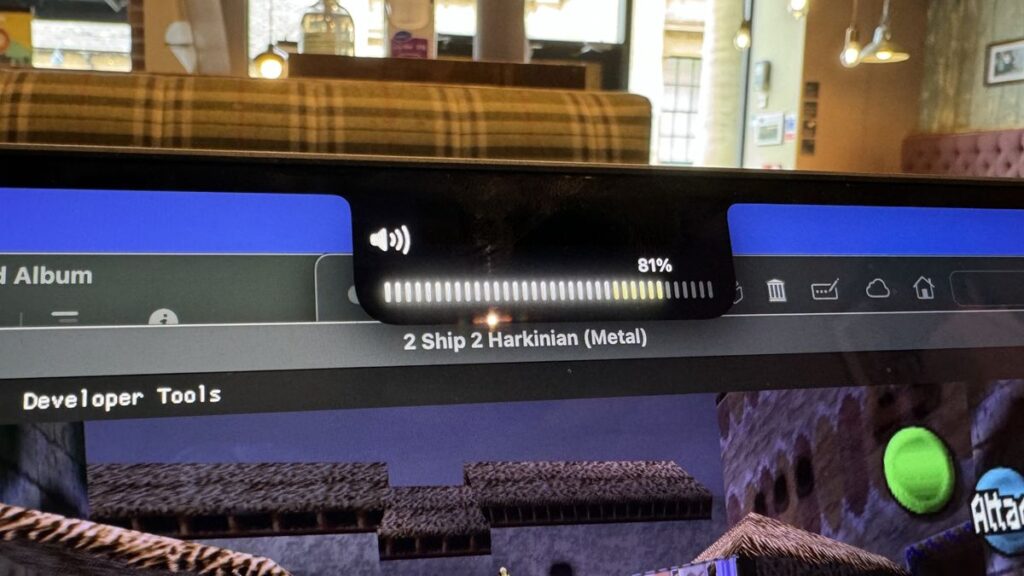
NotchNook for Mac is a macOS customization utility that turns the area around your MacBook’s notch into a useful workspace. It brings together music controls, calendar events, shortcuts, notes, timers, and file management in one compact interface. It also works on Macs without a physical notch by using a small handle at the top of the screen. You can also download QuakeNotch for MacOS
The main idea behind NotchNook is to make frequently used tools easier to access. Instead of switching between applications to check a song, review an upcoming meeting, or move a file, you can open the Nook and access supported features from the top of your screen.

One of its most useful features is media control. NotchNook supports Spotify, Apple Music, and other players that expose playback information through macOS. You can view track information and control playback without opening the music application. However, compatibility can vary depending on how each player integrates with macOS.
The calendar widget is another useful addition. It can display upcoming events through Apple’s Calendar app, including events synchronized from a Google account. The interface also supports meeting links for services such as Google Meet, Zoom, Microsoft Teams, and Webex. This makes it helpful for users who frequently attend online meetings.
NotchNook also includes a file Tray. You can place files there temporarily and retrieve them when needed. This is useful when moving documents between folders, collecting screenshots, or preparing files for sharing through AirDrop. The Tray complements Finder rather than replacing it.
Other tools include Apple Shortcuts integration, a camera Mirror, notes, to-dos, and timers. The available features make the app more than a visual effect inspired by the iPhone’s Dynamic Island. Its actual usefulness depends on how many of these tools fit your daily routine.
Compatibility is another advantage. According to the developer, NotchNook supports macOS 14.6 or later on both Apple silicon and Intel Macs. A physical notch is not required, so users with external monitors can also access its interface.
There are a few things to consider before buying it. NotchNook is a paid application, and some features require permissions for Calendar, Camera, Bluetooth, Automation, or Accessibility. Users should review these permissions and the developer’s privacy policy before enabling them.
Overall, NotchNook is worth considering if you want quick access to media controls, calendar information, and temporary file storage. If you only need a basic music indicator, a simpler alternative may be sufficient.
Features of NotchNook for Mac
- Adds a useful panel around the MacBook notch.
- Works on Macs without a physical notch.
- Provides quick music controls.
- Supports Apple Music, Spotify, and other compatible music apps.
- Shows calendar events.
- Offers quick access to supported online meetings.
- Includes a file Tray for keeping files close at hand.
- Supports AirDrop for file sharing.
- Includes notes and to-do lists.
- Provides timers for everyday tasks.
- Offers a camera mirror.
- Supports Apple Shortcuts.
- Provides access to selected Mac controls.
- Works with Apple silicon and Intel Macs.
- Requires macOS 14.6 or later.
- Provides monthly and lifetime payment options.
Technical Details:
- Software Name: NotchNook MacOS
- Software File Name: NotchNook 1.6.12.dmg
- Version: 1.6.12
- File Size: 41 MB
- File Extension: DMG
- License Type: Premium
- Developer: Lo.café
System Requirements
- Operating System: macOS 10.10 or later
- Processor: Apple Silicon (M1, M2, M3, M4, M5) or Intel Core 64-bit
- RAM: 4 GB minimum, 8 GB recommended
- Storage: 200 MB free disk space
Best Alternatives to NotchNook for Mac
If NotchNook does not suit your needs, there are other Mac apps worth exploring.
MediaMate adds useful controls and visual features to macOS. It is worth considering if your main goal is to improve the way music controls and system information appear on your Mac.
Boring.Notch is an alternative for Mac users who want to add extra functions to the notch area. Its features and appearance may suit users who prefer a different style.
NotchDrop is another option to look into if you mainly want easier access to files near the top of your Mac screen. Check its current features and compatibility before installing it.
NotchNook 1.6.12 for Mac Free Download
Click the button below to download NotchNook 2026 for Mac latest full version setup free. It is a complete standalone installer for macOS with a single-click download link.