AllMacWorld MAC Apps One Click Away
Download Tone Projects Michelangelo v1.0.4 latest full version complete standalone setup for Mac. Michelangelo 2026 for macOS is a premium all-tube stereo EQ and harmonics generator plugin built for music producers, mixing engineers, and mastering professionals who want authentic analog warmth inside their Mac DAW.
Tone Projects Michelangelo Review
Most EQ plugins on Mac sound clean. They sound digital. You get precision, but you lose color. You boost 10 kHz and it just lifts the frequency. Nothing moves. Nothing breathes. That is the core problem for engineers who want analog tone in a digital workflow.
Tone Projects Michelangelo fixes that. It is a meticulous software emulation of the Hendyamps Michelangelo hardware. That hardware is a handbuilt, all-tube stereo EQ designed by Chris Henderson of Hendyamps. It is one of the most sought-after analog EQ units in professional studios. The plugin brings that same sound directly into Logic Pro, Pro Tools, Ableton Live, and any other Mac DAW. You can also download Magika MultiLayerEQ 1.0.1 for Mac
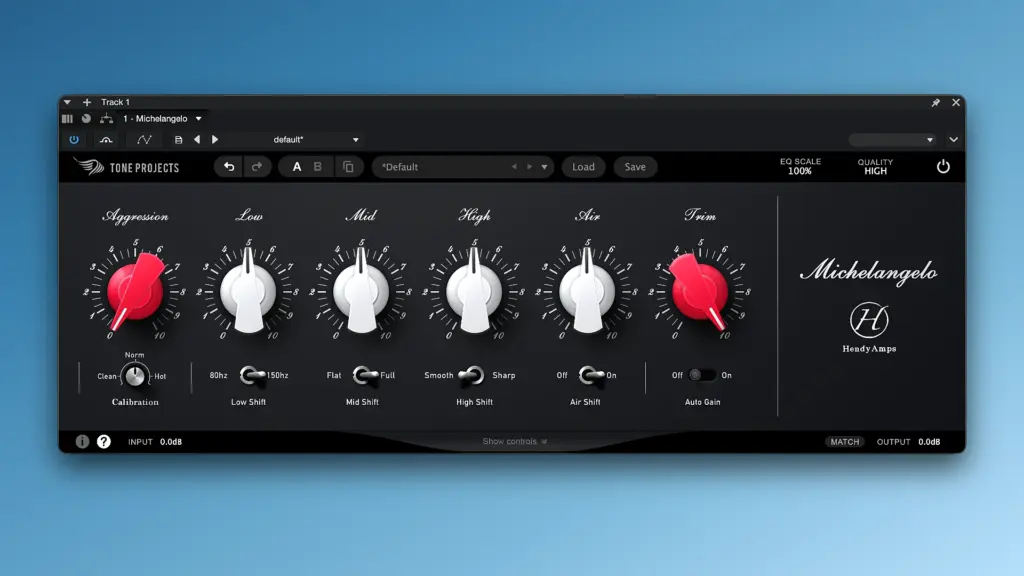
This is not a generic tube EQ with a vintage skin. Tone Projects built this plugin in direct collaboration with Hendyamps. Chris Henderson himself endorsed it. Grammy-winning mastering engineers use it daily. The plugin carries the same signature tone as the hardware, but adds features the hardware never had.
If you produce music, mix tracks, or master audio on a Mac, Michelangelo is worth your full attention.
The Hendyamps Hardware Connection
The Michelangelo hardware has a strong reputation. Engineers love it for its raw sonic beauty and ease of use. It gives you broad, musical EQ strokes. You add a shelf and the whole mix opens up. You boost the low end and it sounds full, not boomy. That is the Hendyamps character.
The plugin captures that character exactly. Tone Projects used close collaboration and official endorsement to ensure accuracy. The result is a plugin that sounds like the hardware. But it goes further. It adds features that hardware cannot offer. You get dynamic EQ, transient processing, mid-side control, and deep tube circuit customization. All inside a single plugin on your Mac.
Transient and Body EQ
This is one of Michelangelo’s most unique features. Most EQs cannot separate transients from sustained body. They process both at the same time. That limits your control.
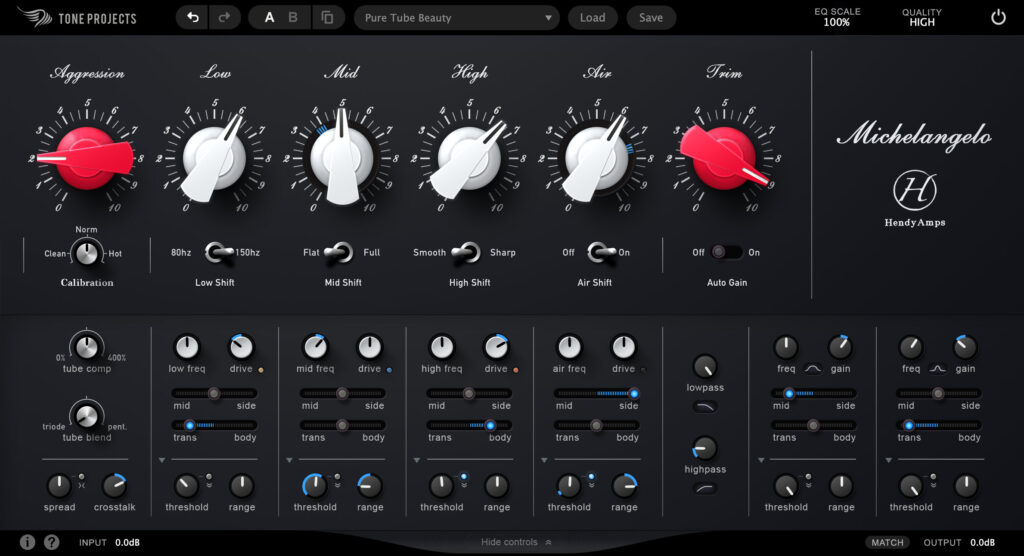
Michelangelo lets you apply EQ moves to the transient only. Or to the body only. Or to both. This is per-band control. You can boost high frequencies on the body without adding harshness to the attack. You can add low-end punch to transients without muddying the sustained notes. You can remove mud from pads without losing the initial hit.
This feature works without warbly artifacts. It uses a non-FFT based approach. The result is smooth, natural, and musical. It is a genuinely new way to EQ audio on your Mac.
Dynamic EQ with Tube Character
Michelangelo includes a compressor and expander per band. It is not a typical dynamic EQ. The detection is musical. The curves are nonlinear and smooth. This matches how analog dynamics behave.
You can apply dynamic EQ to a single band. Set a threshold and let Michelangelo boost or cut only when the signal crosses it. This is perfect for controlling resonances that appear only at certain levels. You can also apply the dynamics across all bands at once. This turns Michelangelo into a full multiband dynamics processor with tube-flavored color baked in.
Tube Circuit Customization
The plugin lets you customize the tube circuitry. You can choose between triode and pentode topologies. Triode gives warm, smooth coloration. Pentode adds punch and harmonic presence.
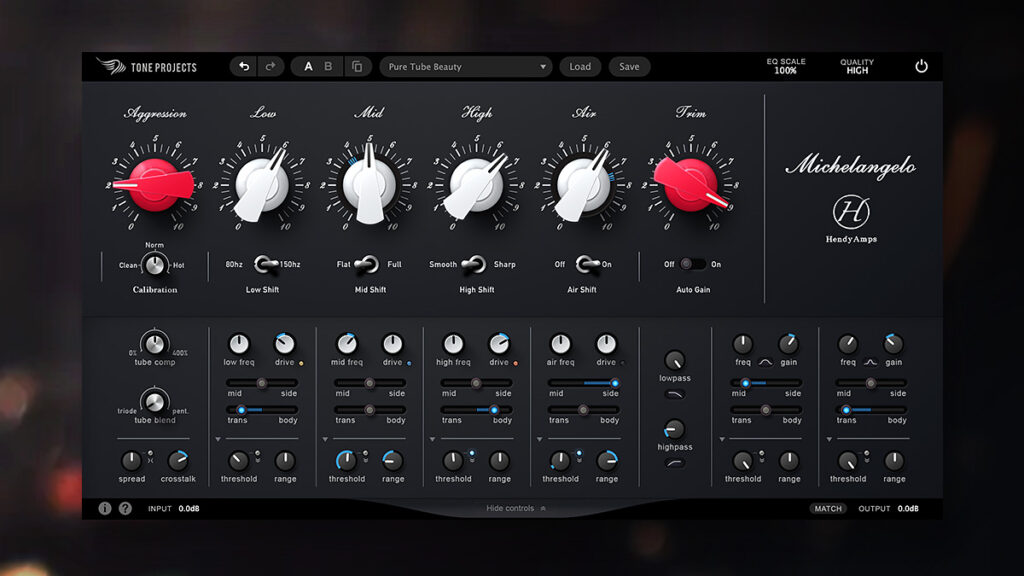
You can also dial in how clean or dirty the tubes behave. Want a sound cleaner than the hardware? Done. Want it dirtier and more saturated? That is available too. This level of circuit control is rare in any tube EQ plugin.
Sound Stage and Stereo Control
Michelangelo includes sound stage enhancement tools. You can dial in channel spread. You can add crosstalk between stereo channels. This blends the gap between pure digital precision and analog character. It is subtle but effective. Mix engineers use it to give mixes a more natural, cohesive feel.
Conclusion of the Discussion
Tone Projects Michelangelo is a serious plugin. It delivers authentic analog tube tone on your Mac. The transient and body EQ feature is unique in the market. The dynamic EQ adds musical movement that static EQs cannot replicate. The tube customization gives you real control over the character of the sound. Grammy-winning mastering engineers trust it. The hardware designer endorses it. If you want one EQ plugin that adds life, color, and presence to your tracks on Mac, this is it.
Features of Tone Projects Michelangelo 2026
- All-tube stereo EQ emulation of the original Hendyamps Michelangelo hardware
- Officially endorsed and built in collaboration with Hendyamps designer Chris Henderson
- Per-band transient and body separation for precise, artifact-free EQ control
- Musical dynamic EQ with above and below threshold modes per band
- Triode and pentode tube topology modes for warm or punchy coloration
- Mid-side EQ mode for selective stereo field processing
- Sound stage controls including channel spread and crosstalk
- Four quality modes from Low Latency to Pristine linear phase oversampling
- Always-on Pristine mode available for offline rendering
- Deep tube circuit customization for cleaner or dirtier tone than the hardware
- Supports AU, VST3, and AAX plugin formats
- Native Apple Silicon support for M1, M2, and M3 Macs
- Universal 2 Binary for full compatibility with Intel and Apple Silicon
- Compatible with Logic Pro, Pro Tools, Ableton Live, Cubase, Reaper, and Wavelab
Technical Details:
- Software Name: Tone Projects Michelangelo
- Software File Name: Tone Projects Michelangelo v1.0.4 Incl.K GUISEPPE.dmg
- Version:0.4
- File Size: 123 MB
- File Extension: DMG
- License Type: Premium
- Developer: Tone Projects
System Requirements:
- Operating System: macOS 10.14 Mojave or later
- Processor: Intel Core or Apple Silicon (M1/M2/M3 native)
- RAM: 4 GB minimum, 8 GB recommended
- Plugin Format: AU, VST3, or AAX compatible DAW
- Compatible DAWs: Logic Pro, Pro Tools, Ableton Live, Cubase, Reaper, Wavelab
Download Tone Projects Michelangelo for Mac
Click on the below button to download Tone Projects Michelangelo free setup for Mac. It is a complete standalone setup of Tone Projects Michelangelo for macOS with a single-click download link.