 AllMacWorld MAC Apps One Click Away
Download APU Software APU Loudness TrueGain v6.0.3 for Mac free latest full version standalone setup. APU Software APU Loudness TrueGain 2026 for MacOS is a powerful loudness compensation plugin that solves the problem of how a mix’s tonal balance changes depending on volume level.
APU Software APU Loudness TrueGain 2026 for Mac Review
APU Software APU Loudness TrueGain is an audio plugin designed for music producers, sound engineers, and music editors. It helps users maintain a more consistent sound balance when listening to music at different volume levels. You can also download FL Studio for MacOS
One common problem during mixing is that music can sound different when you change the listening volume. At a low volume, bass and high frequencies may seem weaker. When you increase the volume, these frequencies can become more noticeable. This can affect decisions about vocals, drums, bass, and other instruments.
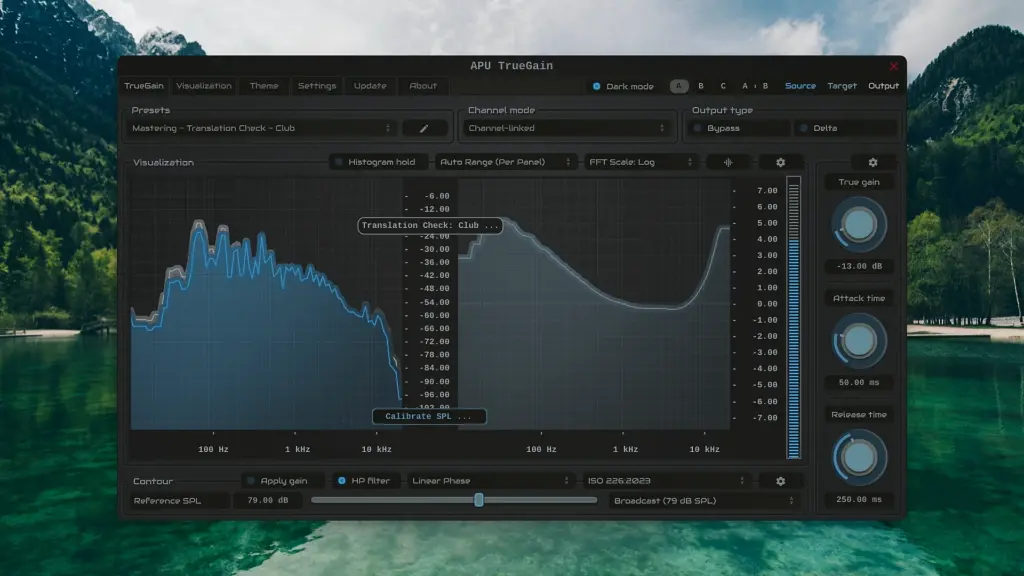
APU TrueGain addresses this issue by adjusting the volume and sound balance together. It uses equal-loudness models to estimate how human hearing responds to different listening levels. This helps producers compare their mixes without relying only on changes in playback volume.
The plugin includes four operating modes. Compensated Gain Control adjusts volume while applying sound compensation. Compensated AGC automatically adjusts the level toward a selected target. Translation Check lets users examine how a mix may sound at another listening level without changing the actual monitoring volume. The standard Gain Control mode adjusts volume without additional sound compensation.
Translation Check is one of the most useful parts of the software. For example, a producer can check how the bass and vocals may sound at different listening levels. This makes it easier to identify possible changes in the perceived balance of a mix. However, it does not simulate different speakers, headphones, or rooms.
APU TrueGain also includes speaker and headphone calibration. Speaker calibration uses an SPL meter and test signals to establish a reference listening level. Headphone users can follow a dialogue-based calibration process. This uses spoken audio to estimate a suitable listening level rather than measuring the actual sound pressure inside the headphones.
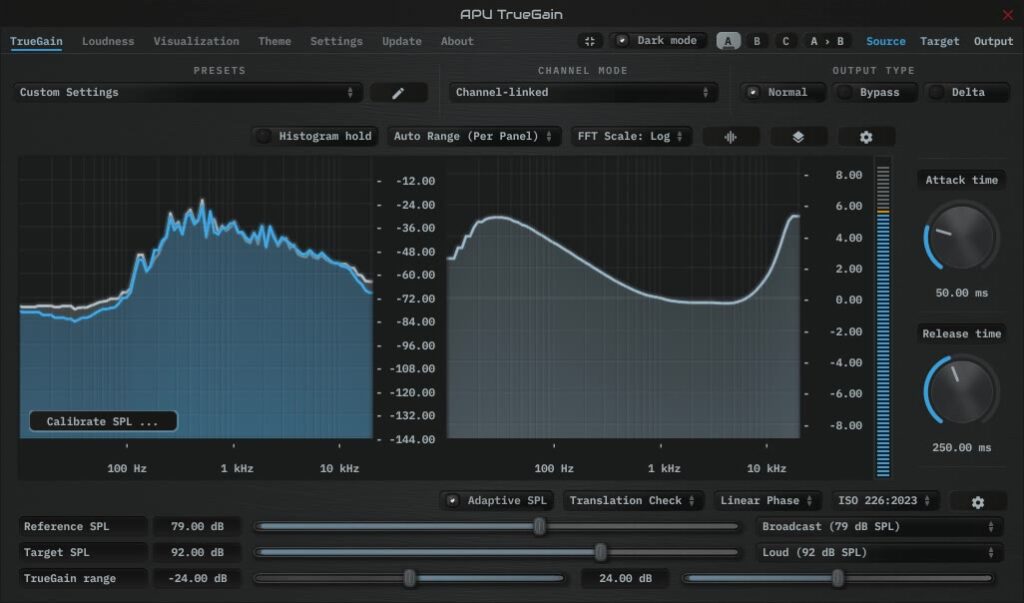
Another useful feature is Adaptive SPL. It follows changes in the input level and updates the compensation while audio plays. Users can adjust its response settings to suit different types of audio. The plugin also includes a real-time spectrum analyzer. It displays the source, target, and output signals. This helps users observe changes in the frequency balance while adjusting the settings.
APU TrueGain supports minimum-phase and linear-phase processing. It also provides attack, release, gain range, and other adjustment options. These controls give experienced users more control over how the plugin responds.
Overall, APU TrueGain is a useful specialist tool for producers who regularly compare mixes at different listening levels. It offers more control than a basic gain plugin, especially for monitoring and checking perceived sound balance.
Features of APU Software APU Loudness TrueGain for Mac
- Equal-Loudness Compensation: Adjusts gain and sound balance together to account for changes in human hearing at different listening levels.
- Four Operating Modes: Includes Compensated Gain Control, Compensated AGC, Translation Check, and standard Gain Control.
- Translation Check: Helps users examine how a mix may sound at different listening levels without changing the actual monitor volume.
- Adaptive SPL: Tracks changes in input loudness and updates the compensation during playback.
- Speaker Calibration: Uses test signals and an SPL meter to establish a reference listening level.
- Headphone Calibration: Provides a dialogue-based calibration method for headphone users.
- Real-Time Spectrum Analyzer: Displays source, target, and output signals for easier sound analysis.
- Multiple Equal-Loudness Models: Supports ISO 226:2003, ISO 226:2023, and Fletcher-Munson.
- Phase Options: Provides minimum-phase and linear-phase processing.
- Attack and Release Controls: Lets users adjust how quickly the plugin responds to level changes.
- Gain Range Settings: Allows users to control the maximum amount of gain adjustment.
- Loudness Measurement: Supports momentary, short-term, and integrated LUFS, along with True Peak, Peak, and RMS measurements.
- Standalone Application: Can be used without opening a digital audio workstation.
Technical Details:
- Software Name: APU Software APU Loudness TrueGain MacOS
- Software File Name: APU Software APU Loudness TrueGain v6.0.3.dmg
- Version: 6.0.3
- File Size: 383 MB
- File Extension: DMG
- License Type: Premium
- Developer: APU Software
System Requirements
- Operating System: macOS 10.10 or later
- Processor: Apple Silicon (M1, M2, M3, M4, M5) or Intel Core 64-bit
- RAM: 8 GB minimum, 16 GB recommended
- Storage: 2 GB free disk space
Best Alternatives to APU Software APU Loudness TrueGain for Mac
Producers looking for other audio tools can consider the following options:
APU Loudness Contour: This plugin is another product from APU Software. It applies frequency contours directly to an audio signal. It is suitable for users who want to experiment with equal-loudness curves and frequency weighting rather than compensated gain adjustment.
Sonarworks SoundID Reference: This software helps correct the frequency response of headphones and studio monitors. It is useful for producers who want a more consistent monitoring setup. Unlike TrueGain, its main purpose is monitoring correction rather than equal-loudness gain compensation.
ToneBoosters Morphit: Morphit provides headphone correction profiles for supported headphone models. It can help reduce differences in headphone frequency response. It is worth considering for producers who mainly work with headphones.
Youlean Loudness Meter: This plugin measures audio loudness and helps users check LUFS and other loudness values. It is useful for mixing, mastering, and preparing audio for delivery. However, it does not provide the same equal-loudness gain compensation as TrueGain.
TDR SlickEQ: This is an equalizer designed for tone adjustment and sound shaping. It offers different equalization styles and is useful for producers who want to make manual changes to their mix.
Each alternative serves a different purpose. Choose APU TrueGain for listening-level compensation, SoundID Reference for monitoring correction, Morphit for headphone correction, and Youlean Loudness Meter for loudness measurement.
APU Software APU Loudness TrueGain 2026 for Mac Free Download
Click the button below to download APU Software APU Loudness TrueGain for Mac latest full version setup free. It is a complete standalone installer for macOS with a single-click download link.