 AllMacWorld MAC Apps One Click Away
Download Steinberg Retrologue 2.5.0 free latest full version standalone offline setup for Mac OS X. Steinberg Retrologue 2026 for macOS emulates the warmth and fullness of classic analog synthesizers. Three virtual analog oscillators and a world-class filter set allow you to create a variety of rich, expressive sounds.
Steinberg Retrologue 2026 for Mac
Steinberg Retrologue is a virtual synthesizer designed for music producers who want to create classic analog-style sounds on their computers. It offers a wide range of sounds, including deep basses, warm pads, bright leads, electronic keys, and rhythmic patterns. It is suitable for different types of music production, including electronic music, hip-hop, pop, and film scoring. You can also download Steinberg The Grand 3 for Mac
Retrologue uses three main oscillators to generate sounds. Each oscillator offers different sound options, allowing producers to create simple tones or combine several sounds into something more complex. You can adjust the pitch, volume, and other settings to get the sound you want. The oscillators also support detuning, which helps create wider and thicker sounds. One oscillator can combine up to eight detuned signals, making it useful for creating powerful leads and rich pads.
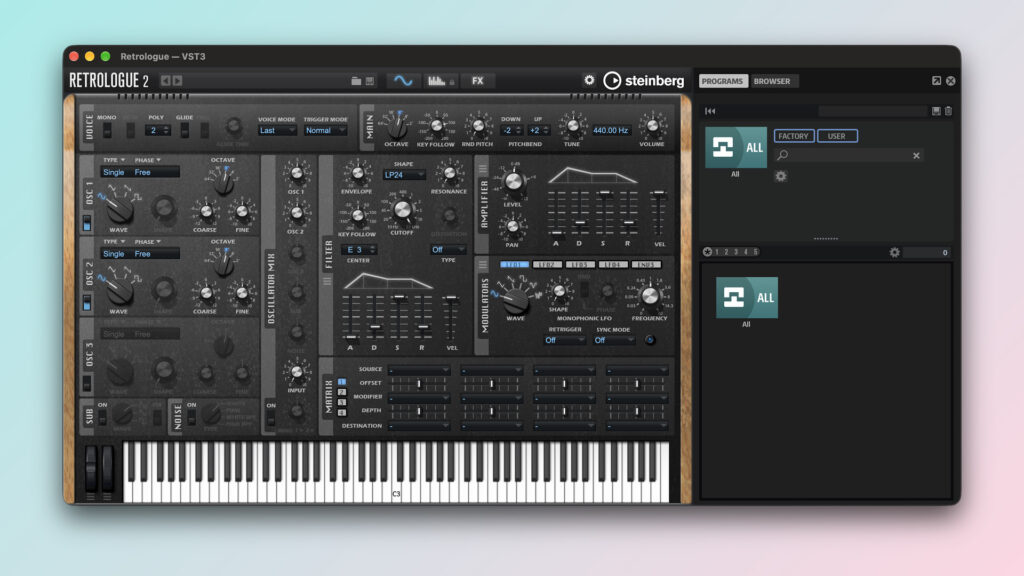
The synthesizer also includes a sub-oscillator and a noise generator. The sub-oscillator adds extra depth to bass sounds, while the noise generator can add texture to leads, effects, and other sounds. Ring modulation provides another way to create unusual tones. These tools give producers more options when building sounds from scratch.
One of the main strengths of Retrologue is its filter section. It includes 24 filter types that help shape the character of each sound. You can use low-pass filters to make sounds softer, high-pass filters to remove low frequencies, and other filter types to create different tones. The filter controls also help create smooth changes and stronger effects. Producers can use these settings to make bass sounds deeper, leads brighter, or pads warmer.
Retrologue offers several options for changing sounds over time. Its modulation system has 16 freely assignable connections. You can use these controls to change different parts of a sound automatically. For example, you can make the filter open slowly, change the pitch, or add movement to a pad. This is useful when creating sounds that need more life and variation.
The built-in arpeggiator and step sequencer are helpful for electronic music production. They can turn simple notes into repeating patterns and rhythmic sequences. You can use them to create basslines, melodies, and electronic patterns without entering every note manually. These tools are especially useful when working on dance music and other styles that depend on repeating sounds.
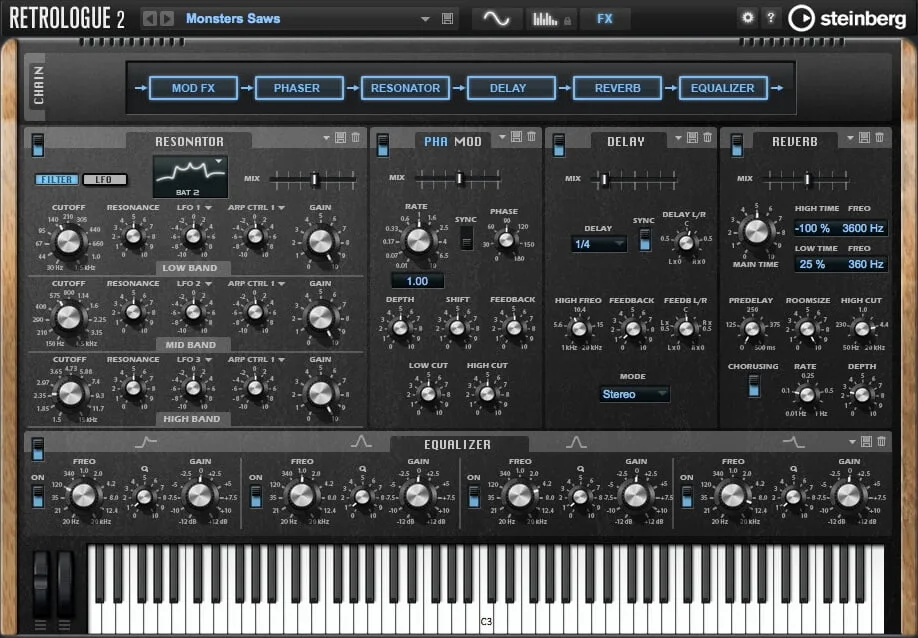
Retrologue also includes six insert effects. These effects can be arranged in different orders to change the final sound. You can use them to add more depth, movement, and character to your instruments. Having effects inside the synthesizer also means you do not always need to load separate plugins for basic sound processing.
The preset library contains more than 700 factory sounds. These include basses, leads, pads, keys, and other sounds for different music styles. You can start with an existing preset and adjust its settings to match your project. This is useful for beginners who are still learning how to create their own sounds. Experienced producers can also use the presets as starting points for more detailed sound design.
The preset browser received improvements in Retrologue 2.5.0. It uses Steinberg’s MediaBay technology, making it easier to browse and search for sounds. The update also improves the way users manage and save presets. This is particularly useful for producers who work with large sound libraries.
Another useful improvement is the adjustable interface size. Retrologue 2.5.0 allows users to change the interface scaling from -50% to +100% in 12.5% steps. This makes the plugin easier to use on different Mac displays. You can choose a smaller interface to save screen space or increase its size for better visibility.
Another thing to consider is its sound design approach. Retrologue is mainly focused on virtual analog sounds. It works well for traditional synthesizer sounds, but producers looking for advanced wavetable editing or detailed sample-based instruments may need additional plugins.
The interface also takes some time to understand if you are new to synthesizers. There are several controls for oscillators, filters, modulation, and effects. Beginners may find the preset library a more comfortable starting point before creating sounds from scratch.
Overall, Steinberg Retrologue is a capable synthesizer for Mac users who want to create analog-style sounds without using physical hardware. Its three oscillators, flexible filters, built-in effects, and large preset collection make it useful for everyday music production. The updated interface and Apple Silicon support also make it a practical option for modern Mac studios.
Features of Steinberg Retrologue for macOS
- Three main oscillators for creating different types of synthesizer sounds.
- Multiple oscillator modes for building simple and complex tones.
- Up to eight detuned signals from one oscillator for wider sounds.
- Sub-oscillator for adding depth to bass sounds.
- Noise generator for creating additional textures.
- Ring modulation for producing unusual electronic sounds.
- 24 filter types for shaping and adjusting sounds.
- Built-in filter distortion for adding extra character.
- 16 assignable modulation connections for controlling sound changes.
- Integrated arpeggiator for creating repeating note patterns.
- Step sequencer for building rhythmic melodies and basslines.
- Six insert effects for processing sounds inside the plugin.
- More than 700 factory presets for different music styles.
- MediaBay-based preset browser for finding and organizing sounds.
- Adjustable interface scaling from -50% to +100%.
Technical Details of Steinberg Retrologue for Mac
- Mac Software Full Name: Steinberg Retrologue
- Version: 2.5.0
- Setup App File Name: Steinberg Retrologue-v2.5.0.dmg
- Full Application Size: 300 MB
- Setup Type: Offline Installer / Full Standalone Setup DMG Package
- Compatibility Architecture: Apple-Intel Architecture
- Latest Version Release Added On: 25 November 2026
- License Type: Full Premium Pro Version
- Developers Homepage: Steinberg
System Requirements for Steinberg Retrologue for Mac
- OS: Mac OS 10.15 or above
- Installed Memory (RAM): 8 GB
- Free HDD: 500 MB of free hard drive space
- Processor (CPU): Intel 64-bit Processor
- Monitor: 1280×1024 monitor resolution
Alternatives of Steinberg Retrologue
u-he Diva is a virtual analog synthesizer focused on recreating the sound of classic hardware instruments. It offers different oscillator and filter models that can be combined to create a wide range of sounds. It is a good option for producers who want detailed analog-style basses, leads, and pads.
Vital is a wavetable synthesizer designed for modern sound creation. It offers flexible sound controls and a wide range of options for building electronic basses, leads, and evolving sounds. Its free version makes it a useful alternative for producers who want powerful sound-design tools without paying upfront.
Arturia Mini V is based on the classic Minimoog-style synthesizer. It is suitable for creating vintage-inspired basses, leads, and other traditional synthesizer sounds. Producers who prefer the character of classic hardware instruments may find it a good alternative to Retrologue.
Although it is mainly focused on virtual analog synthesis, Retrologue remains a good option for creating basses, leads, pads, and electronic melodies. Mac users with compatible systems can also benefit from its native Apple Silicon support and multiple plugin formats.
Download Steinberg Retrologue 2026 for MacOS Free Latest Version
Download Steinberg Retrologue for Mac free latest full version offline direct download link full offline setup by clicking the below button.
Steinberg Retrologue
Steinberg Retrologue Libraries


