 AllMacWorld MAC Apps One Click Away
Download Slate Digital MetaTune 1.2.3.0 free latest full version standalone offline setup for Mac OS X. Slate Digital MetaTune 2026 for macOS gives you complete control over vocal pitch correction. From natural-sounding to extreme effects, this automatic pitch corrector is designed for fast workflow, creative experimentation, and professional mixing.
Slate Digital MetaTune 2026 for Mac
MetaTune is designed to make vocal tuning easier during recording and mixing. It works by detecting the pitch of an incoming audio signal and moving notes toward the selected musical scale. The plugin is useful for different types of music production. If you record pop, hip-hop, R&B, or electronic music, you can use it to improve vocal recordings and create different tuning effects. You can also download Slate Digital Infinity Bass for Mac
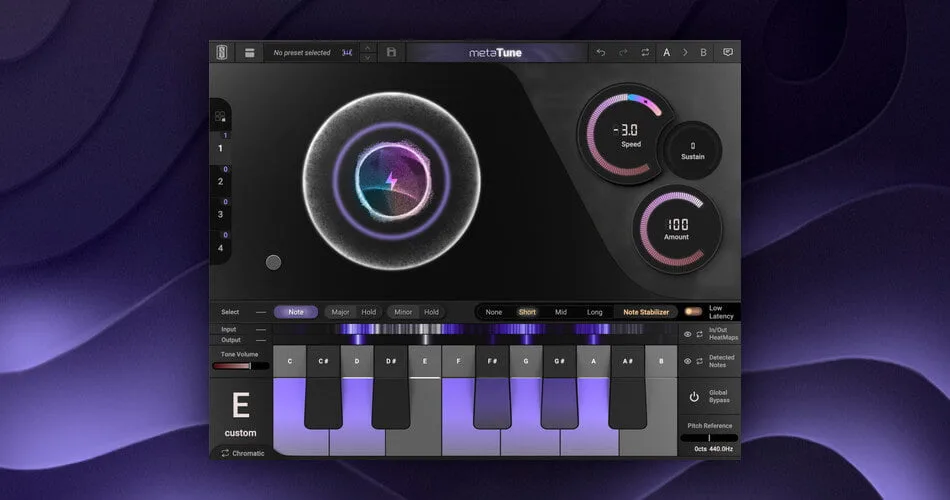
The interface includes a keyboard where you can select the key and scale of your song. You can also enable or disable individual notes. This is helpful when working with songs that use unusual melodies or specific note combinations. One of the most important controls is Speed. It determines how quickly the plugin corrects a note. Higher correction times produce a smoother result, while faster settings create the familiar robotic vocal effect.
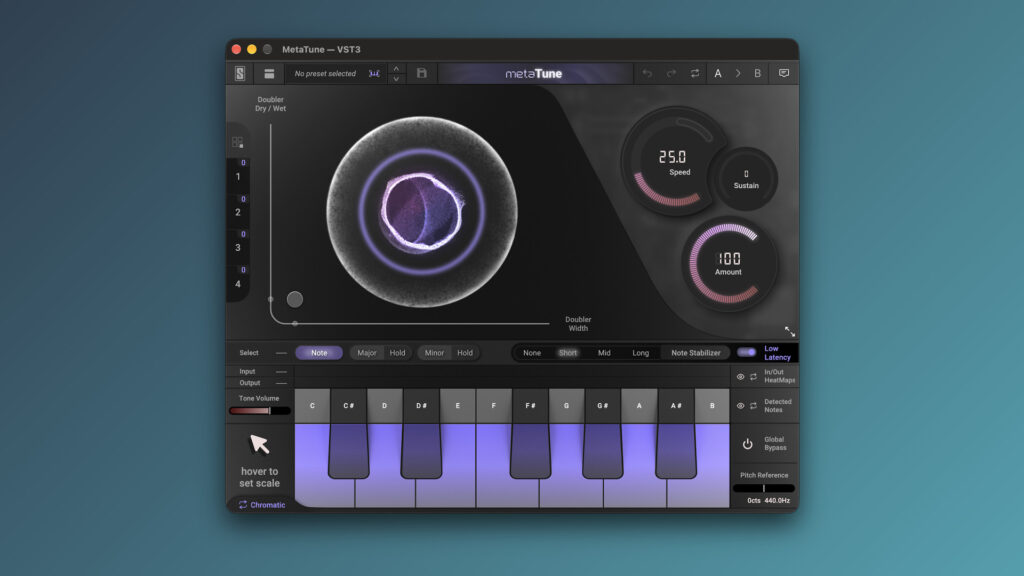
You can also adjust the Amount control. At 0%, the plugin does not correct the pitch. At 100%, it applies full correction toward the selected notes. Lower settings can help preserve some of the singer’s natural pitch movement.
The Sustain control adds more flexibility. It changes how quickly the plugin corrects notes that are held for longer periods. Positive settings make held notes move toward the target pitch faster. Negative settings slow down the correction on sustained notes. This can help preserve natural vibrato.
Another useful feature is Note Stabilizer. Fast pitch correction can sometimes create unwanted changes when a singer moves between notes or uses strong vibrato. Note Stabilizer helps reduce this problem by ignoring very short notes. It offers Short, Mid, and Long settings. These ignore notes shorter than 40 ms, 80 ms, and 200 ms, respectively. This can make the final vocal sound more controlled.
However, there is one important limitation. Note Stabilizer adds approximately 280 ms of latency. This makes it less suitable for live vocal monitoring. If you are recording vocals and want to hear the corrected sound without noticeable delay, use Low Latency mode. Slate Digital lists approximately 2.9 ms of latency in this mode.
MetaTune also includes HeatMaps and detected-note indicators. These features help you see which notes the plugin detects in the original recording. If you are unsure about the song’s key, you can use the displayed notes and built-in tone generator to help find the correct scale.
The Doubler is another useful addition. It creates two extra vocal voices and allows you to adjust their stereo width. This can make lead vocals sound wider and fuller. It is particularly useful for pop choruses, backing vocals, and electronic music.
The Groups feature makes it easier to work with multiple vocal tracks. You can connect several MetaTune instances and control their shared settings together. For example, if you have several backing vocal recordings, you can group them instead of adjusting every instance separately.
The plugin is not a complete replacement for advanced vocal editing software. It does not offer detailed graphical note editing or timing correction. If you need to move individual notes manually or make detailed changes to a vocal performance, Melodyne is a better option.
Overall, MetaTune is a useful choice for producers who want quick pitch correction and creative vocal effects. Its simple controls, Doubler, Groups, and Note Stabilizer make it a practical tool for everyday vocal production.
Features of Slate Digital MetaTune for macOS
- Automatic Pitch Correction: Corrects vocal notes toward the selected musical key and scale.
- Speed Control: Adjusts how quickly the plugin corrects incoming notes. Use slower settings for natural results and faster settings for robotic vocal effects.
- Amount Control: Changes the strength of pitch correction, from no correction to full correction.
- Sustain Control: Changes the correction speed on longer notes and helps preserve different vocal styles.
- Note Stabilizer: Reduces unwanted pitch changes caused by short notes, vibrato, and small pitch movements.
- HeatMaps: Shows detected notes to help identify the pitches in a vocal recording.
- Built-in Keyboard: Allows you to select musical notes and scales directly inside the plugin.
- Tone Generator: Plays reference notes and chords to help find the correct musical key.
- Chromatic Mode: Allows correction to any of the twelve musical notes instead of restricting it to a selected scale.
- Vocal Doubler: Creates two additional voices to add width and thickness to vocals.
- Groups: Connects multiple MetaTune instances so you can manage settings across several vocal tracks.
- Preset Browser: Provides saved settings for different vocal styles and production needs.
- Favorite Presets: Lets you save frequently used presets for quick access.
- Home Presets: Automatically loads your selected preset when the plugin opens.
Technical Details of Slate Digital MetaTune for Mac
- Mac Software Full Name: Slate Digital MetaTune
- Version: 1.2.3.0
- Setup App File Name: Slate Digital MetaTune-1.2.3.0.dmg
- Full Application Size: 288 MB
- Setup Type: Offline Installer / Full Standalone Setup DMG Package
- Compatibility Architecture: Apple-Intel Architecture
- Latest Version Release Added On: 24 November 2026
- License Type: Full Premium Pro Version
- Developers Homepage: Slate Digital
System Requirements for Slate Digital MetaTune for Mac
- OS: Mac OS 10.15 or above
- Installed Memory (RAM): 8 GB
- Free HDD: 500 MB of free hard drive space
- Processor (CPU): Intel 64-bit Processor
- Monitor: 1280×1024 monitor resolution
Alternatives of Slate Digital MetaTune
If MetaTune does not offer all the editing features you need, there are several other vocal tuning plugins worth considering.
Antares Auto-Tune is one of the best-known vocal pitch correction tools. It offers automatic tuning and different controls for creating natural or robotic vocal effects. It is a good alternative for producers who want a dedicated vocal tuning workflow.
Celemony Melodyne is designed for detailed pitch and timing editing. It allows you to select individual notes and adjust their pitch, length, and position. It is a better choice when you need more control over recorded vocals rather than automatic correction alone.
Waves Tune Real-Time provides automatic pitch correction while recording or mixing. It is useful for producers who want to correct vocals without manually editing every note. It also offers controls for adjusting the speed and strength of correction.
If your main goal is to correct vocals quickly, create modern tuning effects, and manage multiple vocal tracks, MetaTune is worth considering. Producers who need detailed manual editing should look at Melodyne or other advanced vocal editing tools.
Download Slate Digital MetaTune 2026 for MacOS Free Latest Version
Download Slate Digital MetaTune for Mac free latest full version offline direct download link full offline setup by clicking the below button.


