 AllMacWorld MAC Apps One Click Away
Download Slate Digital MetaPitch 1.1.2.0 free latest full version standalone offline setup for Mac OS X. Slate Digital MetaPitch 2026 for macOS is a simple yet powerful tool for changing the pitch and formants of a source sound.
Slate Digital MetaPitch 2026 for Mac
Slate Digital MetaPitch is a pitch-shifting plugin designed for music producers, vocal editors, singers, and audio professionals. It helps users change the pitch and character of recorded vocals and individual instruments. It also includes several built-in effects that make it useful for creative audio production. You can also download Logic Pro 13
The plugin is especially useful for working with vocal recordings. You can make a voice sound higher, lower, deeper, brighter, or more robotic. It gives you separate controls for pitch and formant, so you can change the notes without completely changing the original character of the voice.
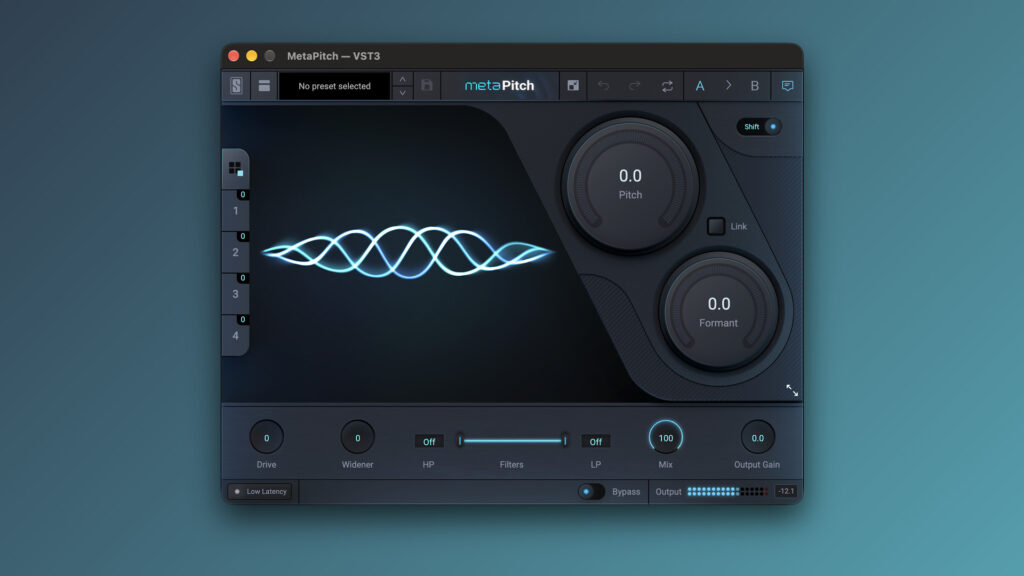
MetaPitch has a simple interface with controls for Pitch, Formant, Drive, Widener, and filters. Each control serves a different purpose, making it easier to shape the sound without opening several separate plugins.
The Pitch control changes the musical note of the recording. You can move a vocal up or down by semitones to create different effects. This is useful when preparing vocal samples, making backing vocals, or creating unusual sounds for electronic music.
The Formant control changes the character of the voice. For example, lowering the pitch of a vocal can make it sound deeper. However, it can also make the voice sound unnatural. Formant control helps you adjust the vocal character separately from its pitch.
MetaPitch also includes a Link option. When enabled, Pitch and Formant move together. This creates an effect similar to speeding up or slowing down a record. When disabled, you can adjust both controls independently.
Another interesting feature is Robotic mode. It locks the processed sound to a selected musical note. You can choose the note and octave or send MIDI notes to control the sound. This makes it possible to turn ordinary vocal recordings into robotic melodies and electronic vocal effects. This feature is useful for electronic music, experimental production, background vocals, and sound design. Producers can also use it to create short vocal effects for songs, videos, and other audio projects.
The Drive control adds saturation to the sound. It can make a clean vocal sound warmer, rougher, or more aggressive. This is useful when creating distorted vocal effects or adding character to recorded samples. You can adjust the amount of Drive depending on how much distortion you want.
MetaPitch also includes a Widener control. It expands the stereo width of the processed sound. This can help background vocals and vocal layers sound wider in a mix. It is also useful for adding space to creative vocal effects. However, using too much widening on a lead vocal can make it sound less focused.
The built-in High-Pass and Low-Pass filters provide additional sound control. The High-Pass filter removes unwanted low frequencies, while the Low-Pass filter reduces high frequencies. These controls are useful when shaping vocal samples or creating darker and warmer sounds. The Mix control lets you blend the processed signal with the original recording. This is helpful when the full effect sounds too strong. You can reduce the processed signal and keep more of the original vocal.
The Output Gain control adjusts the final volume. This is useful because pitch shifting and saturation can change the perceived loudness of a recording. Adjusting the output level helps maintain a suitable volume when experimenting with different settings.
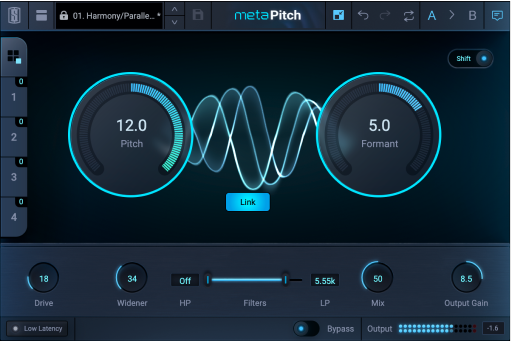
One of the most useful features for recording artists is Low Latency mode. It reduces the delay between singing and hearing the processed sound. This makes it easier to monitor vocals while recording. Slate Digital notes that this mode slightly reduces pitch and formant processing quality, so the normal mode may be preferable during final mixing.
MetaPitch also supports grouped plugin instances. This feature is helpful when working with several vocal tracks. You can place multiple MetaPitch instances in the same group and control their settings together. It saves time when processing backing vocals, vocal layers, and ad-libs. The plugin supports up to four groups, and grouped instances must use the same plugin format.
The interface also offers a compact view for users who prefer a smaller plugin window. It keeps the main controls accessible without taking up too much screen space. The preset browser provides access to factory presets and saved settings, which can help users get started.
Overall, MetaPitch is a useful plugin for producers who want more control over vocal pitch and character. Its combination of pitch shifting, formant adjustment, saturation, filtering, and stereo widening makes it suitable for different music production tasks.
It is worth remembering that MetaPitch is mainly a pitch-shifting and sound-design tool. It is not designed to replace dedicated vocal correction software when you need to fix individual wrong notes in a complete singing performance.
Features of Slate Digital MetaPitch for macOS
- Pitch Shifting: Change the pitch of vocals and individual instruments up or down.
- Formant Control: Adjust the character and tone of a voice independently of its pitch.
- Link Control: Move Pitch and Formant together for combined effects.
- Robotic Mode: Lock audio to a selected note and create robotic vocal sounds.
- MIDI Support: Control Robotic mode using MIDI notes.
- Drive Control: Add saturation and distortion to vocals and instruments.
- Stereo Widener: Make processed sounds wider in the stereo mix.
- High-Pass Filter: Remove unwanted low frequencies.
- Low-Pass Filter: Reduce high frequencies and create darker sounds.
- Mix Control: Blend the original and processed signals.
- Output Gain: Adjust the final output volume.
- Low Latency Mode: Reduce processing delay during recording and monitoring.
- Grouped Instances: Control multiple MetaPitch instances together.
- Preset Browser: Browse factory presets and save your own settings.
- Compact View: Use a smaller interface while working in your DAW.
Technical Details of Slate Digital MetaPitch for Mac
- Mac Software Full Name: Slate Digital MetaPitch
- Version: 1.1.2.0
- Setup App File Name: Slate Digital MetaPitch-1.1.2.0.dmg
- Full Application Size: 265 MB
- Setup Type: Offline Installer / Full Standalone Setup DMG Package
- Compatibility Architecture: Apple-Intel Architecture
- Latest Version Release Added On: 23 November 2026
- License Type: Full Premium Pro Version
- Developers Homepage: Slate Digital
System Requirements for Slate Digital MetaPitch for Mac
- OS: Mac OS 10.15 or above
- Installed Memory (RAM): 8 GB
- Free HDD: 500 MB of free hard drive space
- Processor (CPU): Intel 64-bit Processor
- Monitor: 1280×1024 monitor resolution
Alternatives of Slate Digital MetaPitch
Soundtoys Little AlterBoy is a popular choice for vocal pitch and formant effects. It allows producers to change the pitch of vocals, create deeper voices, and produce robotic sounds. It also includes a Drive control for adding distortion. Little AlterBoy is suitable for pop, hip-hop, electronic music, and creative vocal production.
Waves Vocal Bender is another option for producers who want to change vocal pitch and formants. It is designed for real-time vocal processing and creative sound effects. You can use it to make vocals sound higher, lower, or different from their original character. It is useful for creating vocal layers, electronic effects, and unusual sounds.
Antares Auto-Tune is widely used for correcting vocal tuning. It helps singers and producers bring recorded vocals closer to the correct musical notes. It can also create the hard-tuned vocal effect heard in many modern songs. Unlike MetaPitch, Auto-Tune focuses more on correcting singing performances and controlling how quickly vocals move between notes.
Logic Pro includes built-in pitch-shifting effects that Mac users can use without purchasing another plugin. Its Pitch Shifter effect is useful for basic pitch changes and creative audio processing. It can handle many everyday pitch-shifting tasks directly inside Logic Pro.
If you regularly work with vocals, samples, and sound effects, MetaPitch is worth considering as part of your Mac audio production setup.
Download Slate Digital MetaPitch 2026 for MacOS Free Latest Version
Download Slate Digital MetaPitch for Mac free latest full version offline direct download link full offline setup by clicking the below button.


