 AllMacWorld MAC Apps One Click Away
Download Picmal 2.4.0 free latest full version standalone offline setup for Mac OS X. Picmal 2026 for macOS is a universal offline media file converter and compressor designed for processing images, video, and audio, with fast batch processing and a built-in workflow
Picmal 2026 for Mac
Picmal is a media conversion and compression app for macOS. It helps users convert images, audio, video and PDF files without relying on online conversion websites. The app combines several file utilities in one interface, making it useful for people who regularly work with different media formats. You can also download Permute for macOS
The app uses a simple drag-and-drop workflow. Users can add files, select an output format, adjust settings and start processing. It also supports batch conversion, so you don’t need to convert every file separately. This is particularly useful when working with large collections of photos, audio recordings or video clips.
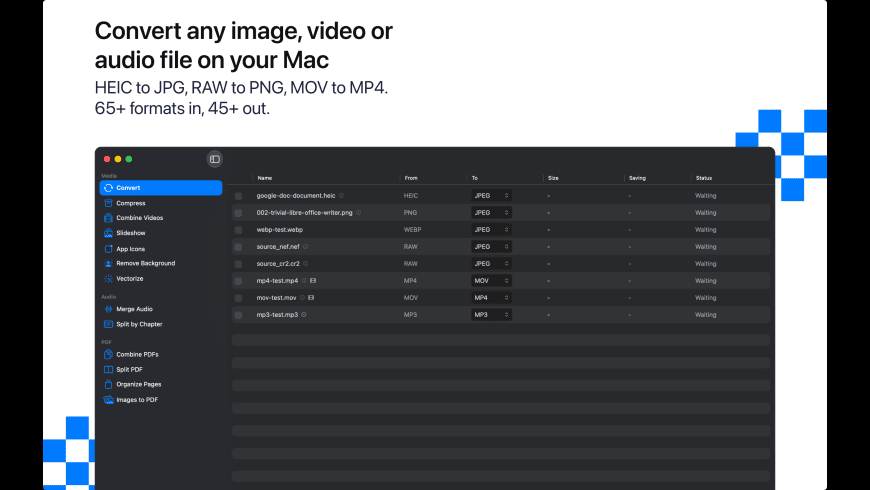
Picmal supports many popular image formats, including JPEG, PNG, HEIC, WebP, AVIF, TIFF and GIF. It also handles several professional and less common formats, such as PSD, EXR, DDS and JPEG XL. Some formats are supported for importing only, so users should check the format list before choosing an output format.
The app also includes audio conversion tools. Users can convert files between formats such as MP3, WAV, FLAC, AAC, M4A, AIFF and OGG. This can help when preparing audio files for different devices, applications or playback systems. Some audio formats are supported for conversion into other formats rather than export.
Video conversion is another part of Picmal. It supports common formats such as MP4, MOV, MKV, AVI, WebM, WMV and MPEG. Users can adjust video settings and compression options to reduce file size or prepare clips for different uses. Hardware-assisted H.264 and HEVC encoding is also listed among its capabilities.
Picmal is not limited to changing file formats. It includes tools for resizing images, compressing media, adjusting metadata, changing color spaces and controlling DPI settings. These options are useful for preparing images for websites, documents, printing and other projects.
One of its practical advantages is that files are processed locally on the Mac. According to the developer, files aren’t uploaded to a remote server during conversion. This can be helpful when working with personal photos, client media, private documents or other files you don’t want to upload to an online converter.
The application also integrates with several macOS workflows. Users can access it through Finder Quick Actions, Shortcuts, Raycast, watched folders and a command-line tool. These integrations can make repeated conversion tasks easier to manage.
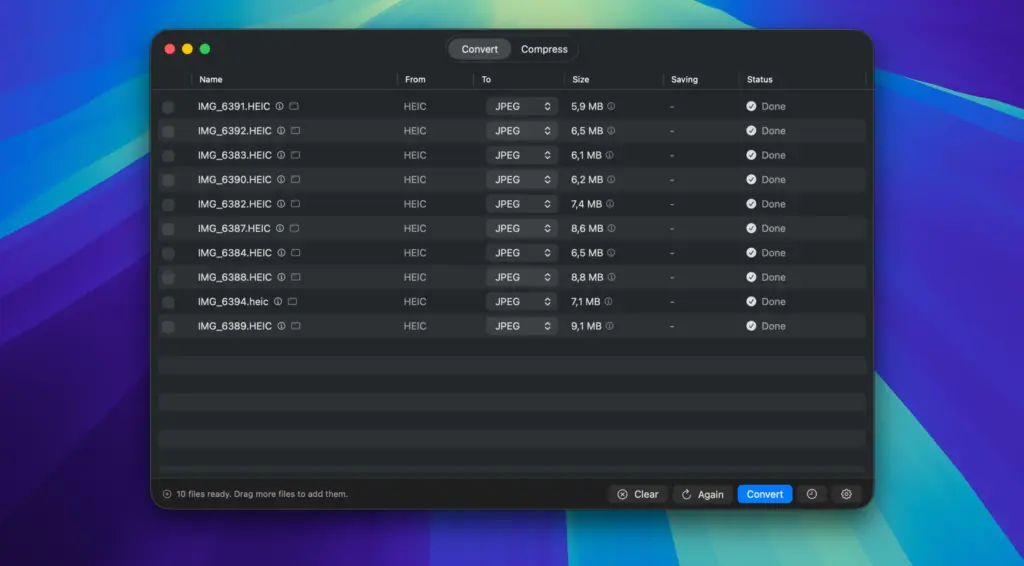
The interface is designed to keep everyday tasks simple while providing additional settings for users who need more control. Beginners can use the basic conversion workflow, while more experienced users can adjust compression, output and processing settings.
For Mac users who regularly convert, compress or prepare media files, Picmal brings several useful tools together in one application. It may not replace dedicated video editors, image editors or advanced audio applications, but it can reduce the need for separate conversion utilities.
Features of Picmal for macOS
- Batch Media Conversion: Convert multiple images, audio files and videos in one workflow instead of processing them individually.
- Image Format Support: Convert images between formats such as JPEG, PNG, HEIC, WebP, AVIF, TIFF, GIF and more.
- Video Conversion: Convert video files between supported formats, including MP4, MOV, MKV, AVI and WebM.
- Audio Conversion: Convert audio files into formats such as MP3, WAV, FLAC, AAC, M4A and AIFF.
- Media Compression: Reduce file sizes with adjustable compression settings for images, audio, video and PDFs.
- Image Resizing: Resize images using different methods, including dimensions, percentage and file-size targets.
- PDF Tools: Combine PDFs, split documents, organize pages, compress PDFs and create PDF files from images.
- Metadata Control: Remove, preserve or adjust metadata when processing supported media files.
- Background Removal: Remove backgrounds from images and save the result as a transparent PNG.
- Image Vectorization: Convert raster images into SVG paths for supported vectorization workflows.
- Finder Integration: Access conversion workflows through macOS Finder and supported system integrations.
- Automation Tools: Use Shortcuts, Raycast, watched folders and the command-line tool for repeated tasks.
- Offline Processing: Process files locally on your Mac according to the developer’s stated privacy model.
- Video Settings: Adjust supported video processing settings, including resolution, compression and encoding options.
- Icon Creation: Create icon files and icon sets for supported platforms.
Technical Details of Picmal for Mac
- Mac Software Full Name: Picmal
- Version: 2.4.0
- Setup App File Name: Picmal-v2.4.0.dmg
- Full Application Size: 90 MB
- Setup Type: Offline Installer / Full Standalone Setup DMG Package
- Compatibility Architecture: Apple-Intel Architecture
- Latest Version Release Added On: 25 November 2026
- License Type: Full Premium Pro Version
- Developers Homepage: Alberto Galca
System Requirements for Picmal for Mac
- OS: Mac OS 10.15 or above
- Installed Memory (RAM): 8 GB
- Free HDD: 50 MB of free hard drive space
- Processor (CPU): Intel 64-bit Processor
- Monitor: 1280×1024 monitor resolution
Alternatives of Picmal
Permute is a media conversion application for Mac users who want a simple way to convert images, audio and video files. It offers a drag-and-drop workflow and supports a range of media formats. Permute is a useful alternative for users who want a dedicated media converter with a straightforward interface. It is worth comparing its supported formats, available features and licensing before choosing between the two applications.
HandBrake is an open-source video transcoder. It is mainly designed for converting and compressing video files. Users can select presets, adjust video settings, manage audio tracks and configure subtitles. HandBrake is a strong choice for users whose main requirement is video conversion. However, it isn’t a general-purpose image, audio and PDF utility like Picmal.
FFmpeg is a powerful multimedia framework used for converting, encoding, decoding and processing audio and video. It supports a wide range of codecs, containers and media operations.
Preview is already included with macOS. It can open, edit, export and convert many common image files. It also provides PDF viewing, annotation and document tools.
Download Picmal 2026 for MacOS Free Latest Version
Download Picmal for Mac free latest full version offline direct download link full offline setup by clicking the below button.