AllMacWorld MAC Apps One Click Away
Download DockFlow 1.83 for Mac free latest full version standalone setup. DockFlow 2026 for MacOS is a utility that allows you to create, save, and instantly switch between different Dock configurations (presets). It is designed to help users who work with different sets of applications for different tasks quickly adapt their workspace.
DockFlow 2026 for Mac Review
DockFlow is a Mac utility designed for people who use their Mac for different types of work throughout the day. Instead of keeping the same apps in the Dock all the time, DockFlow lets you create different Dock setups and switch between them when needed. You can also download Octavo for MacOS
For example, you might want Safari, Mail, Slack, and Notes available when working. When editing photos, you may prefer Photoshop, Lightroom, Finder, and a few project folders. With DockFlow, you can create a separate setup for each type of work and switch between them without manually changing the Dock every time.
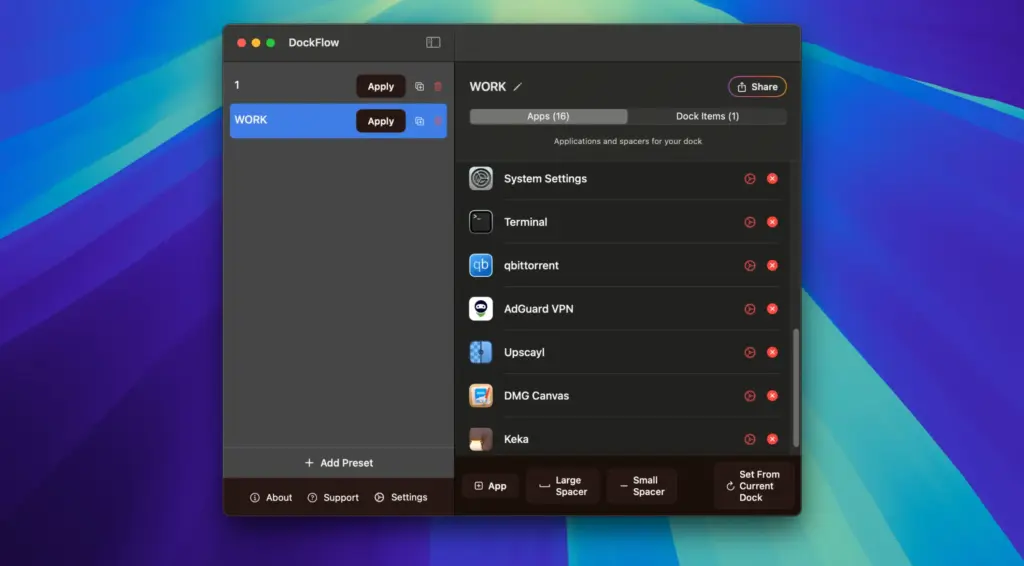
One of the biggest advantages of DockFlow is that it works with the normal macOS Dock. It does not replace the Dock with a completely different interface. Your Mac still uses Apple’s Dock, while DockFlow handles the different setups in the background.
The app is particularly useful for people who regularly move between work, study, creative projects, coding, writing, and other tasks. It can also be useful if you connect your Mac to multiple displays and want more control over how the Dock behaves. DockFlow lets you create multiple Dock presets. Each preset can contain different apps, folders, files, and web links. Once your presets are created, you can switch between them with a click or use keyboard shortcuts.
The keyboard controls are one of the more useful parts of the app. You can assign shortcuts to different presets, which means you do not have to open the DockFlow menu every time you want to change your setup.
DockFlow also supports Apple Shortcuts. This opens up more possibilities for users who already use Shortcuts to automate everyday tasks on their Mac. You can include DockFlow in a larger Shortcut workflow instead of treating it as a completely separate action.
Another useful feature is Focus Mode support. You can connect your Dock setup with different Focus modes so that your Dock can change depending on what you are doing. For example, a Work Focus could use a Dock containing your browser, email, calendar, communication apps, and work folders. A Personal Focus could use a completely different setup.
DockFlow can also open and close applications when you change presets. This means switching presets can do more than simply change the icons shown in the Dock. It can also help prepare your Mac for the task you are about to start.
The app supports files, folders, and web links as well. This is useful when a particular project requires more than a few applications. You can keep the folders and websites you regularly use for a project inside the same Dock setup. Dock spacers are another small but useful feature. They allow you to create some visual separation between groups of apps, making a busy Dock easier to organize.
For people who like keyboard-based workflows, DockFlow also includes command-line support. This can be useful when you want to trigger Dock changes from scripts or other tools. DockFlow has also added a Lock Dock feature for users who work with multiple monitors. This requires Accessibility permission because the feature needs additional control over the Dock.
What makes DockFlow interesting is that it focuses on organization rather than completely changing the appearance of macOS. If you already like Apple’s Dock but find yourself constantly adding and removing apps, DockFlow solves that particular problem.
There are, however, some limitations. DockFlow is not designed to completely redesign the Dock. You should not expect it to turn the Dock into a Windows-style taskbar or give you unlimited control over its appearance. It also does not make every Dock setting independent for every preset. Some parts of the Dock remain controlled by macOS itself.
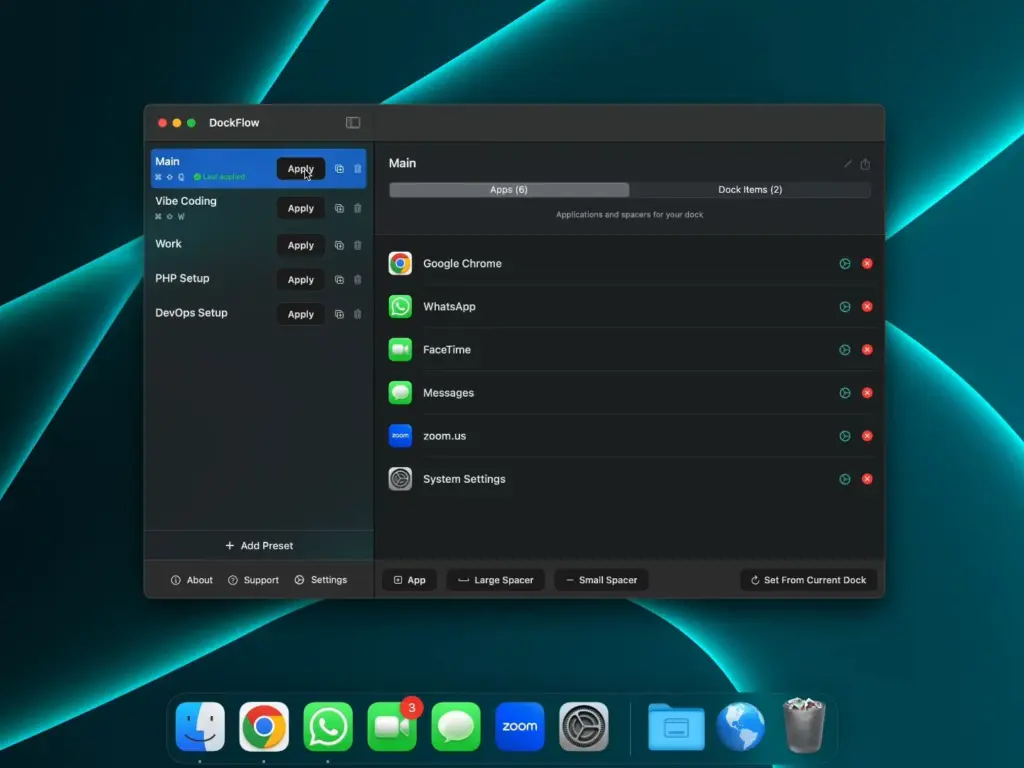
Another point to consider is that DockFlow is most useful when you actually have different workflows. If you only use a few applications every day and rarely change your Dock, you may not need a dedicated Dock manager.
Its automation features can also take some time to set up properly. The basic preset system is easy to understand, but getting the most from shortcuts, Focus modes, app actions, and other options requires some initial configuration. Overall, DockFlow is a practical Mac utility for people who want different Dock setups for different situations. Its biggest strength is that it works alongside the familiar macOS Dock rather than trying to replace it.
Features of DockFlow for Mac
- Create multiple Dock presets
- Switch between Dock setups with one click
- Use keyboard shortcuts to change presets
- Support for key sequences and multi-press shortcuts
- Add applications to different presets
- Open applications automatically when switching presets
- Close selected applications when changing presets
- Add folders to Dock presets
- Add individual files
- Add web links
- Add Dock spacers to separate groups of items
- Use App Actions for additional control
- Connect DockFlow with Apple Shortcuts
- Work with macOS Focus modes
- Use command-line controls
- Lock the Dock when using multiple monitors
- Continue using the native macOS Dock
- Create Dock setups for different tasks and projects
Technical Details:
- Software Name: DockFlow MacOS
- Software File Name: DockFlow 1.83.dmg
- Version: 1.83
- File Size: 28 MB
- File Extension: DMG
- License Type: Premium
- Developer: Appit Studio
System Requirements
- Operating System: macOS 10.10 or later
- Processor: Apple Silicon (M1, M2, M3, M4, M5) or Intel Core 64-bit
- RAM: 4 GB minimum, 8 GB recommended
- Storage: 200 MB free disk space
Best Alternatives to DockFlow for Mac
If DockFlow does not match what you need, there are several other Mac applications worth considering.
DockDoor is focused more on improving the way you interact with open windows. Its free version provides features such as window previews and keyboard-based window switching while keeping the macOS Dock.
DockMate adds window previews and additional controls to the Mac Dock. You can move the mouse over an application and see its open windows, then focus, minimize, maximize, or close them.
uBar takes a different approach by replacing the traditional Mac Dock with a taskbar-style interface. It is designed for users who prefer a Windows-like taskbar and want more control over how applications and windows are displayed.
The Built-in macOS Dock: You may not need another application at all. macOS already lets you add and remove applications, change Dock size and position, adjust magnification, and change several other settings.
For users with a simple setup, the built-in Dock can be enough. DockFlow becomes more useful when you want several different Dock arrangements and want to switch between them quickly.
DockFlow 1.83 for Mac Free Download
Click the button below to download DockFlow 2026 for Mac latest full version setup free. It is a complete standalone installer for macOS with a single-click download link.