AllMacWorld MAC Apps One Click Away
Download Session Pomodoro Focus Timer for Mac free latest full version standalone setup. Session 2026 is a native Apple productivity app that helps you focus using the Pomodoro Technique. It blocks distracting websites and apps, tracks your work sessions, and syncs across all your Apple devices. It is built for developers, writers, freelancers, and remote workers who struggle to stay focused and want a structured way to manage deep work on their Mac.
Session Pomodoro Focus Timer for Mac Review
Staying focused on a Mac is harder than it sounds. Slack pings keep coming. Safari tabs are always one click away. You sit down to work and somehow lose an hour without finishing anything meaningful. Most people know this feeling. The problem is not laziness. It is the lack of structure. Without a clear boundary between work time and everything else, your attention drifts constantly. You can also download Replacicon for Mac
Session solves this with a simple idea. You work for 25 minutes. You take a break. You repeat. This is the Pomodoro Technique, and Session is built entirely around it. But Session goes far beyond a basic countdown timer. It is a complete focus system designed specifically for Mac and the wider Apple ecosystem.
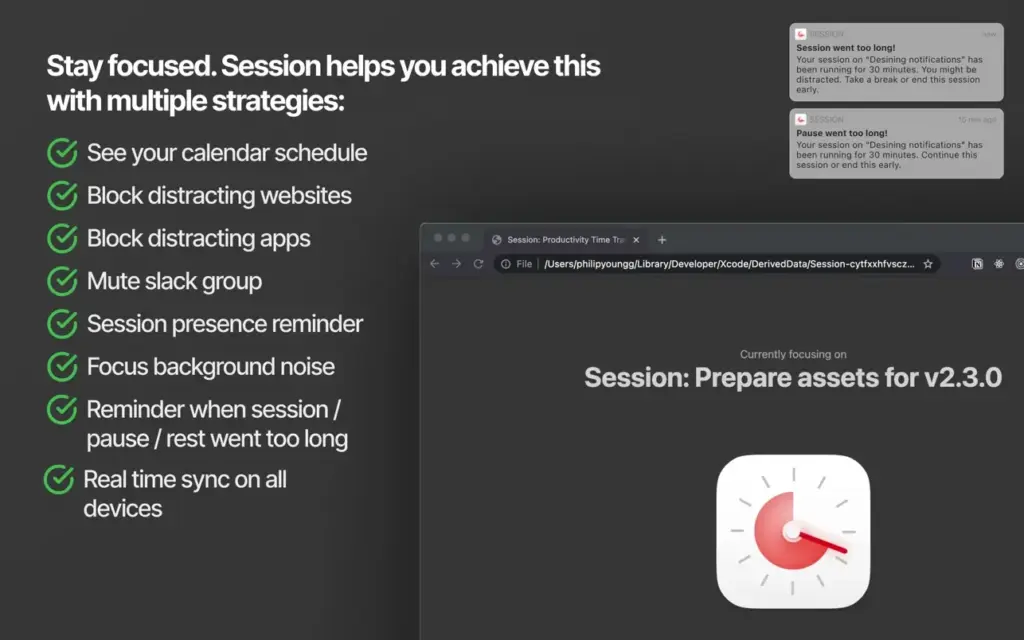
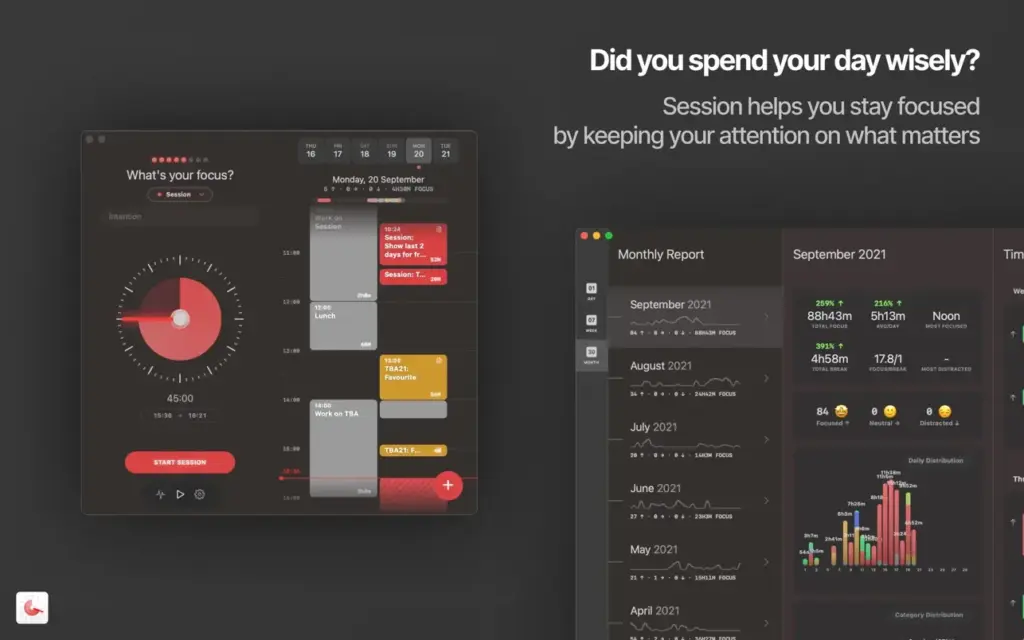
The app works by creating a clear boundary around your work time. When you start a session, Session blocks the websites and apps you have chosen as distractions. It updates your Slack status automatically so your team knows you are focusing. It plays a distinct background sound so you always know which phase you are in, even without looking at the screen. When the session ends, everything restores on its own.
The interface is clean and native. It feels like an Apple app. You get a menu bar timer, keyboard shortcuts, and a full-screen focus view. Setting an intention before each session takes one click. After the session ends, the app asks what you learned or accomplished. This small habit builds a useful log of your daily work over time.
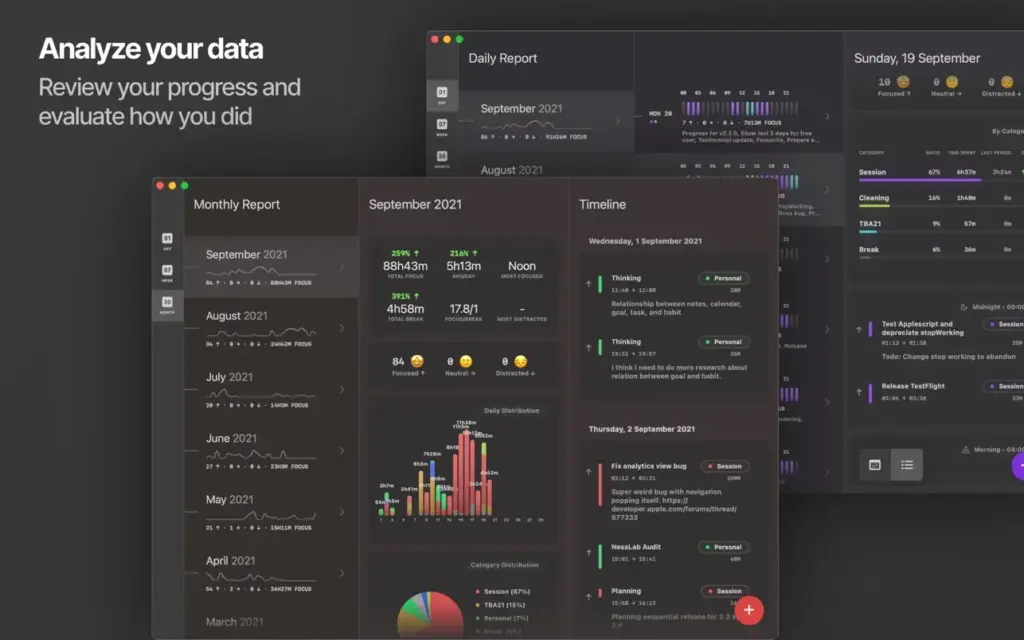
Session also connects to Apple Calendar. You can see your scheduled events alongside your focus blocks. The analytics dashboard shows your daily and weekly session counts, total focus time, and category breakdowns. For anyone who wants to understand how they actually spend their day, this data is genuinely useful.
The app runs natively on Mac with full Apple Silicon support. It syncs your progress in real time across iPhone, iPad, and Apple Watch. If you start a session on your Mac and need to step away, your timer continues on your iPhone through Live Activities on the Dynamic Island. The entire experience is built around one ecosystem and it shows.
All in all, Session Pomodoro Focus Timer is the most complete focus tool available for Mac in 2026. It does not just count down time. It builds a structured work habit around the Pomodoro Technique with the kind of Apple-native polish that makes it feel like it belongs on your Mac.
Features of Session Pomodoro Focus Timer for Mac
- Pomodoro timer with 25-minute and 45-minute focus session options
- Blocks distracting websites in Safari, Chrome, Brave, and Microsoft Edge during active sessions
- Blocks distracting Mac apps while a session is running
- Automatically updates your Slack status when a session starts and restores it when it ends
- Connects to Apple Calendar to show events alongside your focus blocks
- Integrates with Apple Focus mode to silence notifications during sessions
- Plays distinct background sounds for each phase: session, overflow, break, and break overflow
- Built-in intention setting before each session with end-of-session reflection notes
- Full analytics dashboard with daily and weekly session tracking
- Menu bar timer for quick access without switching windows
- Complete keyboard shortcut set for starting, stopping, pausing, and ending sessions
- Cross-device sync across Mac, iPhone, iPad, and Apple Watch
- Live Activities support on iPhone Dynamic Island
- Apple Shortcuts integration for workflow automation
- Universal Binary with native Apple Silicon and Intel Mac support
Technical Details:
- Software Name: Aescripts Fractal Noise Browser
- Software File Name: Session 2.13.48.dmg
- Version: 2.13.48
- File Size: 50 MB
- File Extension: DMG
- License Type: Premium
- Developer: Translucent
System Requirements
- Operating System: macOS 13 Ventura or later (including macOS 26 Tahoe)
- Processor: Apple Silicon (M1, M2, M3, M4) or Intel 64-bit
- RAM: 4 GB minimum
- Storage: Minimal disk space required
Best Alternatives to Session Pomodoro Focus Timer for Mac
Session is the best full-featured Pomodoro focus timer for Mac users in the Apple ecosystem. If you need something different, here are strong alternatives worth considering.
Flow is a minimalist Pomodoro timer for macOS. It handles the core countdown well with a clean interface and a usable free plan. It lacks distraction blocking and deep integrations but is a good option if you want something simple without a subscription.
Focus by HeyFocus combines a Pomodoro timer with a dedicated website and app blocker. It gives you more control over blocking schedules and works well for users who want distraction blocking as the primary feature rather than analytics and sync.
TomatoBar is a free, open-source Pomodoro timer for Mac. It lives in the menu bar and does nothing else. It is the right choice if you want zero complexity, zero cost, and a lightweight native timer that stays out of your way.
Be Focused Pro is a one-time purchase Pomodoro app for Mac and iOS. It includes task management, session tracking, and basic statistics. It is the best option for users who want a capable timer without a recurring subscription fee.
Toggl Track is a time tracking tool, not a Pomodoro timer. But it works well alongside any timer app for users who need detailed project-level time logs billed to clients or reported to a team.
Each app covers a different set of needs. Session stands out for Mac users who want distraction blocking, Apple ecosystem sync, analytics, and Slack integration in a single polished app.
Session Pomodoro Focus Timer 2.13.48 for Mac Free Download
Click the button below to download Session Pomodoro Focus Timer for Mac latest full version setup free. It is a complete standalone installer for macOS with a single-click download link.