AllMacWorld MAC Apps One Click Away
Download XLN Audio XO 1.8.10 for Mac free latest full version standalone setup. XLN Audio XO 2026 for MacOS is an innovative beat-making plugin that simplifies working with drum samples. It automatically sorts your one-shot samples by sonic similarity, displaying them in the XO Space visual interface, where similar sounds (e.g., kicks, snares, hats) are grouped together.
XLN Audio XO 2026 for Mac Review
XLN Audio XO is a drum plugin and standalone app for Mac. It is made to help you find drum sounds faster and create beats with them. The main idea behind XO is simple. Instead of opening many folders to search for a kick, snare, hi-hat, or percussion sound, XO puts your samples into one visual area called XO Space. You can also download ROLI ROLI Studio Player for MacOS
XO looks at your drum samples and places similar sounds close to each other. When you find a sound you like, you can quickly check other sounds that are close to it. This can save a lot of time when you have thousands of samples on your Mac. This is where XO is different from a normal sample browser. You don’t have to remember the name of a file or where you saved it. You can start with a sound you like and keep trying similar sounds until you find something that fits your beat.
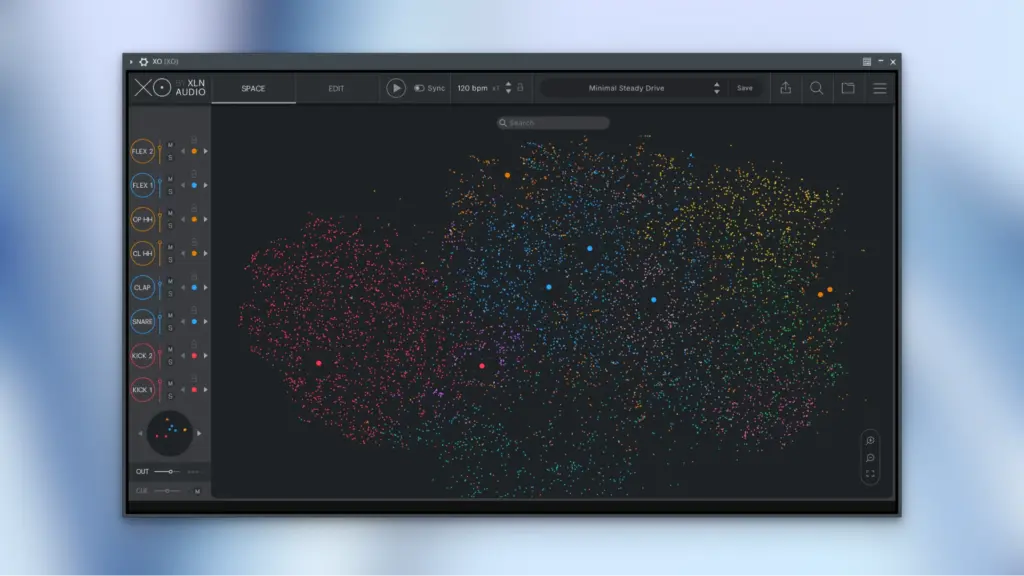
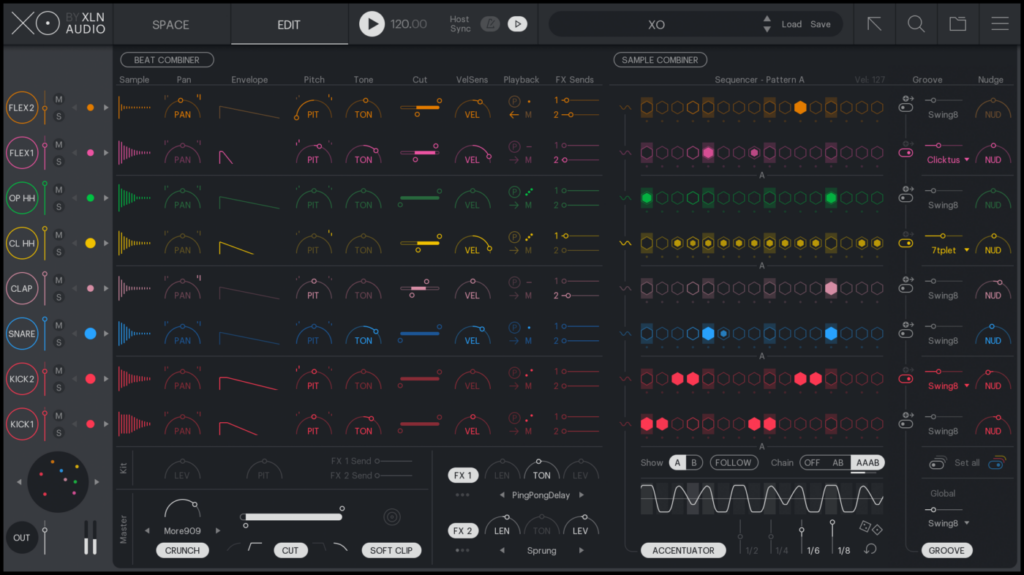
XO also lets you build a complete drum kit using eight sample slots. You can add a kick, snare, hi-hat, percussion, and other sounds to these slots. You can then change individual sounds while your beat is playing. This is useful because a drum sound can sound good by itself but not work well with the rest of the beat. XO lets you hear the replacement sound with the other sounds already playing.
The search and filter tools make the process easier. You can search for specific sounds and narrow down the results. You can also use the Similarity List to find sounds that are close to the one you already selected.
The similarity feature is helpful, but it isn’t perfect. Two sounds that seem similar to you may not always appear next to each other. So, XO should be treated as a way to discover sounds, not as a system that always knows which sounds are the same.
XO also includes its own beat maker. You get eight drum lanes and 16 steps for creating patterns. You can add notes, change their strength, add rolls, adjust the timing, and create small changes in the rhythm. There are two main patterns called A and B. You can use them separately or connect them to create longer combinations such as AB or AAAB.
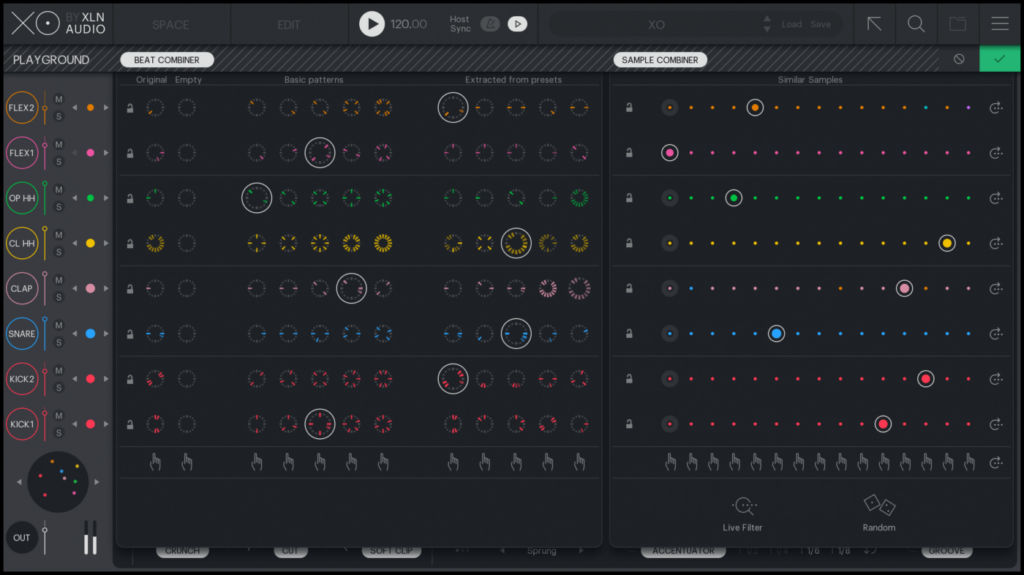
This works well when you want to quickly create a drum idea. It is not designed to replace the main editing tools in Logic Pro, Ableton Live, Cubase, FL Studio, or another full music program. A common way to use XO is to find your sounds and create a basic beat in XO, then move the MIDI or audio into your main music program. XO also includes tools for changing the feel of a beat. You can move sounds slightly forward or backward in time, change the rhythm, adjust how strongly notes are played, and create small variations.
The Beat Combiner and Sample Combiner are useful when you want to experiment. You can try different drum sounds and patterns without losing the setup you were working on. There is also a Live Filter Mode. As you change the search settings, XO can change the sounds in the kit. You can lock sounds that you want to keep while trying different options for the other parts.
The sound editing tools cover the basic changes most producers need for drums. You can change the start and end of a sample, add fades, change pitch, adjust the attack and decay, change the tone, control the volume response, reverse sounds, and adjust the stereo position.
XO also has reverb and delay effects. These controls are enough for shaping a drum sound, but XO is not a deep drum sampler. If you need many layers of the same drum, detailed sample switching, or advanced sound design controls, another drum plugin may be more suitable.
One of XO’s useful features is its export system. You can drag individual samples, complete kits, MIDI, audio, and separate drum parts into your music program. This means you can use XO during the early part of a project and then continue working in Logic Pro, Ableton Live, Cubase, or another DAW.
XO can also work with your own sample collection. You can add folders from your Mac and let XO scan them. It supports common audio formats including WAV, AIFF, MP3, OGG, FLAC, and WMA. This is important because the main reason many producers may want XO is not the sounds that come with it. The bigger benefit is being able to search through their own large collection more easily.
XLN Audio currently lists more than 8,700 one-shot samples and more than 240 beat presets with XO. The current Mac requirements are also fairly broad. XLN Audio lists support for macOS 10.13 and later, with support for both Intel and Apple Silicon Macs. XO is available as a standalone app and supports VST, VST3, AU, and AAX formats.
There are also some limitations to keep in mind. The eight sample slots can feel restrictive if you normally build very large drum setups. The 16-step beat maker is good for quick ideas but isn’t ideal for complicated drum arrangements. The sound matching system can also produce results that don’t always match what you would consider similar. These aren’t necessarily problems with the product. They are mainly the result of what XO is designed to do.
XO is focused on finding sounds quickly and helping you experiment with them. It isn’t trying to replace your complete music production setup. For producers with thousands of drum samples spread across different folders and drives, that can be its biggest advantage.
Features of XLN Audio XO for Mac
- Visual system for browsing drum samples
- Finds similar drum sounds
- Search and filter tools
- Eight sample slots
- Quick sample replacement
- More than 8,700 included one-shot samples
- More than 240 beat presets
- Built-in 16-step beat maker
- Two main patterns, A and B
- Pattern combinations such as AB and AAAB
- Rhythm and timing controls
- Note strength controls
- Roll controls
- Beat Combiner
- Sample Combiner
- Live Filter Mode
- Sample start and end controls
- Fade controls
- Pitch controls
- Tone controls
- Attack and decay controls
- Volume response controls
- Reverse playback
- Stereo controls
- Reverb and delay
- MIDI export
- WAV export
- Individual drum-part export
- Drag-and-drop support
- Support for personal sample folders
- Standalone Mac app
- VST and VST3 support
- AU support
- AAX support
Technical Details:
- Software Name: XLN Audio XO MacOS
- Software File Name: XLN Audio XO 1.8.10.dmg
- Version: 1.8.10
- File Size: 2.2 GB
- File Extension: DMG
- License Type: Premium
- Developer: XLN Audio
System Requirements
- Operating System: macOS 10.10 or later
- Processor: Apple Silicon (M1, M2, M3, M4, M5) or Intel Core 64-bit
- RAM: 8 GB minimum, 16 GB recommended
- Storage: 6 GB free disk space
Best Alternatives to XLN Audio XO for Mac
Algonaut Atlas is another drum tool that can organize samples, create drum kits, and make beats. It is worth considering if you want automatic kit creation and beat making. XO puts more attention on finding sounds through its visual sample system.
Sononym is mainly designed for finding and comparing sounds in large sample collections. It doesn’t focus on making beats in the same way XO does. If you already have a favorite drum plugin and mainly need a better way to search your samples, Sononym is worth looking at.
Native Instruments Battery is a more traditional drum sampler. It gives you more control over individual drum sounds, effects, layers, and other settings. XO is more focused on quickly finding sounds and trying different combinations.
Ableton Drum Rack is a useful option for people who already use Ableton Live. It works directly inside Ableton and gives you strong control over drums, effects, MIDI, and mixing.
It doesn’t offer the same visual sample-search system as XO, but it can cover many basic drum-production needs without another plugin.
XLN Audio XO 1.8.10 for Mac Free Download
Click the button below to download XLN Audio XO for Mac latest full version setup free. It is a complete standalone installer for macOS with a single-click download link.