AllMacWorld MAC Apps One Click Away
Download Binary Ninja 6.0.10601 for Mac free latest full version standalone setup. Binary Ninja 2026 for MacOS is an interactive disassembler, decompiler, and binary analysis platform for reverse engineers, malware analysts, vulnerability researchers, and software developers that runs on Windows, macOS, and Linux.
Binary Ninja 2026 for Mac Review
Binary Ninja is a software analysis program made by Vector 35. It is used to examine compiled programs when the original source code is not available. The Mac version runs on macOS and can be used to inspect software made for both Intel and Apple Silicon Macs. This makes it relevant to developers and security researchers who work with Mac applications and other native software. You can also download Reeder for MacOS
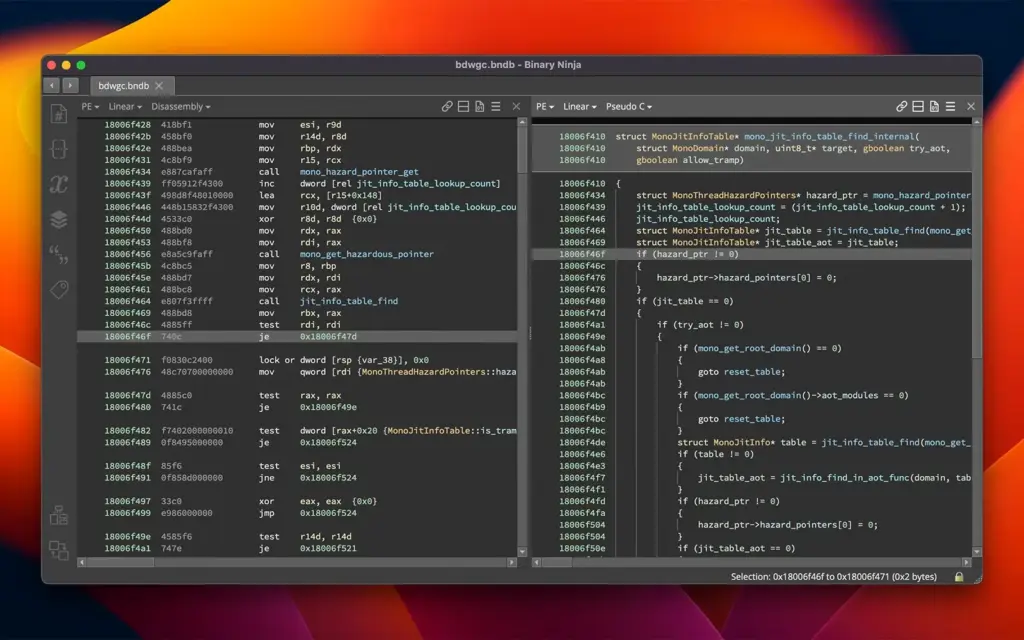
Binary Ninja is different from Xcode. Xcode is used to build applications. Binary Ninja is used to look at applications that have already been built. After opening a supported program, you can inspect its code, functions, text, and the connections between different parts of the program. One of the first things you’ll notice is that Binary Ninja does not simply show a long list of processor instructions. It organizes the program into functions and sections, making it easier to move through the file.
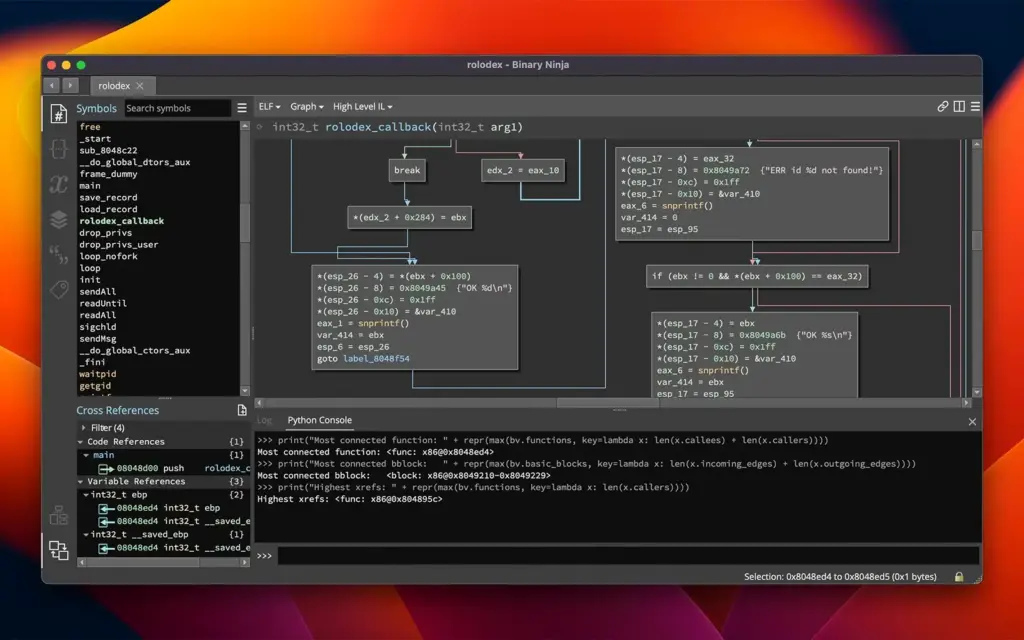
The visual function view is helpful when a piece of code has several possible paths. You can see where a function starts, where it makes a decision, and where each path goes next. This is much easier to follow than reading hundreds of instructions from top to bottom. Binary Ninja can also display code in a more readable form. This helps when you want to understand what a function does without examining every processor instruction individually.
There is an important limitation. The program cannot restore the exact source code used to create an application. During compilation, information such as variable names, comments, and parts of the original structure may be removed. The result shown by Binary Ninja is an interpretation of the compiled program.
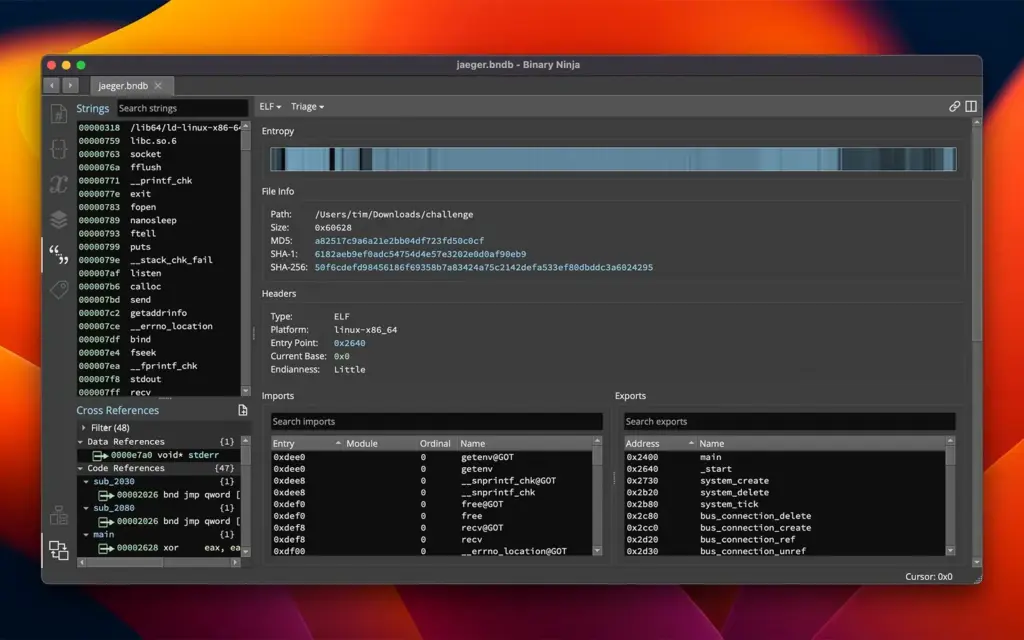
Compiler settings can also change what the code looks like. A compiler may combine functions, remove unused code, change the order of operations, or make other changes to improve performance. This can make the program look quite different from the source code that produced it. Binary Ninja also makes it easy to search for text stored inside a program. This can include error messages, website addresses, file names, commands, and other readable information.
Finding a useful piece of text can give you a starting point. You can check where that text is used and then examine the related part of the program. For example, suppose an application contains an error message about an invalid license. Finding that message may lead you to the function responsible for displaying it. You can then examine what that function calls and what happens before the message appears.
The program also supports scripting. This matters when the same type of check needs to be performed many times. Instead of going through hundreds of functions manually, you can write a script that searches for a specific pattern or collects certain information.
Binary Ninja can also be used alongside Apple’s debugging tools. Binary Ninja lets you examine the program itself, while LLDB can be used to see what happens when the program is running. These tools answer different questions and can be used together.
Mac users working with Apple Silicon will encounter ARM64 software frequently. Older Intel Macs use x86-64 software. Binary Ninja supports analysis of these architectures, so the same application can be used when working with different generations of Mac software.
Mac applications can also contain more than one version of their executable code. A program may include code for both Intel and Apple Silicon Macs. When examining such a file, you need to select the architecture you want to study.
Binary Ninja isn’t a general-purpose programming application. It is aimed at people who need to inspect compiled software. If your work involves software testing, security research, reverse engineering, or low-level programming, its features are relevant to that work.
Features of Binary Ninja for Mac
- macOS support: Runs on Mac computers and can be used to examine supported software.
- Apple Silicon: Supports analysis of ARM64 software used by Apple Silicon Macs.
- Intel support: Can analyze x86-64 software made for Intel-based Macs.
- Mac application analysis: Can examine supported native Mac program files.
- Code inspection: Shows the instructions contained in a compiled program.
- Function view: Separates a program into individual functions for easier examination.
- Visual code view: Shows the different paths that code can take.
- Readable code view: Provides a higher-level view of program instructions.
- Text search: Finds readable text stored inside a program.
- Reference search: Shows where a function, string, or other item is used.
- Function analysis: Helps identify functions within a program.
- Multiple views: Lets you examine the same program from different perspectives.
- Scripting: Allows repetitive tasks to be automated.
- Plugins: Supports additional tools and custom features.
- Security research: Can be used to examine software during authorized security testing.
- Software analysis: Helps examine programs when source code is unavailable.
Technical Details:
- Software Name: Binary Ninja MacOS
- Software File Name: Binary Ninja 6.0.10601-personal.dmg
- Version: 6.0.10601
- File Size: 584 MB
- File Extension: DMG
- License Type: Premium
- Developer: Vector 360 lnc
System Requirements
- Operating System: macOS 10.10 or later
- Processor: Apple Silicon (M1, M2, M3, M4, M5) or Intel Core 64-bit
- RAM: 8 GB minimum, 16 GB recommended
- Storage: 4 GB free disk space
Best Alternatives to Binary Ninja for Mac
There are several alternatives to Binary Ninja, but the right choice depends on what you want from a productivity app.
Ghidra is a free, open-source program for examining compiled software. It includes code analysis, a decompiler, scripting tools, and support for many processor types.
Its main advantage is the price. You can use it without buying a commercial license. The interface can take some time to learn, especially if you’ve never worked with this type of software.
IDA Pro is a long-established program used for software analysis and security research. It supports many processor types and has a large collection of extensions.
It is a commercial product and is commonly found in professional reverse-engineering work.
Hopper is a Mac-oriented application for examining compiled programs. It provides code viewing and decompilation features and supports common Mac software formats. It can be a simpler choice for someone mainly interested in examining Mac applications.
LLDB is a debugger rather than a direct replacement for Binary Ninja. It is included with Apple’s development tools and can show what a program is doing while it runs. You can stop a program, examine its memory and registers, and step through its instructions. Binary Ninja and LLDB can therefore be used for different parts of the same investigation.
Radare2 is a free, open-source command-line toolkit for examining compiled software. It supports many file formats and processor types.
It is powerful, but its command-line approach can be harder to learn than a graphical application.
FAQ’s
Is Binary Ninja available for Mac?
Yes. Binary Ninja has a macOS version for examining supported programs and libraries.
Does Binary Ninja work on Apple Silicon Macs?
Yes. Binary Ninja supports ARM64 software, which is the architecture used by Apple’s M-series processors. Check the current system requirements for the version you plan to install.
Is Binary Ninja better than Ghidra?
It depends on what you need. Ghidra is free and open source. Binary Ninja is a commercial product with a different interface and analysis system. Both can be used to examine compiled programs.
Is Binary Ninja better than IDA Pro?
Neither is the best choice for every person. IDA Pro has been used in professional software analysis for many years. Binary Ninja has its own approach to code analysis, scripting, and program navigation.
Can Binary Ninja recover the original source code?
No. It can show an approximation of how compiled code works, but it cannot normally recreate the exact source code, comments, names, and formatting written by the original developer.
Can Binary Ninja analyze ARM64 software?
Yes. ARM64 is the processor architecture used by Apple Silicon Macs, and Binary Ninja can analyze ARM64 programs.
Does Binary Ninja replace Xcode?
No. Xcode is Apple’s main development environment. Binary Ninja is used to examine compiled software. They are designed for different tasks.
Does Binary Ninja replace LLDB?
No. LLDB is used to inspect a program while it is running. Binary Ninja is mainly used to examine the compiled program without running it.
Who uses Binary Ninja?
It is used by developers, security researchers, software analysts, reverse engineers, vulnerability researchers, and people studying how compiled programs work.
Is Binary Ninja difficult to learn?
It can take time to learn if you have no experience with compiled programs. Basic knowledge of programming, memory, functions, and processor instructions will make it easier to understand what you see.
Can Binary Ninja analyze Intel Mac software?
Yes. It supports x86-64 software, which is commonly found in applications made for Intel-based Macs.
Can Binary Ninja analyze universal Mac applications?
It can analyze supported binaries containing multiple architectures. When a file contains both Intel and ARM64 code, select the architecture you want to examine.
Binary Ninja 6.0.10601 for Mac Free Download
Click the button below to download Binary Ninja 2026 for Mac latest full version setup free. It is a complete standalone installer for macOS with a single-click download link.