AllMacWorld MAC Apps One Click Away
Download PDFsam 6.0.6 for Mac free latest full version standalone setup. PDFsam 2026 for MacOS is a desktop application to split, merge, mix, rotate PDF files, and extract pages.
PDFsam 2026 for Mac Review
PDFsam Basic is a free PDF tool for Mac. It is made for simple PDF tasks such as merging, splitting, extracting, and rotating pages. The software is available for macOS, Windows, and Linux. It is also open source, so its source code is available for public review. You can also download PDF Expert for MacOS
PDFsam Basic is a good choice if you do not need a full PDF editor. It focuses on working with PDF pages instead of adding many advanced editing tools. Whether you’re a student, a professional, or just someone who frequently works with documents, you’ve likely encountered the need to manipulate PDF files. This powerful and versatile software tool is designed to help you manage your PDF files efficiently.
You do not need to install Java separately. Current versions of PDFsam include the required Java components with the app. PDFsam is also useful for people who want to keep their PDF files on their computer. Its main PDF tasks are handled locally on your Mac. You do not need to upload your files to a website.
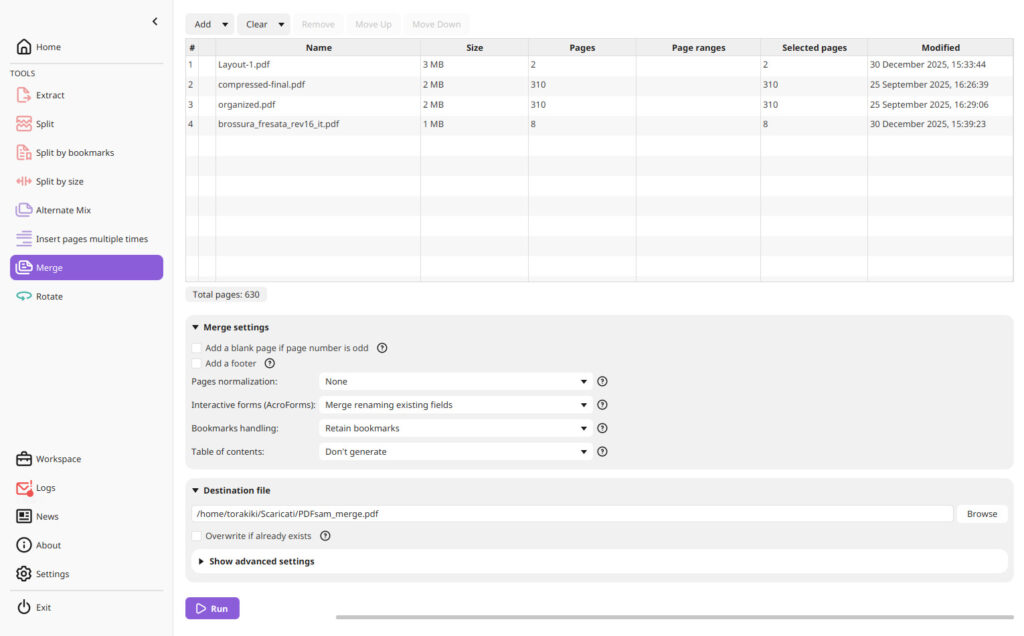
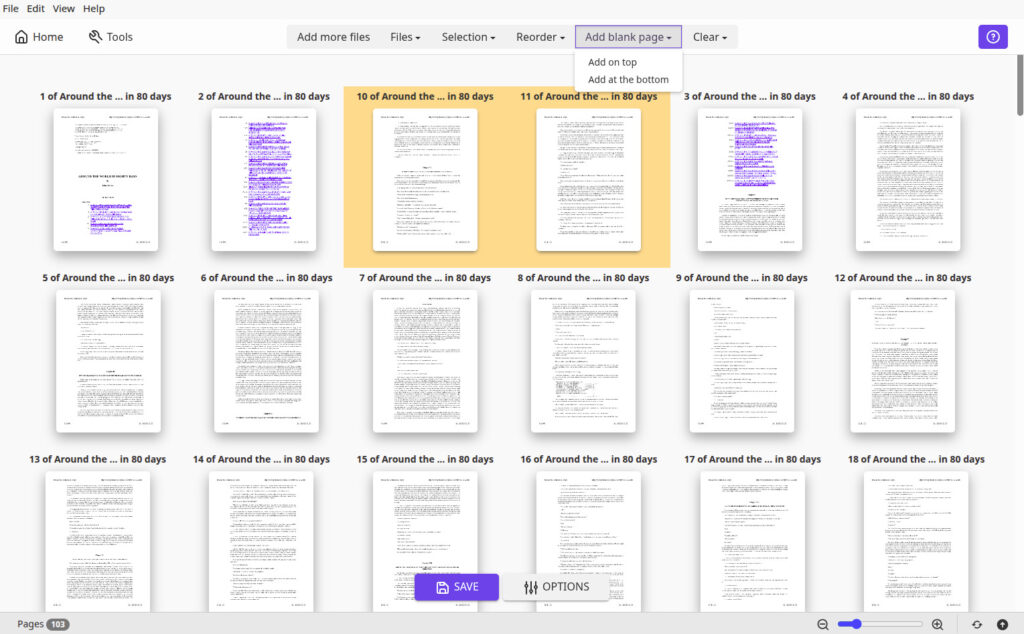
The merge tool is easy to use. You can add several PDF files, change their order, select page ranges, and create one PDF file. The split tool is also useful. You can split a large PDF after selected pages or after a set number of pages. You can also split files using bookmarks or an approximate file size.
PDFsam can extract selected pages from a PDF. This is useful when you only need a few pages from a large document. The rotate tool lets you rotate all pages or selected pages. You can rotate pages by 90, 180, or 270 degrees. You can also select odd or even pages.
PDFsam Basic does not add watermarks to your files. The official product also states that there is no file-size limit for its main PDF tools. However, very large PDF files can take longer to process depending on the file and your Mac.
The main weakness is that PDFsam Basic is not a full PDF editor. You cannot use it for the same range of tasks offered by advanced PDF software. For example, users who need to edit PDF text, work with forms, add signatures, or use OCR may need another application.
The interface is simple, but it may look less modern than some paid Mac PDF apps. This is not a major issue if your main goal is to manage PDF pages. Overall, PDFsam Basic is a practical choice for Mac users who need free tools for splitting, merging, extracting, and rotating PDF files. It is an indispensable tool for anyone who frequently works with PDFs. Whether you need to merge, split, rotate, or protect PDF files, PDFsam provides a simple and effective solution. Its user-friendly interface and diverse features make it a must-have application for efficient PDF management on your macOS device.
Features of PDFsam for Mac
- Free to use
- Open source
- Works on Mac
- Supports Apple Silicon and Intel Macs
- Supports macOS 11 Big Sur and newer versions
- No separate Java installation needed
- Merge multiple PDF files
- Split large PDF files
- Extract selected pages
- Rotate PDF pages
- Rotate pages by 90, 180, or 270 degrees
- Rotate selected pages
- Rotate odd or even pages
- Split files after selected pages
- Split files after a set number of pages
- Split files using bookmarks
- Split files by approximate file size
- Select specific page ranges
- Change the order of PDF files before merging
- Process PDF files on your Mac
- No watermark in PDFsam Basic
- No signup needed for the basic desktop app
Technical Details:
- Software Name: PDFsam MacOS
- Software File Name: PDFsam 1.0.0.dmg
- Version: 6.0.6
- File Size: 200 MB
- File Extension: DMG
- License Type: Premium
- Developer: PDFsam
System Requirements
- Operating System: macOS 10.10 or later
- Processor: Apple Silicon (M1, M2, M3, M4, M5) or Intel Core 64-bit
- RAM: 8 GB minimum, 16 GB recommended
- Storage: 4 GB free disk space
Best Alternatives to PDFsam for Mac
Apple Preview is already included with macOS. It can handle many basic PDF tasks. You can view PDFs, rotate pages, reorder pages, combine files, and remove pages.
Adobe Acrobat is a much more advanced option. It offers tools for editing PDF text, creating forms, adding signatures, converting files, and working with scanned documents.
PDF Expert is another popular PDF application for Mac. It provides a cleaner interface and offers more editing tools than PDFsam Basic.
Smallpdf provides many PDF tools through a web browser. It can merge, split, compress, convert, and edit PDF files.
PDFsam 6.0.6 for Mac Free Download
Click the button below to download PDFsam 2026 for Mac latest full version setup free. It is a complete standalone installer for macOS with a single-click download link.
ARM
Intel Only