AllMacWorld MAC Apps One Click Away
Download Octavo 1.2.3 for Mac free latest full version standalone setup. Octavo 2026 for MacOS is an app that transforms the process of creating booklets, brochures, mini-zines, and business cards from a page-calculating puzzle into a simple and straightforward task.
Octavo 2026 for Mac Review
Octavo is a specialized macOS application for PDF imposition and physical document preparation. It takes an existing PDF or image-based document and prepares its pages for printing, folding, cutting, stapling, punching, or binding. Octavo has a clear purpose, and that is one of its biggest advantages. You can also download PDFelements for Mac
Instead of trying to do everything, the app focuses on the part of printing that can become confusing. For example, imagine you have a 32-page PDF and want to print it as a small booklet. You can’t simply print pages 1, 2, 3, 4 in that order and expect the finished booklet to work. The pages have to be rearranged on each sheet. After printing, the sheets are folded and placed together, which puts the pages back into normal reading order.
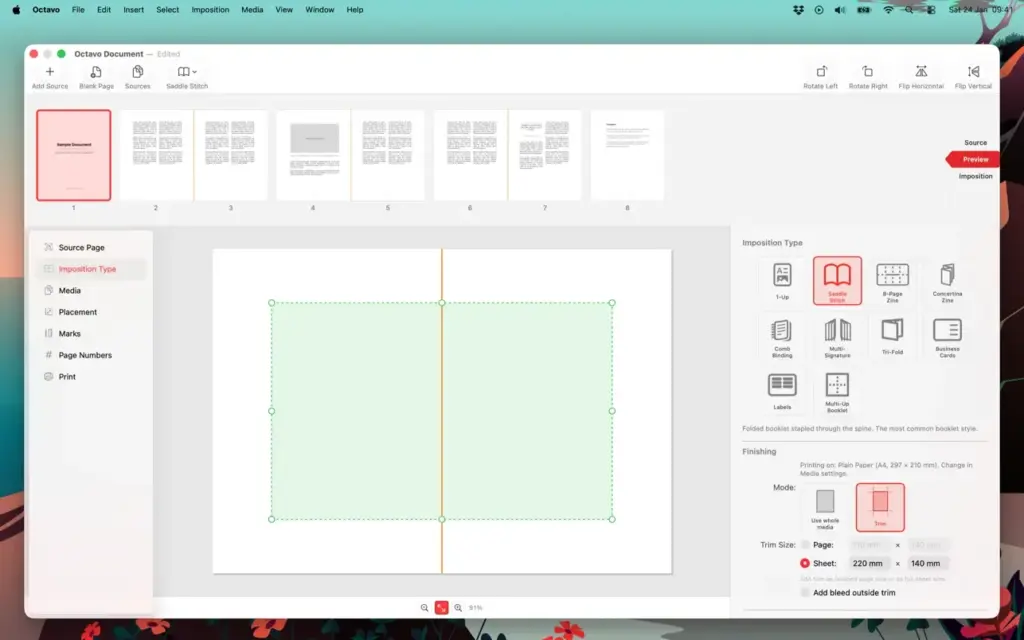
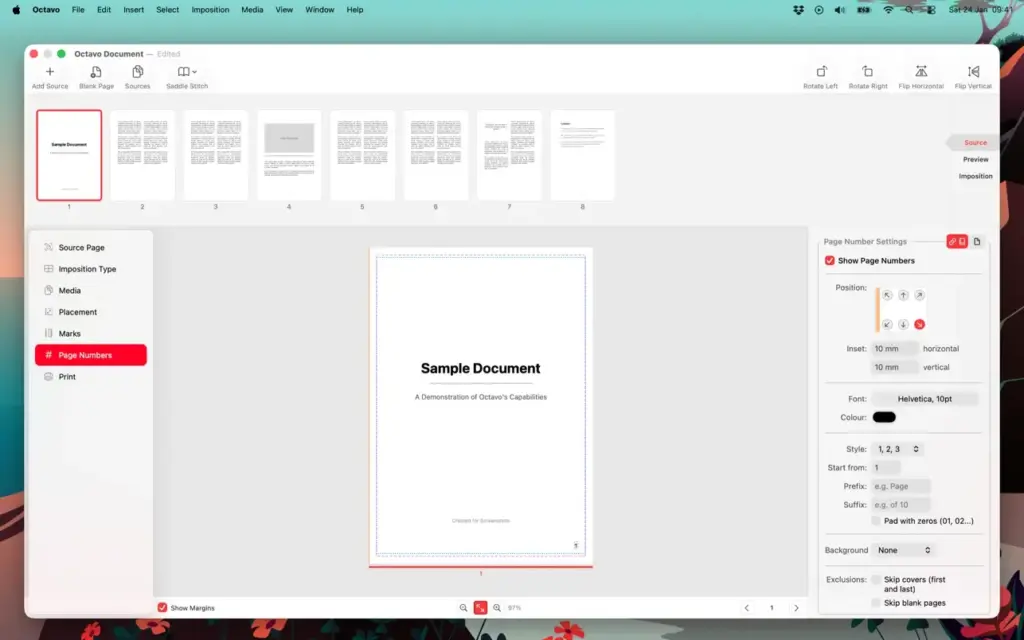
Octavo handles this automatically. You simply import your PDF and select the type of booklet you want to make. The app can also add blank pages when the number of pages doesn’t work correctly for the selected booklet format. This makes it useful for people who don’t want to manually work out which pages should appear together.
Another useful part of Octavo is its ability to fix problems with the original document. You can rotate pages, flip them, straighten crooked scans, crop unwanted areas, correct pages photographed at an angle, and make several basic image adjustments. That’s particularly useful if you’re working with scanned documents.
A scanned book, old manual, or photocopied document may have pages that aren’t perfectly straight. Some pages may have larger borders than others. Octavo lets you correct these problems before printing. The page placement controls are also well designed. You can adjust the top, bottom, inside, and outside margins. You can change the size of the pages and move their position on the sheet.
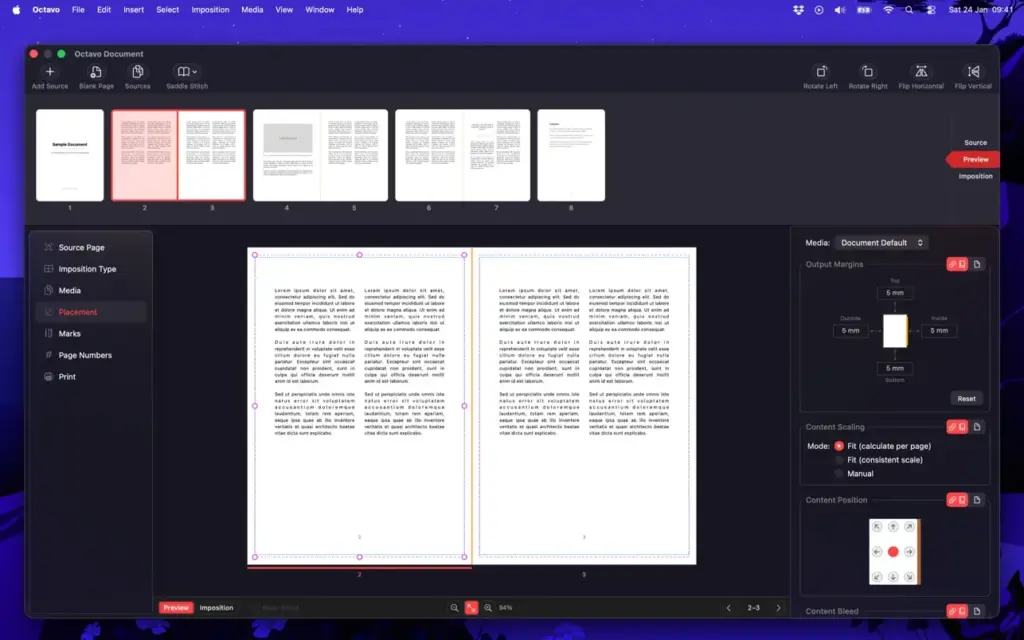
You can also make changes to individual pages instead of applying the same setting to the entire document. This becomes useful when one page doesn’t match the others. For example, you could have a PDF where the main pages are A5 but the cover image is a different size. Instead of rebuilding the entire document, you can adjust the cover separately. Octavo also gives you a preview before printing. This is important because a document can look perfectly normal in its original PDF while the printed version requires a completely different page arrangement.
You can check how the pages will appear on the actual sheets before wasting paper. The app also supports different types of paper. For example, you could use thicker paper for the cover and normal paper for the inside pages. Octavo lets you assign different paper settings to different parts of the document. Printer support is another useful part of the application.
Octavo works with the normal macOS printing system instead of requiring a special printer. It supports automatic double-sided printing when the printer allows it, and it also provides a manual process for printers that can’t print on both sides automatically.
You can also save the finished result as a PDF instead of printing immediately. That’s useful if you’re sending the file to a professional print shop. One area where you shouldn’t expect exaggerated claims is performance.
There aren’t enough independent tests available to say that Octavo is faster than every other Mac booklet application. The application is relatively focused, so it doesn’t carry all the features of a large publishing program. For normal booklets and smaller documents, that focused approach should make the workflow straightforward. However, if you’re working with very large scanned PDFs, it’s sensible to test your own files.
There is a free version that lets you test the application before purchasing. Printed output from the trial includes an Octavo banner, while the app allows certain mini-zine projects without requiring the full purchase. One small thing worth knowing is that Octavo keeps links to the original files you import. If you move the original PDF to another location, you may need to reconnect it inside Octavo.
Overall, Octavo is easiest to understand as a printing helper for finished PDFs. If you already have the document and your problem is getting it onto paper correctly, the app makes sense. If you need to write the document, redesign its pages, edit large amounts of text, or create a complete publication from scratch, you’ll want another application.
Features of Octavo for Mac
- Print folded and stapled booklets
- Create multi-part booklets
- Create tri-fold brochures
- Print business cards
- Print labels
- Create 8-page mini zines
- Create accordion-style zines
- Print pages individually
- Import PDF files
- Import images
- Rearrange pages
- Remove pages
- Add blank pages
- Rotate pages
- Flip pages
- Straighten crooked scans
- Correct pages photographed at an angle
- Crop pages
- Adjust page size
- Adjust page position
- Set inside and outside margins
- Change scaling for individual pages
- Add bleed space
- Add crop marks
- Add fold marks
- Add cutting guides
- Add staple guides
- Add hole-punch guides
- Add page numbers
- Use different paper types
- Use different paper for covers and inside pages
- Preview the finished layout
- Print directly from the app
- Print on both sides of the paper
- Support manual double-sided printing
- Export the finished layout as a PDF
- Save projects for later
- Drag and drop pages
- Undo and redo changes
- Support Dark Mode
Technical Details:
- Software Name: Octavo MacOS
- Software File Name: Octavo 1.2.3.dmg
- Version: 1.2.3
- File Size: 12 MB
- File Extension: DMG
- License Type: Premium
- Developer: Double & Thrice
System Requirements
- Operating System: macOS 10.10 or later
- Processor: Apple Silicon (M1, M2, M3, M4, M5) or Intel Core 64-bit
- RAM: 8 GB minimum, 16 GB recommended
- Storage: 100 MB free disk space
Best Alternatives to Octavo for Mac
Create Booklet 2 is probably the closest alternative to Octavo. It has been available for Mac for many years and focuses on making booklets from existing documents. If you have an older Mac, Create Booklet 2 may be worth considering.
Swift Publisher is a different type of application. It lets you actually create the document as well as print it. You can work with text, pictures, page layouts, templates, and multiple-page documents. It also has a booklet printing option.
Affinity Publisher is a much larger publishing application. It can be used to create books, magazines, brochures, posters, and other professional documents. It gives you much more control over the design itself, including text, images, page layouts, and professional PDF output.
Adobe InDesign is designed for professional publishing. It’s suitable for creating long books, magazines, brochures, catalogues, and other complex documents. If you’re starting with a blank page and need to design the entire publication, InDesign is in a completely different category from Octavo.
Octavo 1.2.3 for Mac Free Download
Click the button below to download Octavo 2026 for Mac latest full version setup free. It is a complete standalone installer for macOS with a single-click download link.