AllMacWorld MAC Apps One Click Away
Download Aescripts FontReplacer 1.1 for Mac free latest stable version setup. Aescripts FontReplacer 2026 for Mac is a plugin for After Effects that fixes one of the most annoying problems in motion design. Missing or mismatched fonts.
FontReplacer for Mac Review
Anyone who works in After Effects knows the pain of a missing font warning. You open a project from a client or a teammate. A pop-up tells you a font is missing. Then you spend the next ten minutes clicking through comps, trying to find every layer that uses it. This gets worse when the project has precomps inside precomps.
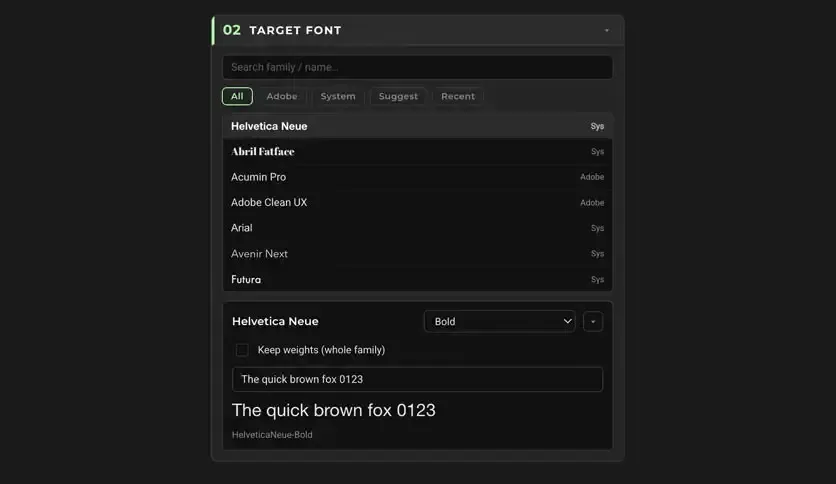
FontReplacer solves this by scanning your whole project at once. It finds every font in use, including fonts hidden inside expressions and keyframed text. You pick the font you want to replace. You pick the new font. FontReplacer applies the change everywhere it is needed, in one step.
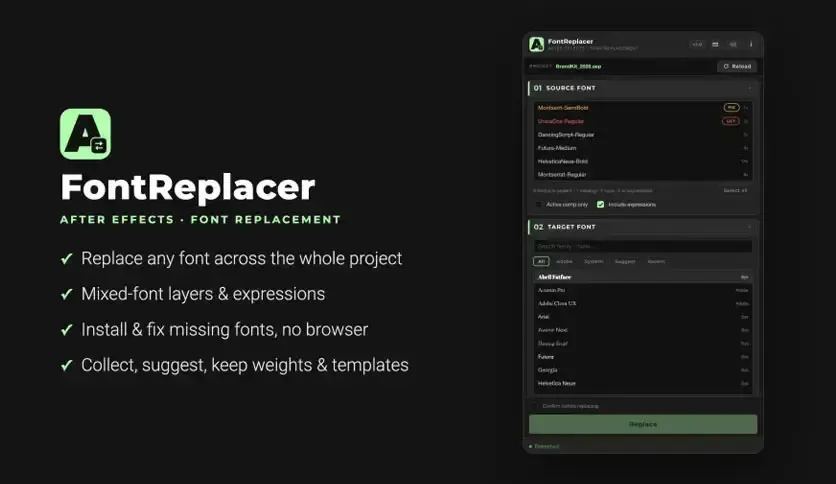
The plugin runs natively on Mac. It sits inside your After Effects panel like any other extension. You do not need a separate app or a browser window. Everything happens inside your normal After Effects workflow.
One detail that stands out is how FontReplacer treats expressions. Most tools only fix fonts on text layers. FontReplacer also reads Source Text expressions and updates the font name inside them. If a font name was typed wrong in an expression, the plugin can repair it in one click. This is rare among After Effects plugins and it solves a problem that used to require manual code edits.
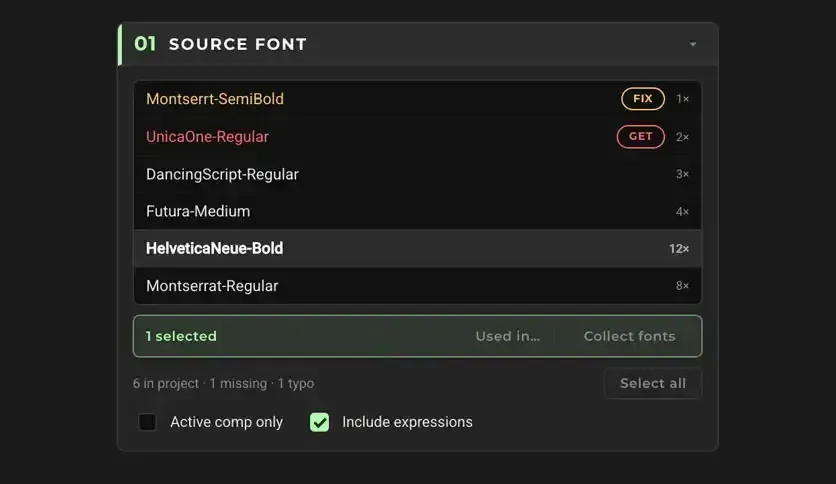
Another strong point is style matching. When you swap a font, FontReplacer keeps the correct weight. A Bold layer stays Bold. A Light layer stays Light. This happens automatically, so your animation does not break just because the new font family has different style names.
Features of FontReplacer for Mac
- Replace fonts across an entire After Effects project in one action
- Works on mixed-font layers, not just single-font text boxes
- Fixes font names inside Source Text expressions
- Repairs misspelled font names inside expressions with one click
- Supports keyframed and animated text layers
- Collects every used font into one folder for easy access
- Generates a CSV report showing font usage and replacements
- Jumps directly to the comp, layer, or expression where a font appears
- Suggests close font matches by name and by visual metrics
- Handles per-character font runs, not only the main layer font
- Maps font styles correctly, so Bold and Light stay consistent after a swap
- Lets you save font replacement rules and reuse them in future projects
- Applies every change in a single undo step
- Runs natively inside After Effects on Mac
Technical Details:
- Software Name: Aescripts
- Software File Name: Aescripts FontReplacer v1.1 Mac.zip
- Version:1
- File Size:2 MB
- File Extension: DMG
- License Type: Premium
- Developer: Aescripts
System Requirements
- Operating System: macOS 10.13 High Sierra or later
- Processor: Apple Silicon (M1, M2, M3, M4, M5) or Intel Core 64-bit
- RAM: 8 GB minimum, 16 GB recommended
- Storage: 100 MB free disk space
Alternatives to FontReplacer
If FontReplacer does not fit your workflow, a few other options exist for Mac users working in After Effects.
Project Font Pro: A simpler tool for finding and swapping fonts, without expression-level fixes.
Font Manager: Better suited for building animated typefaces rather than fixing missing fonts.
Manual replacement through the Character panel: Works for small projects with only a few text layers, but becomes slow on larger files.
Each option fits a different size of project and a different level of automation.
Aescripts FontReplacer 1.1 for Mac Free Download
Click the button below to download Aescripts FontReplacer for Mac latest full version setup free. It is a complete standalone installer for macOS with a single-click download link.