AllMacWorld MAC Apps One Click Away
Download WhatCable Pro 1.1.0 for Mac free latest full version standalone setup. WhatCable Pro 2026 for macOS is a deep USB-C diagnostics tool built for Apple Silicon Macs. It reads live data directly from Apple’s IOKit framework and tells you exactly what every cable, port, and connected device can do. It is built for engineers, IT professionals, developers, and power users who need complete visibility into every USB-C connection on their Mac.
WhatCable Pro for Mac Review:
Every USB-C cable looks exactly the same from the outside. One cable charges your MacBook at 20W. Another handles 140W and 40 Gbps data. A third one supports a 6K display. You cannot tell them apart just by looking. Your MacBook charges slowly, your external monitor runs at the wrong resolution, or your dock keeps dropping connection. You swap cables and hope something changes. The real problem is you have no way to see what is actually happening inside the connection.
WhatCable Pro solves that problem. It is a macOS menu bar app built by Darryl Morley. It reads directly from Apple’s IOKit framework and surfaces everything your Mac already knows about every connected cable and port. No extra hardware is needed. No root access is required. No data is sent anywhere. The information comes straight from your Mac’s own port controllers.
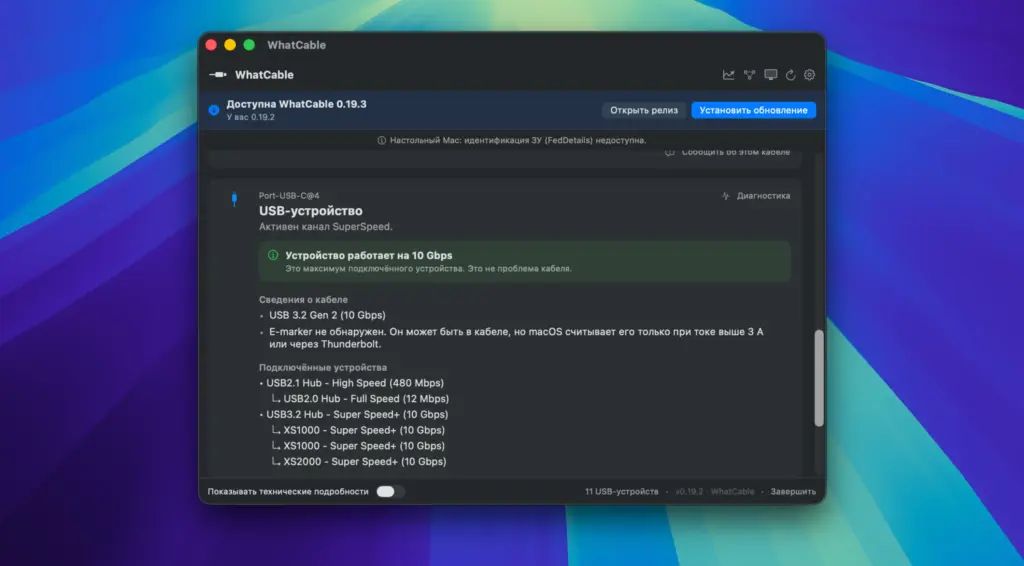
It gives you a plain-English verdict on what is limiting a connection. WhatCable Pro goes much deeper. It shows the full negotiation breakdown for every active connection. You see what the Mac port supports, what the cable supports, and what the connected device supports. All three appear side by side. The weak link in the chain is highlighted clearly. You can also download Downie 4 for Mac
The live power metering in Pro updates every two seconds. You can watch exact watts, amps, and voltage for every port in real time. If your MacBook is drawing 30W when your charger can deliver 96W, you will see exactly which part of the connection is limiting the power. The PD contract inspector shows you the full list of power profiles the charger offered and which one the Mac actually accepted.
Display diagnostics is one of the most useful features in Pro. If your external monitor is stuck below its maximum resolution or refresh rate, WhatCable Pro reads the monitor’s full capability and the live DisplayPort link and compares them directly. It tells you exactly where the gap is. It works correctly on 5K and 6K displays and confirms full quality even through DSC compressed connections.
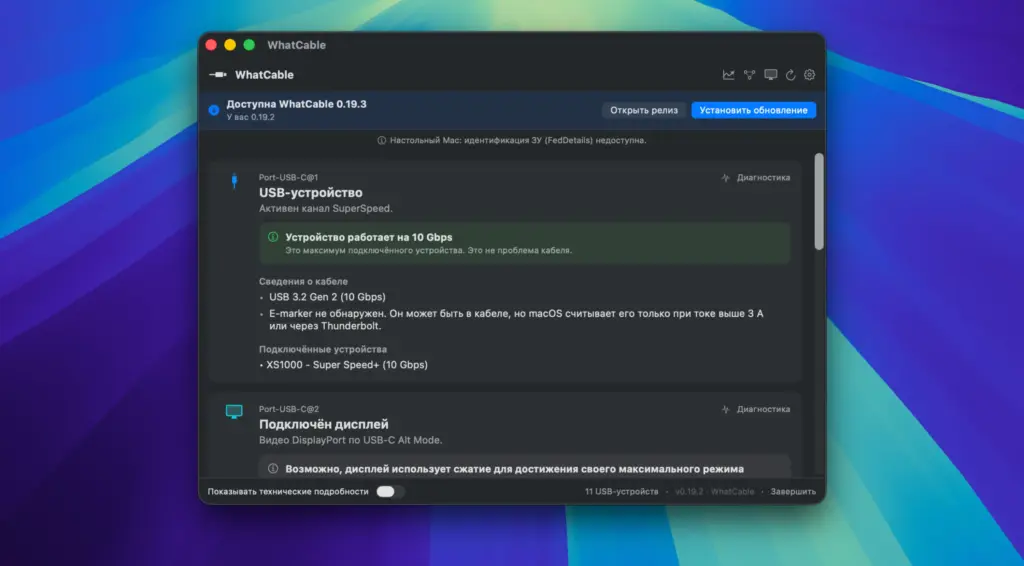
Port health counters track lifetime errors, resets, shorts, and FET failures per port. These numbers matter when a dock keeps disconnecting or a port behaves inconsistently. The CLI adds a full-screen terminal dashboard via the –dashboard flag. Three live screens cover Overview, Negotiation, and Power. You can tab between them. JSON output is available for scripting and automation. Watch mode updates in real time as cables connect and disconnect.
All in all, WhatCable Pro is a must-have utility for any Apple Silicon Mac user who works seriously with USB-C cables, docks, chargers, and external displays.
Features of WhatCable Pro for Mac
- Live power metering shows exact watts, amps, and voltage per port with 2-second updates
- Negotiation diagnostics display Mac port, cable, and device capabilities side by side with the weak link highlighted
- E-marker cross-check compares cable self-reported data against the Thunderbolt controller for accuracy
- Display diagnostics read the monitor’s live mode and compare it against the active DisplayPort link
- Works correctly on 5K and 6K displays including DSC compressed connections
- PD contract inspector shows the full PDO list and the active voltage and current contract
- Port health counters track lifetime resets, shorts, errors, and FET failures per port
- DP Alt Mode and EDID details show lane counts, link rates, and complete monitor identity
- Pro screens detach into standalone windows for side-by-side monitoring while swapping cables
- Terminal dashboard via –dashboard flag with Overview, Negotiation, and Power screens
- JSON output and watch mode available through the bundled CLI
- Reads directly from IOKit with no root access and no extra software required
- Detects when macOS accessory security is blocking a connection instead of a bad cable
- Supports 19 languages including translated diagnostic verdicts
Technical Details:
- Software Name: WhatCable Pro
- Software File Name: Whatcable_Pro_1.1.0.dmg
- Version: 1.1.0
- File Size: 9 MB
- File Extension: DMG
- License Type: Premium
- Developer: Darryl Morley
System Requirements
- Operating System: macOS 13 Ventura or later (including macOS 26 Tahoe)
- Processor: Apple Silicon (M1, M2, M3, M4) or Intel 64-bit
- RAM: 4 GB minimum
- Storage: Minimal disk space required
Best Alternatives to WhatCable Pro for Mac:
WhatCable Pro is the best deep USB-C diagnostic tool for Apple Silicon Macs. If you need something different for a specific use case, here are strong alternatives.
System Information (built-in macOS) shows basic USB and Thunderbolt device details under the About This Mac menu. It identifies connected devices and cable protocols but gives no live power data, negotiation breakdown, or display diagnostics. Good for a quick device check but not for troubleshooting performance issues.
Amphetamine with USB-C monitoring scripts is a free menu bar app for keeping your Mac awake. Some users pair it with custom shell scripts to log USB-C data. It requires technical setup and gives no visual interface for cable diagnostics. Not a practical replacement for dedicated diagnostics.
IORegistryExplorer (Apple Developer Tools) exposes the full IOKit tree including USB-C controller data. It shows everything WhatCable reads but in raw engineering format. Very powerful for developers but requires deep knowledge of IOKit naming conventions. There is no plain-English output and no power metering.
USB-C hardware cable testers are physical devices that plug into a cable and report its capabilities on a small screen. They work across platforms and do not require a Mac. They cannot read live negotiation data or real-time power draw from your Mac’s port controller. Useful for testing cables in isolation.
ChargePoint or ChargerLab Power-Z meters are inline USB-C power meters. They measure live voltage and current with high accuracy. They give no information about cable data capability, DisplayPort negotiation, or Thunderbolt status. Best used alongside WhatCable Pro rather than instead of it.
Each of these covers a specific angle. WhatCable Pro is the only tool that combines live power metering, full negotiation diagnostics, display link analysis, port health tracking, and plain-English verdicts in a single native macOS app with no recurring cost.
WhatCable Pro 1.1.0 for Mac Free Download
Click the button below to download WhatCable Pro for Mac latest full version standalone setup free. It is a complete installer for macOS with a single-click download link.