 AllMacWorld MAC Apps One Click Away
Download Scapple 1.5.5 free latest full version standalone offline setup for Mac OS X. Scapple 2026 for macOS
Scapple 2026 for Mac
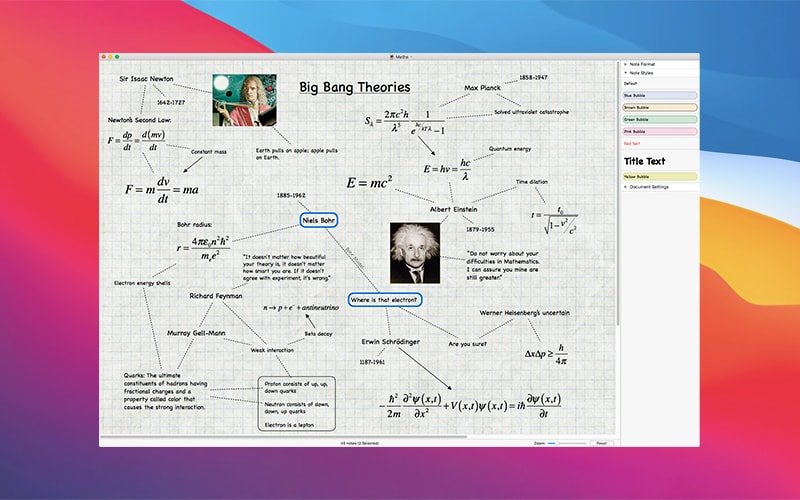
Scapple for Mac is a simple mind-mapping and note-organizing application developed by Literature & Latte. It is designed for people who want to collect ideas, arrange thoughts, connect information and plan projects without following a fixed structure. Unlike traditional mind-mapping software, Scapple doesn’t require users to begin with a main topic and build branches around it. You can start writing anywhere on the canvas and organize your ideas later. You can also download XMind for MacOS
Scapple works like a digital sheet of paper. You can add notes in different areas, move them around, create connections between them and group related thoughts. This makes it useful for brainstorming, writing, planning, research, study notes and organizing creative projects. The application keeps the process simple, so you can focus on your ideas instead of spending too much time setting up a diagram.
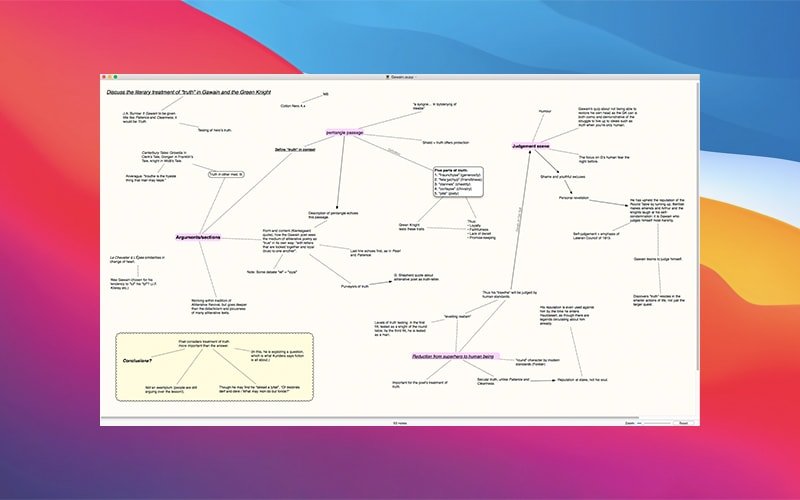
This approach can be helpful for writers, students, researchers and people working on creative projects. For example, if you’re planning a blog post, you can add the main topic, related keywords, questions, examples, research notes and ideas for headings. Once you have collected enough information, you can move related notes together and start creating a clear outline.
Scapple also works well for project planning. You can use it to organize tasks, collect project requirements, plan content, arrange meeting ideas or create a visual overview of a project. It doesn’t force you to organize everything into a list from the beginning. You can first collect your thoughts and then decide which ideas are important and how they relate to one another.
The application allows you to connect notes using lines and arrows. These connections help show how different ideas relate to each other. You can connect two notes, link several notes or use arrows to show a direction between ideas. This is useful when creating research diagrams, explaining a process or showing relationships between different topics.
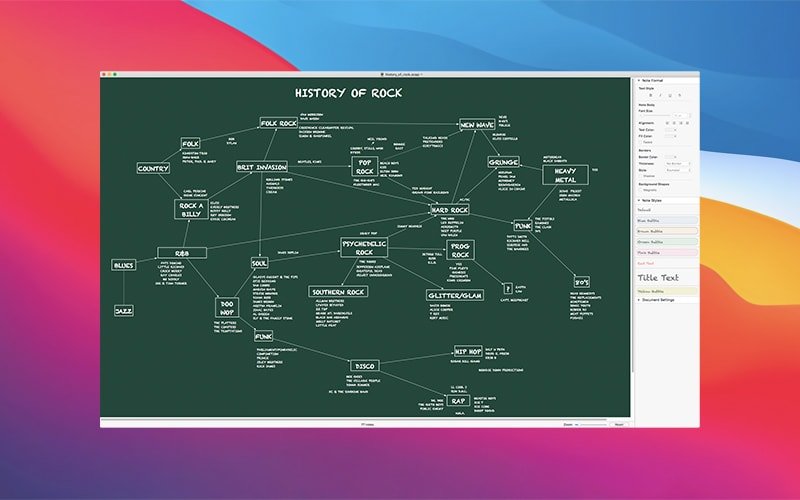
However, the connections are mainly visual. They don’t work like task dependencies in project-management software. Scapple won’t automatically track which task needs to be completed before another or manage project deadlines. It’s better suited to planning and organizing information than managing a project from beginning to end.
You can also create stacks of notes. Stacks help organize related information into a vertical list. They are useful when you have several notes that belong together but don’t need separate connections. For example, you can create a stack of article ideas, research questions, meeting points or tasks related to a particular project.
Background shapes offer another way to organize the canvas. You can place a shape behind a group of notes to separate different sections. This can help when working with larger boards containing several topics. You might use separate areas for research, ideas, problems, solutions and next steps. Background shapes can make the board easier to understand without forcing you to create a strict hierarchy.
Scapple also lets you change the appearance of your notes. You can adjust text formatting, colors, borders and other visual settings. These options help distinguish important notes from supporting information. You can use different styles for headings, questions, reminders or ideas that need further research. The formatting options are useful, although Scapple doesn’t offer the same extensive design tools as dedicated diagramming applications.
The interface is relatively clean. When you open a new document, you can begin creating notes without going through a complicated setup process. Most of the work takes place on the canvas. This makes the application suitable for quick brainstorming sessions, especially when you don’t want to spend time choosing templates or setting up a project structure.
Scapple is also useful for working with existing material. You can bring supported text documents and other files into your board using drag-and-drop. This makes it easier to collect information from different sources in one place. If you’re working on research, you can bring notes into the canvas, arrange them and create relationships between different pieces of information.
One of its useful features for writers is its connection with Scrivener. Both applications are developed by Literature & Latte. Scapple can help you collect and arrange ideas before you begin writing in Scrivener. You can move notes into Scrivener and use them as starting points for chapters, sections or writing projects. This can save time when you need to turn scattered ideas into a structured document.
Scapple also provides several ways to export your work. You can export your board as a PDF or image, along with supported text-based formats. PDF and image exports are particularly useful when you want to preserve the visual arrangement of your notes and connections. Text and outline exports can be useful when moving information into other applications, but they may not preserve every visual relationship in the same way.
Scapple isn’t designed to replace a complete project-management application. It doesn’t provide the same tools for tracking deadlines, assigning tasks, managing teams or monitoring progress. If you need a complete project workflow, you may need to move your organized ideas into another application.
Overall, Scapple for Mac is a useful application for people who prefer flexible, visual and unstructured planning. It works well for brainstorming, organizing research, collecting ideas and preparing writing projects. Its simple interface and freeform canvas make it easy to start working without creating a complicated structure first. The lack of advanced project-management tools, templates and mobile support may limit its use for some people, but it remains a practical choice for organizing ideas on a Mac.
Features of Scapple for macOS
- Freeform canvas: Add notes anywhere on the canvas without following a predefined structure or layout.
- Quick note creation: Double-click anywhere on the board to create a note and start typing.
- Flexible note arrangement: Move, resize and rearrange notes whenever your ideas change.
- Connect notes: Link ideas using lines and arrows to show relationships between different topics.
- Note stacks: Organize related notes into vertical stacks for easier reading and management.
- Background shapes: Group related notes using shapes to separate different areas of your board.
- Custom note styles: Change note colors, text formatting, borders and appearance.
- Research organization: Collect information, research notes, questions and ideas in a single canvas.
- Import supported files: Bring supported text documents and other content into your board using drag-and-drop.
- Scrivener integration: Move ideas from Scapple into Scrivener to develop writing projects.
- Export options: Export your boards as PDF, PNG and supported text-based formats.
- Full-screen mode: Work on your ideas using a larger workspace.
- Keyboard shortcuts: Use keyboard commands to create, arrange and connect notes more quickly.
- Flexible planning: Organize ideas, research, writing projects and brainstorming sessions without a fixed hierarchy.
Technical Details of Scapple for Mac
- Mac Software Full Name: Scapple
- Version: 1.5.5
- Setup App File Name: Scapple-v1.5.5.dmg
- Full Application Size: 23 MB
- Setup Type: Offline Installer / Full Standalone Setup DMG Package
- Compatibility Architecture: Apple-Intel Architecture
- Latest Version Release Added On: 28 November 2026
- License Type: Full Premium Pro Version
- Developers Homepage: Literature & Latte Ltd
System Requirements for Scapple for Mac
- OS: Mac OS 10.15 or above
- Installed Memory (RAM): 8 GB
- Free HDD: 50 MB of free hard drive space
- Processor (CPU): Intel 64-bit Processor
- Monitor: 1280×1024 monitor resolution
Alternatives of Scapple
Apple Freeform is a good option for Mac users who want a free canvas for brainstorming, drawing, adding notes and organizing ideas. It supports images, shapes, text and other elements. It’s worth considering if you want to work across Apple devices without purchasing another application.
XMind is a mind-mapping application for people who prefer structured maps, organized branches and more traditional mind-mapping layouts. It is useful for study notes, brainstorming, presentations and planning projects.
MindNode is suitable for users who want to organize ideas using mind maps and outlines. It offers a more structured approach to planning and can help turn ideas into organized tasks and documents.
OmniGraffle is a diagramming application for creating flowcharts, visual diagrams, layouts and more detailed designs. It’s a better choice when you need greater control over diagram appearance and structure.
Tinderbox is designed for collecting, organizing and connecting information. It can be useful for researchers, writers and people working with complex information that needs more advanced organization.
Download Scapple 2026 for MacOS Free Latest Version
Download Scapple for Mac free latest full version offline direct download link full offline setup by clicking the below button.