 AllMacWorld MAC Apps One Click Away
Download DiskFox v1.4.0 for Mac free latest full version standalone setup. DiskFox 2026 for MacOS is an app that solves the problem of disappearing disk space. Instead of simply showing which files are large, DiskFox tracks exactly what has grown, when, and why, allowing you to safely clean up your storage with full visibility into the consequences.
DiskFox 2026 for Mac Review
DiskFox takes a different approach to Mac storage management. Most disk analyzer applications show which files and folders are using the most space. DiskFox goes further by recording storage measurements and comparing them with previous scans. You can also download Daisydisk for MacOS
This makes it useful when your Mac keeps running out of space but you cannot identify the reason. For example, imagine your Mac has 100 GB of free storage on Monday. A few days later, you notice that only 65 GB remains. You might not remember downloading anything large or installing new software.
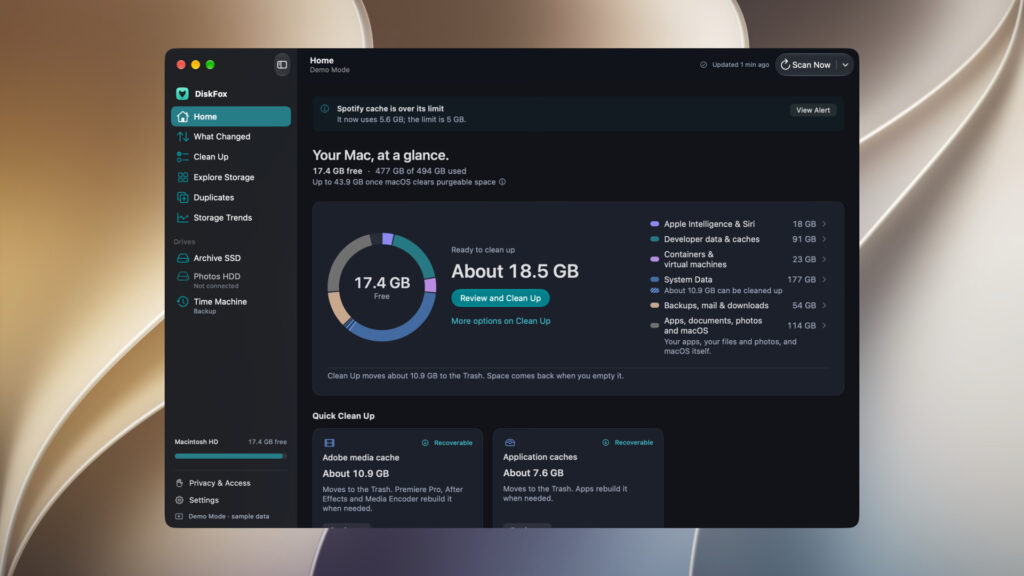
DiskFox can compare its previous and current measurements. It can show which storage categories have increased and help identify the folders responsible for the change.
The What Changed feature is particularly useful. It presents storage changes in a dated list and explains where the increase occurred. If the application can identify a specific cause, it names it. If it only has an indication based on timing or location, it describes the cause as likely rather than confirmed.
Another useful part of DiskFox is its System Data analysis. Many Mac users see System Data occupying dozens or even hundreds of gigabytes. Apple’s Storage settings do not always explain exactly what is included in this category.
DiskFox attempts to break down System Data into more understandable parts. It can identify storage associated with application data, logs, Time Machine local snapshots, iPhone backups, developer files, and other system-related items.
However, it cannot identify everything. Some macOS-managed files and storage areas are restricted. The application may also show unknown or partially measured storage when it cannot access a particular location. This is an important limitation to understand before using it.
DiskFox also includes a visual storage map. It displays storage usage through blocks that represent different files, folders, applications, and categories. Larger blocks indicate greater storage use. You can select individual blocks to investigate their contents.
This approach makes it easier to find folders that have grown unexpectedly. It is also useful for people who work with large video projects, audio libraries, software development files, and downloaded archives.
The Largest Files feature provides another way to find unnecessary storage usage. It lists large files so you can review old downloads, installers, archives, videos, and other items. You can decide which files to move to the Trash.
The duplicate finder is also useful. It looks for exact duplicate files instead of relying only on similar names. It checks file sizes, compares SHA-256 checksums, and verifies file contents. This helps reduce the chance of incorrectly identifying different files as duplicates.
DiskFox also provides application storage information. Mac applications often store additional data in the Library folder. This data can include caches, preferences, databases, and other support files. Over time, these folders can become quite large.
The application helps identify these folders and provides an uninstall option. You can review the application and its associated support files before confirming removal. However, it may not remove every file created by an application, particularly when that application uses system extensions or requires its own uninstaller.
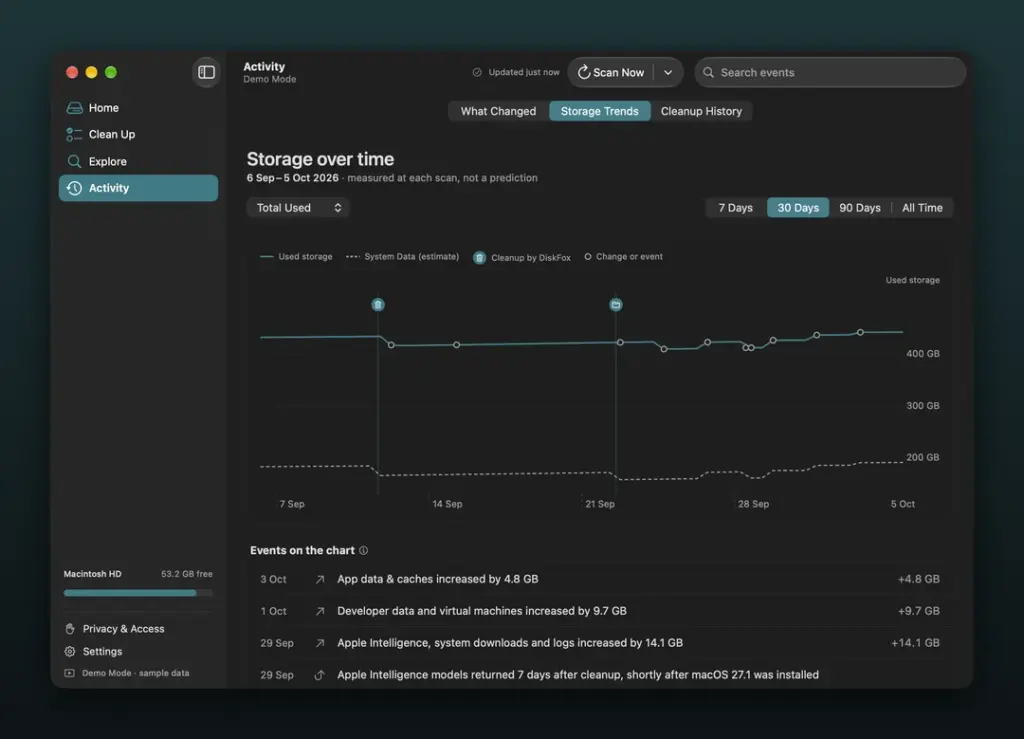
One feature that makes DiskFox useful for regular monitoring is its Storage Trends section. It displays storage changes over different periods, including seven days, 30 days, 90 days, and all available history. You can also monitor individual folders.
DiskFox can run automatic checks every three, six, or twelve hours, or once a day. Six hours is the default setting. You can also enable the application to open when you log in, allowing it to continue monitoring storage from the menu bar.
External drive support is another useful addition. DiskFox can monitor supported external SSDs and hard drives after you enable them in Settings. It records their storage usage and can compare changes when you reconnect a drive.
The cleanup feature deserves attention because removing the wrong files can cause problems. DiskFox does not provide a single button that deletes everything. Instead, it displays cleanup recommendations and explains what each item does.
Most selected files are moved to the Trash first. This gives you an opportunity to restore them if something goes wrong. Some advanced operations, such as removing certain Xcode simulator files, require separate confirmation and can permanently remove data.
The application also has limitations. It does not clean RAM, scan for malware, or provide general Mac performance optimization. Its main purpose is storage analysis, monitoring, and cleanup. Privacy is another important consideration. According to the developer, storage scans and file analysis take place locally on your Mac. File names and file contents are not uploaded during normal scanning.
Overall, DiskFox is more suitable for users who want to understand changing storage usage than people who only need a simple file cleaner. Its storage history and monitoring tools are its strongest features.
Features of DiskFox for Mac
- Storage Monitoring: Records storage measurements and compares them with previous scans to identify changes.
- Storage History: Keeps a history of storage usage so you can investigate when disk space started decreasing.
- What Changed: Shows dated storage changes and identifies the folders or categories responsible for growth.
- System Data Analysis: Breaks down some of the storage included in the macOS System Data category.
- Visual Storage Map: Displays files, folders, applications, and storage categories in a visual format.
- Largest Files Finder: Finds large files that may be taking up unnecessary storage.
- Duplicate File Finder: Identifies exact duplicate files by comparing their contents.
- Application Storage Analysis: Shows application-related folders and their storage usage.
- Application Uninstaller: Helps remove applications and selected support files after review.
- Cleanup Recommendations: Identifies selected caches, logs, old downloads, and other files that may be removed.
- Storage Trends: Displays storage changes over seven days, 30 days, 90 days, or all available history.
- Folder Monitoring: Lets you monitor selected folders and receive alerts when their size changes.
- External Drive Monitoring: Tracks supported external SSDs and hard drives.
- Automatic Scans: Checks storage at scheduled intervals while the application is running.
- Cleanup History: Records previous cleanup actions and provides a way to restore items that remain in the Trash.
- Local File Processing: Processes storage information locally instead of uploading file contents to the developer.
Technical Details:
- Software Name: DiskFox MacOS
- Software File Name: DiskFox v1.4.0.dmg
- Version: 1.4.0
- File Size: 13 MB
- File Extension: DMG
- License Type: Premium
- Developer: DiskFox
System Requirements
- Operating System: macOS 10.10 or later
- Processor: Apple Silicon (M1, M2, M3, M4, M5) or Intel Core 64-bit
- RAM: 4 GB minimum, 8 GB recommended
- Storage: 200 MB free disk space
Best Alternatives to DiskFox for Mac
DiskFox is not the only option for checking storage on a Mac. Several other applications offer disk analysis, file management, and cleanup features. The best alternative depends on whether you want visual storage analysis, a free tool, or a complete maintenance application.
DaisyDisk is a popular Mac storage analyzer. It uses a visual map to show how much space files and folders occupy. You can scan a drive, select large sections, and investigate the files responsible for storage usage. It is a good choice if you want to find large files quickly. Unlike DiskFox, its main focus is visual disk analysis rather than tracking storage changes over time.
CleanMyMac is a broader Mac maintenance application. It offers storage cleanup, application removal, malware scanning, and other maintenance features. It is suitable for users who want several Mac maintenance tools in one application. However, DiskFox has a more specific focus on storage history and monitoring.
GrandPerspective is a free, open-source storage analyzer for macOS. It displays files and folders through a visual treemap. Larger files appear as larger blocks. It is useful for finding large folders and understanding how storage is distributed. It is a good alternative if you prefer a free application and do not need DiskFox’s ongoing storage monitoring features.
OmniDiskSweeper provides a straightforward way to find large files and folders. It displays folder contents in a column-based layout, allowing you to move through directories and identify storage-heavy items. It is particularly useful for users who prefer browsing folders rather than using visual storage maps. It does not offer the same storage history and monitoring approach as DiskFox.
If you regularly work with large files, development tools, media projects, or limited Mac storage, DiskFox is worth trying.
DiskFox 2026 for Mac Free Download
Click the button below to download DiskFox for Mac latest full version setup free. It is a complete standalone installer for macOS with a single-click download link.


