 AllMacWorld MAC Apps One Click Away
Download Space Drop 2.9 for Mac free latest full version standalone setup. Space Drop 2026 for MacOS is an essential utility for Mac users who want to seriously speed up their workflow.
Space Drop 2026 for Mac Review
Space Drop for Mac is a file management utility developed by FIPLAB Ltd. It makes moving files between different folders and applications easier. Instead of keeping your mouse button pressed while searching for a destination, you can temporarily place files on a floating shelf and move them later. You can also download Dropshare for MacOS
The application runs quietly from the macOS menu bar. When you start dragging a file towards the configured screen edge, its floating shelf appears. You can drop the file onto the shelf, release your mouse, and continue working. Once you find the destination, simply drag the file out of the shelf.
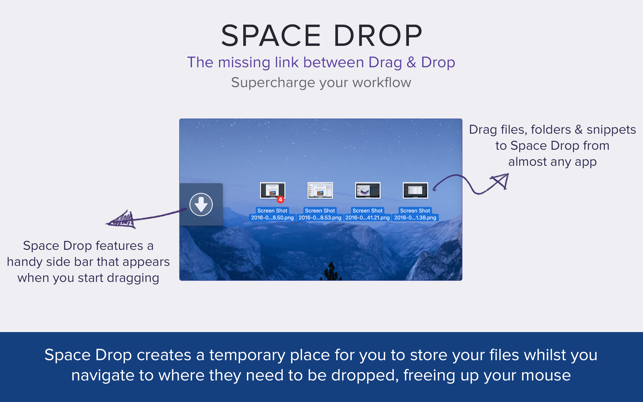
This approach is useful when working with multiple Finder windows. For example, imagine collecting images from different folders for a single project. Normally, you would need to switch between folders several times or arrange multiple windows on your screen. Space Drop gives you one place to collect those images before moving them together.
The application also supports collecting multiple files from different locations. You can gather documents, images, PDFs, and other files before sending them to another folder or application. This makes it useful for designers, office workers, students, researchers, and people who regularly manage project files.
One of its useful features is the ability to create stacks. These groups help keep related files together while collecting items. For example, you can group project images, documents, and other resources before transferring them to their final location. This is helpful when working with several files at once.
Space Drop also supports automatic screenshot capture. Screenshots can appear directly in the shelf, so you don’t have to search through your Desktop or screenshot folder every time you need to share an image. You can drag a screenshot into an email, document, or messaging application.
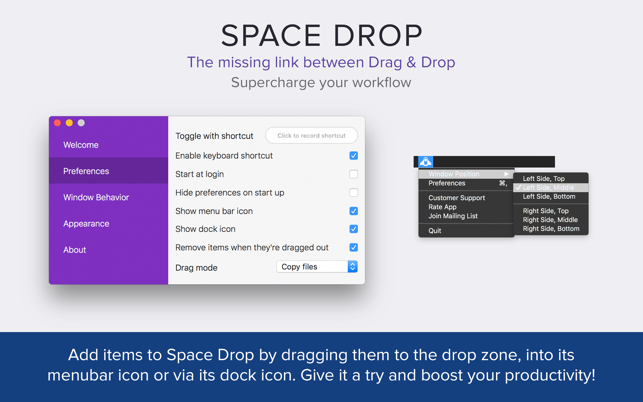
Another useful feature is the choice between copy and move modes. Copy mode keeps the original file in its existing location and creates another copy at the destination. Move mode transfers the file to its new location. However, when transferring files between different storage drives, macOS copies them instead of moving them directly.
The Rocket Drop feature offers another way to collect files. It displays a smaller drop area near your cursor during a drag operation. This can save unnecessary mouse movement, especially when working with a large display.
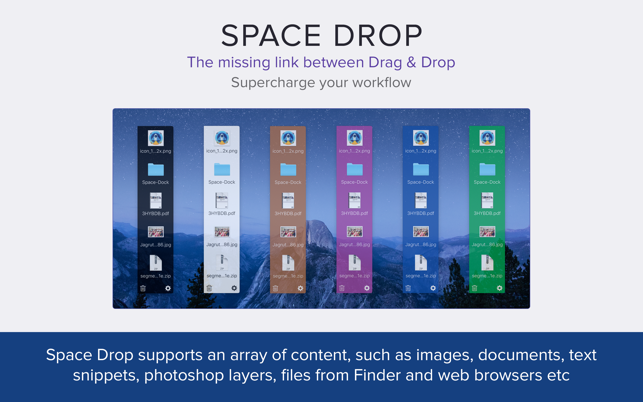
Space Drop also supports multiple monitors. Its shelf can appear on the screen where your mouse is located. You can adjust its position and appearance to suit your workspace. Options include shelf placement, size, color, and transparency.
The application includes Quick Look support, which lets you preview files without opening them in another application. Keyboard controls also make it easier to browse the shelf. You can use the arrow keys to select files, press Space to preview an item, Delete to remove it, and Escape to hide the shelf.
However, Space Drop has some limitations. It is not a complete file manager and does not provide a history of copied text, links, or other clipboard content. Its purpose is to hold files temporarily while you move between locations.
Another important detail is that the shelf refers to the original files. If you move or delete an original file, its entry on the shelf may stop working. Some file types or applications may also have drag-and-drop compatibility problems. If a file does not appear on the shelf, FIPLAB recommends trying to drag it directly from Finder.
Overall, Space Drop offers a simple solution to a common Mac problem. It is useful for people who regularly collect and transfer files. However, users looking for clipboard history or advanced file management should consider other applications.
Features of Space Drop for Mac
- Floating file shelf: Displays a temporary shelf when you start dragging a file towards the configured screen edge.
- Multiple file collection: Collect files from different folders and applications before transferring them together.
- File stacks: Group related files to keep your collected items organized.
- Automatic screenshot capture: Add screenshots directly to the shelf for easier sharing.
- Copy and move modes: Choose whether to keep the original file or transfer it to another location.
- Rocket Drop: Use a smaller drop area near your cursor to collect files without moving towards the main shelf.
- Multiple monitor support: Use the shelf across different displays.
- Quick Look preview: Preview files directly from the shelf without opening another application.
- Keyboard controls: Browse files, preview items, remove them, and hide the shelf using keyboard shortcuts.
- Shelf customization: Adjust its position, size, color, and transparency.
- Menu bar access: Keep the application available from the macOS menu bar.
- Keyboard shortcut support: Open or hide the shelf using a configured shortcut.
Technical Details:
- Software Name: Space Drop MacOS
- Software File Name: Space Drop v2.9.dmg
- Version: 2.9
- File Size: 13 MB
- File Extension: DMG
- License Type: Premium
- Developer: FIPLAB Ldt
System Requirements
- Operating System: macOS 10.10 or later
- Processor: Apple Silicon (M1, M2, M3, M4, M5) or Intel Core 64-bit
- RAM: 4 GB minimum, 8 GB recommended
- Storage: 200 MB free disk space
Best Alternatives to Space Drop for Mac
Dropover is one of the closest alternatives to Space Drop. It provides a temporary shelf where you can collect files, images, links, and other content before moving or sharing them Its shake gesture allows you to create a shelf near your cursor while dragging an item. It also offers additional actions for sharing files and working with other services Dropover is a good choice if you want more ways to share and manage collected content.
Yoink is another Mac application designed to make drag-and-drop operations easier. It provides a temporary place to hold files and other content while you move between applications or folders You can collect multiple items, preview files, and transfer them when you are ready. Its simple design makes it useful for everyday file management Yoink is worth considering if you want a straightforward alternative to Space Drop.
Dropzone takes a different approach to file management. It allows you to drag files onto specific areas to perform actions such as moving, uploading, and organizing content. You can use it to reduce repetitive tasks and create shortcuts for common file operations. It is more suitable for users who want to automate regular tasks instead of simply collecting files in a temporary shelf.
Maccy is a clipboard manager for macOS. Unlike Space Drop, it stores a history of copied text so you can access previously copied content. You can search your clipboard history and reuse text without copying it again from the original source. Maccy is a better choice if you frequently work with copied text, links, code snippets, and other clipboard content.
Paste is another clipboard manager for Mac. It keeps copied content organized so you can find and reuse previous items. It is useful for people who regularly copy text, links, images, and other content between applications. Its visual clipboard history makes it easier to find something you copied earlier. If you need a clipboard manager rather than a file shelf, Paste is worth considering.
Space Drop 2026 for Mac Free Download
Click the button below to download Space Drop for Mac latest full version setup free. It is a complete standalone installer for macOS with a single-click download link.


