AllMacWorld MAC Apps One Click Away
Download Audio Modeling Camelot v2.5.4 for Mac free latest full version standalone setup. Audio Modeling Camelot 2026 for MacOS is a live performance management application that combines performance playlists, a digital mixer, a plug-in host, a PDF score viewer, a multi-track audio player, and advanced MIDI routing into a single system.
Audio Modeling Camelot 2026 for Mac Review
Audio Modeling Camelot for Mac is a music application designed for live performances. It helps musicians manage virtual instruments, MIDI keyboards, external synthesizers, backing tracks, and sheet music from one place. Camelot is developed by Audio Modeling. It allows musicians to organize their sounds and performance settings into setlists, songs, and scenes. This makes it easier to prepare for concerts, rehearsals, and live shows. You can also download Ableton Live Suite for MacOS
Instead of opening several applications to control different instruments, you can manage many parts of your setup through Camelot. It is especially useful for keyboard players and musicians who use several instruments during a performance. Audio Modeling Camelot for Mac is built mainly for live music. It helps musicians prepare their instruments, arrange sounds, and switch between different setups during a show.
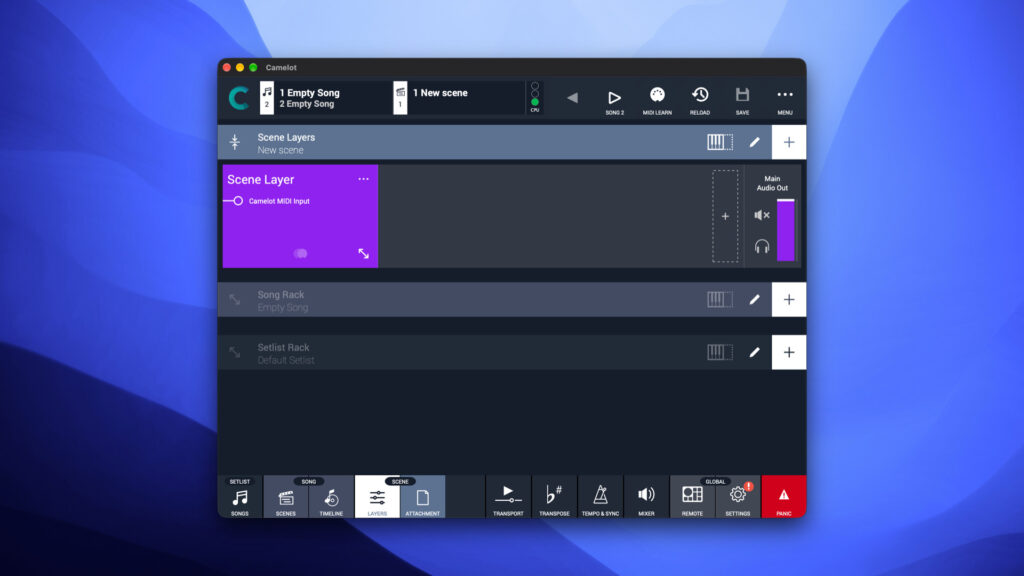
One of its main features is setlist management. You can organize your music into songs and scenes. Each scene can have its own instruments, sound settings, and MIDI controls. For example, you can create one scene for piano, another for piano and strings, and a third for a synthesizer sound. You can then switch between these setups as your performance changes. Camelot is also designed to make sound changes smoother. This can help reduce unwanted interruptions when switching between instruments during a live performance.
The application supports compatible virtual instruments and audio effects. You can load supported plugins directly into Camelot and use them with your MIDI keyboard or other controllers. It supports 64-bit Audio Units, VST, and VST3 plugins on macOS. Older 32-bit plugins are not supported.
This plugin support gives you more freedom when choosing sounds. You can use virtual pianos, synthesizers, strings, and other instruments without depending only on the sounds built into your keyboard. You can also apply effects to improve your sound.
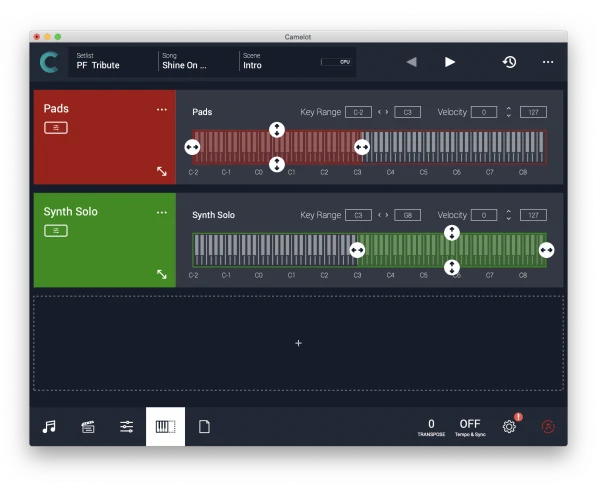
Camelot is useful for musicians who work with external keyboards and synthesizers. Its MIDI tools allow you to connect compatible devices, assign MIDI channels, and control how instruments respond to your keyboard. You can also create keyboard splits, so different parts of the keyboard play different sounds.
For example, you can assign a piano sound to the lower keys and a string sound to the upper keys. You can also combine several instruments to create a fuller sound. Camelot includes Smart Maps for supported hardware instruments, making it easier to control their sounds and settings.
Another useful feature is audio playback. You can add backing tracks to your performance and manage them alongside your instruments. The built-in mixer helps you adjust volume levels, mute or isolate sound sources, and manage audio outputs. Your available output options will depend on your Mac and connected audio equipment.
Camelot also supports PDF sheet music and performance notes. You can attach them to songs or scenes, keeping important information close at hand. This can be helpful when performing from written arrangements or managing a large collection of songs.
Your Mac’s performance will depend on how you use Camelot. A simple setup with one instrument needs fewer resources than a setup with several virtual instruments, audio effects, and backing tracks running together.
Camelot is worth considering if you perform live and need to control several instruments from your Mac. Its setlists, sound management, and MIDI controls can help keep your setup organized. However, beginners may need some time to learn how to arrange songs, scenes, and instruments.
If your main goal is recording, editing, and producing music, a traditional music production application may be a better choice. Camelot is most useful for musicians who want to prepare and control their instruments during live performances.
Features of Audio Modeling Camelot for Mac
- Virtual instrument support: Use compatible software instruments on your Mac.
- Audio effects: Add supported effects to shape your sound.
- MIDI control: Connect compatible keyboards, controllers, and synthesizers.
- Keyboard splits: Assign different sounds to different sections of your keyboard.
- Layered sounds: Play multiple instruments together.
- Hardware instrument control: Use Smart Maps with supported external instruments.
- Custom MIDI settings: Adjust how compatible devices send and receive MIDI messages.
- Backing track playback: Play audio tracks alongside your live instruments.
- Built-in mixer: Adjust volume levels and manage audio sources.
- Audio output control: Route sound through supported audio outputs.
- Sheet music support: Attach PDF scores and performance notes to songs.
- Smooth sound changes: Switch between scenes while reducing unwanted interruptions.
- MIDI activity monitoring: Check MIDI signals while setting up your instruments.
Technical Details:
- Software Name: Audio Modeling Camelot MacOS
- Software File Name: Audio Modeling Camelot v2.5.4.dmg
- Version: 2.5.4
- File Size: 86 MB
- File Extension: DMG
- License Type: Premium
- Developer: Audio Modeling
System Requirements
- Operating System: macOS 10.10 or later
- Processor: Apple Silicon (M1, M2, M3, M4, M5) or Intel Core 64-bit
- RAM: 8 GB minimum, 16 GB recommended
- Storage: 2 GB free disk space
Best Alternatives to Audio Modeling Camelot for Mac
Several other music applications can help with live performances. The right choice depends on your computer, instruments, and the type of music you play.
MainStage is Apple’s live performance application for Mac. It lets musicians use virtual instruments and effects, organize sounds into patches, and control their setup with MIDI keyboards. It is a good choice for musicians who already use Logic Pro or other Apple music tools.
Gig Performer is designed for musicians who use virtual instruments and effects during live shows. It helps organize plugins, connect MIDI devices, and control different sounds from one workspace. It is useful for musicians with complex setups that require detailed control over their instruments.
Cantabile is a live music application for Windows. It supports virtual instruments, audio effects, MIDI control, and performance arrangements. It is an option for Windows users, but it is not a native replacement for Camelot on Mac.
Ableton Live is a music production application that also offers tools for live performance. It lets you record music, arrange tracks, use virtual instruments, and trigger audio clips during a show. It is particularly useful for electronic music, live looping, and performances that combine recorded audio with instruments.
Logic Pro is Apple’s music production software for Mac. It includes recording tools, virtual instruments, audio effects, editing features, and mixing controls. It is better suited to users who want to record and produce complete songs. It can also support live music workflows, although its main purpose differs from Camelot’s focus on managing instruments during performances.
Choose Camelot if you need to organize live performances and control several instruments. MainStage is worth considering if you prefer Apple’s live performance tools. Gig Performer offers another option for complex plugin setups. Ableton Live suits musicians who combine live shows with electronic music production, while Logic Pro is a strong choice for recording and producing songs.
Before choosing an application, check its current price, system requirements, and compatibility with your instruments and audio equipment.
Audio Modeling Camelot v2.5.4 for Mac Free Download
Click the button below to download Audio Modeling Camelot 2026 for Mac latest full version setup free. It is a complete standalone installer for macOS with a single-click download link.