AllMacWorld MAC Apps One Click Away
Download UJAM Virtual Guitarist AMBER 2 v2.3.1 for Mac free latest full version standalone setup. uJAM Virtual Guitarist AMBER 2026 for MacOS is built around a simple idea: create an acoustic guitar performance without spending a large amount of time programming individual notes. That makes it particularly useful for producers, composers, and editors who need results quickly.
UJAM Virtual Guitarist AMBER 2026 for Mac Review
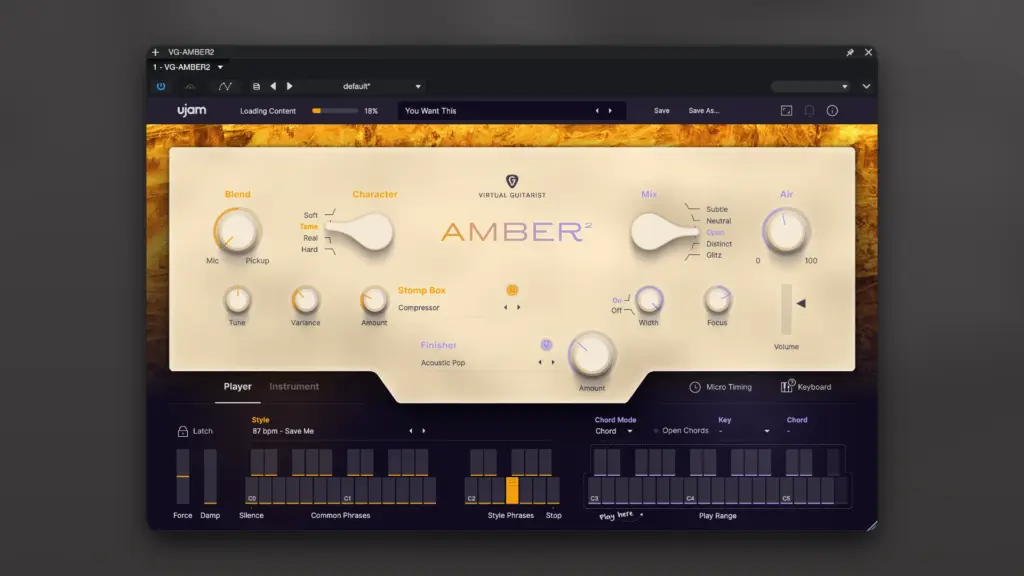
uJAM Virtual Guitarist AMBER 2 is a virtual acoustic guitar instrument built around ready-made playing patterns. The basic idea is simple: provide the chord information, select a suitable playing style, and shape the performance to fit the song. This can make a noticeable difference during songwriting. Instead of stopping the creative process to program individual guitar notes, you can quickly establish the harmonic and rhythmic foundation of a track. You can also download UJAM Virtual Guitarist IRON 2 for MacOS
For example, a producer working on an acoustic pop song can enter the chord progression into the DAW and use AMBER 2 to create a rhythmic guitar part. A composer working on a film cue can use the same approach to add an acoustic texture to a larger arrangement.
The biggest advantage is therefore not simply the guitar samples themselves. It’s the workflow.
Traditional guitar libraries can give you extensive control, but that control often comes with additional programming. You may need to manage articulations, playing techniques, strings, fret positions, and other details. AMBER 2 takes a different approach by handling much of that performance behavior for you. That makes it particularly useful when the goal is to get an idea down quickly.
The sound will depend on the selected performance, arrangement, and mixing. Acoustic guitar rarely works in isolation in a finished production. It often sits alongside vocals, piano, drums, bass, strings, or other instruments.
For that reason, it’s better to judge AMBER 2 inside your actual arrangement rather than by listening to an isolated preset.
A guitar part that sounds slightly understated on its own can work extremely well once the vocal and other instruments are added. The instrument can also be useful as a temporary production tool. A composer might use AMBER 2 to establish the guitar part during the writing stage and later replace it with a recording from a guitarist. That’s an important distinction. You don’t necessarily have to choose between software and a real guitarist at the beginning of a project.
AMBER 2 can provide the musical reference while you build the arrangement. For beginners, the pattern-based approach can be easier to understand than a deeply sampled guitar library. You don’t need to learn detailed guitar programming before you can create a usable part. Some knowledge of guitar arrangement is still helpful, though.
A virtual instrument won’t automatically make every chord progression sound like a guitarist would naturally play it. Rhythm, chord movement, dynamics, and the role of the guitar within the arrangement still matter. Professional producers can also benefit from this approach because time is often more important than having hundreds of controls.
If you’re creating a demo, writing a song, preparing a composition, or producing a project under a tight deadline, getting a convincing starting point quickly can be more useful than having maximum control over every detail. The main limitation becomes apparent when you need very specific guitar behavior.
If you’re trying to reproduce a particular guitarist’s playing, create unusual fingerpicking patterns, control individual strings extensively, or make detailed changes to individual notes, AMBER 2 may feel restrictive compared with a more advanced guitar library. This is the central tradeoff.
AMBER 2 prioritizes speed and musical results. More detailed guitar libraries prioritize control. Neither approach is automatically better. It depends on the job.
Recording a real guitarist still provides the greatest freedom when authentic performance is essential. A musician can react to the song, alter timing naturally, change picking intensity, and make small decisions that are difficult to reproduce perfectly with software. But recording also requires a guitar, player, recording setup, suitable environment, and time. AMBER 2 removes much of that preparation. For a quick demo or production sketch, that can be a major advantage.
Mac users should also check current uJAM compatibility information before installing the software. Apple’s transition from Intel processors to Apple Silicon has changed compatibility requirements for many music applications and plug-ins. If you’re using an M-series Mac, check the current requirements for your specific macOS version, DAW, processor architecture, and supported plug-in format. The requirements can change as both Apple and music software developers release new versions.
In practical use, AMBER 2 makes the most sense when you want to turn an existing chord progression into a convincing acoustic guitar performance without spending excessive time on MIDI programming. If that describes your workflow, the instrument has a clear purpose.
Features of UJAM Virtual Guitarist AMBER 2 for Mac
- Acoustic guitar-focused virtual instrument
- MIDI-based chord control
- Ready-made guitar performance patterns
- Designed for fast music production
- Suitable for songwriting and demos
- Useful for composers creating music mockups
- Can be used for film, television, game, and advertising compositions
- Reduces the need for manual guitar MIDI programming
- Can be layered with other instruments
- Suitable for producers who don’t play guitar
- Designed to work within compatible DAWs
- Mac compatibility depends on the current uJAM system requirements
- Can be used as a final production element or as a temporary part during songwriting
Technical Details:
- Software Name: UJAM Virtual Guitarist AMBER 2 MacOS
- Software File Name: UJAM Virtual Guitarist AMBER 2 v2.3.1.dmg
- Version: 2.3.1
- File Size: 6 GB
- File Extension: DMG
- License Type: Premium
- Developer: UJAM
System Requirements
- Operating System: macOS 10.10 or later
- Processor: Apple Silicon (M1, M2, M3, M4, M5) or Intel Core 64-bit
- RAM: 8 GB minimum, 16 GB recommended
- Storage: 500 MB free disk space
Best Alternatives to UJAM Virtual Guitarist AMBER 2 for Mac
Ample Sound is worth considering if you want more control over guitar playing. Its guitar instruments focus more on detailed guitar simulation. This can be useful when you need control over individual notes and playing techniques. The workflow can take more time than IRON 2.
Native Instruments also offers guitar instruments and sample libraries. These can be useful for producers who already use the Kontakt ecosystem. Different products focus on different guitar styles and playing methods.
Evolution Series is another option for guitar-based production. Its instruments can suit users who want more control and a different approach to sampled guitar performances.
A real guitarist is still the best option when the guitar performance is a major part of the song. A guitarist can play custom riffs, react to changes, and add small timing and expression changes.
The downside is that live recording requires more time, planning, and budget.
The choice is therefore fairly simple. AMBER 2 is a good fit when speed matters. A detailed guitar library is better when you need more control. A real guitarist is the strongest option when you need a unique performance.
UJAM Virtual Guitarist AMBER 2 v2.3.1 for Mac Free Download
Click the button below to download UJAM Virtual Guitarist AMBER 2 for Mac latest full version setup free. It is a complete standalone installer for macOS with a single-click download link.